
Graph X-Ray
Extension Actions
- Live on Store
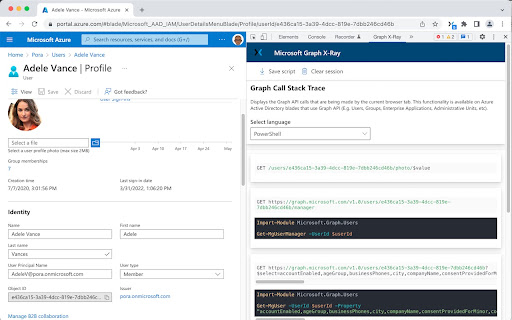
Graph X-Ray converts your Microsoft admin portal clicks into ready-to-use code in PowerShell, C#, Python, and more.
Turn Your Clicks into Code
Ever performed an action in Microsoft admin portals like Entra or Intune and wished you knew how to script it? Graph X-Ray gives you 'X-ray vision' into Microsoft Graph API calls!
Stop Digging Through Documentation
Simply perform the action in the portal, and Graph X-Ray provides you with ready-to-use scripts
Generate scripts in the most popular languages for M365 automation, including:
- Microsoft Graph PowerShell
- Python
- C#
- JavaScript
- Go
- Java
- Objective-C
Accelerate Automation: Go from a manual, repetitive task in the UI to a fully automated script in seconds.
Who is this for?
- Microsoft 365 Administrators wanting to automate user management, policy configuration, and reporting.
DevOps Engineers building CI/CD pipelines for Microsoft 365 and Azure environments.
- Developers creating applications that integrate with Microsoft Graph.
- IT Consultants & Support Professionals who need to quickly script solutions for clients.
Supercharge your Microsoft 365 workflow. Install Graph X-Ray today and turn your clicks into code!
To learn more see https://github.com/merill/graphxray/
Latest reviews
- Gavin Jackson
- OMG this is amazing! Is there a way to do a feature request? I am an Exchange Engineer and was wondering if it is possible to implement this into Outlook Calendar in OWA and Email to see the calls when adding a calendar event or creating an email?
- Andy Pyne
- Excellent productivity tool - recommend to any IT professional who is familiar with Microsoft Portals and has a need to script some PowerShell to leverage similar outputs to the GUI
- Tom Machado
- Basically, i love this extension. It made my graph research so easier so i can automate deployments and actions. Thanks so much !
- Thomas MG
- Oh wow. I thought that this extension was just going to collect Graph calls from the Developer > Network tool in a cleaner viewer - which I would've been happy with - but it is SO MUCH BETTER than that! Excellent addition to my toolbox. I can already tell that I'll be using this a LOT
- Anton S
- Great! Gives you all the info you need and the multiple language options is neat. Thanks.
- Anton S
- Great! Gives you all the info you need and the multiple language options is neat. Thanks.
- Demo Matt
- Really useful tool if you are getting into Graph PowerShell.
- Demo Matt
- Really useful tool if you are getting into Graph PowerShell.