
Coursera Video Speedup
Extension Actions
- Live on Store
Speed up Coursera videos with this simple Chrome extension.
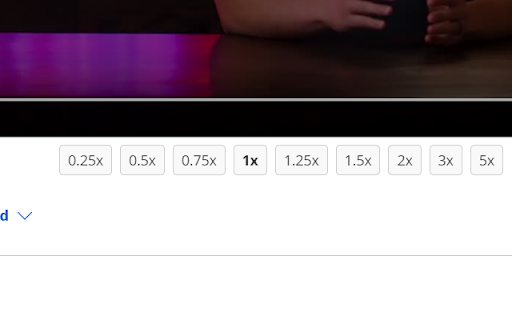
Coursera Video Speedup is a lightweight and easy-to-use browser extension that allows you to control the playback speed of videos on Coursera. With multiple speed options available, you can quickly adjust the playback speed of your video lectures or tutorials, making it easier to learn at your own pace.
This extension offers a clean and intuitive interface with speed buttons displayed below the video in window mode, hiding them in fullscreen mode for an immersive viewing experience. The selected speed button is highlighted, giving you clear visual feedback about the current playback speed.
Whether you want to slow down a complex topic or breeze through familiar content, Coursera Video Speedup Extension gives you the flexibility to customize your video-watching experience.
Main features:
🚀 Multiple speed options: 0.25x, 0.5x, 0.75x, 1x, 1.25x, 1.5x, 2x, 3x, and 5x
🎛️ Easy-to-use interface with speed buttons
📺 Fullscreen compatibility
Latest reviews
- Quoc Huan Tran
- why it doesn't work ?
- Rudra Kandekar
- useless
- Ya Vo
- Skip Video+ (Coursera) one click https://youtu.be/QBKqjqhCtYw
- Aurora Edward
- useless, stupid, I should go to hell instead of using it. Thanks you for waste 5 minutes of my life. Thanks you. I wish we don't see again ever again....hmm...
- kavindu udhara
- it does not work on new coursera version
- Abdelhak
- This extension appears to be no longer working on Coursera as they made a few changes a few months ago.
- heera vinod
- Nice Plugin with clean UI. would have preffered more options
- heera vinod
- Nice Plugin with clean UI. would have preffered more options