
Bass Booster
Extension Actions
- Extension status: Featured
Bass Booster helps unleash the power of sound Youtube, Spotify. Sound Booster and Bass Booster of any tab. Volume control
Sound Booster is an extension that will allow you to increase the sound of your system. It can raise volume level up to 600%. Make a sound from your browser really awesome with this Volume Booster extension.
Volume amplifier helps you if your songs on Spotify, Deezer, or Soundcloud or videos on YouTube, Vimeo, or Facebook are too quiet even on the maximum. With our volume booster, you can increase the volume up to +600%. Also, modern websites are crowded with media content such as video, music, streaming video, audio, and ads. To take control of all this sound, you need a volume control tool with the ability to set individual volume settings for each tab.
Volume Booster allows you to improve the sound quality in the Chrome browser to get more pleasure from listening to music and watching videos. Bass boost to the full. Volume boost by 600%
Here are reasons to choose Volume Booster:
- Sound Booster can increase the volume of the content being played up to 1000%
- Volume booster. Volume Control volume up to 500% boost.
- Bass boost level
- Equalizer 32hz-16khz
- Volume Booster - increase volume to 400% of the standard sound power;
- Bass Booster preset - audio effect to amplify low frequencies of the sound;
Volume Booster extension helps you set the desired speaker volume level for each individual tab in your browser. Websites are simply filled with multimedia content such as video, music, streams, audio and video ads. Volume Booster
Bass Booster makes videos, songs, movies and more sound awesome by boosting your speakers or headphones.
Bass Boost is a simple to use Audio Equaliser that's got several settings to make Videos, Music, Movies, Gameplay, Anime and more sound incredible at the click of a button. It's like having expensive headphones/speakers for completely free, so download it now!
How to use sound booster
After downloading Volume Booster refresh or open a new Tab.
Access the popup menu by clicking the bass boost logo in top right.
Then toggle "Enable bass boost" - That's it! The tab will stay bass boosted even when you visit a new site. volume booster
Want to turn up the sound booster
Access the sound booster popup menu and pick a new preset.
The default setting is meant to increase the bass by a little bit so feel free to go higher. sound booster
Want to turn off sound booster
Access the sound booster popup menu and disable bass booster.
This will disable bass boost on the current tab, without effecting any other bass boosted tabs. sound booster
Bass Booster works on any website, so that means you can use it on Youtube™, SoundCloud™, Netflix™ or any other site you want.
We made the interface of our Volume Booster as simple and intuitive as the volume control and volume sound, keeping all its functions in a lightweight case.
How to use Sound booster Chrome extension:
1. Install Volume Booster
2. Pin it in the toolbar
3. Click on the Volume Booster extension icon and enable the volume booster with toggle button.
4. Then, click on the extension icon and choose the Sound boost range.
Sound Booster displays a volume slider that you may use to change the volume. The icon of the extension indicates the volume level at any time so that you see it at first glance.
How to install Volume Booster? Here are the steps to download and use the sound booster extension:
Install the Volume Booster from the download button
Pin the Volume booster for quick access
Play any video or audio
Enable the extension by clicking on the icon
Easily adjust volume levels by slider bar
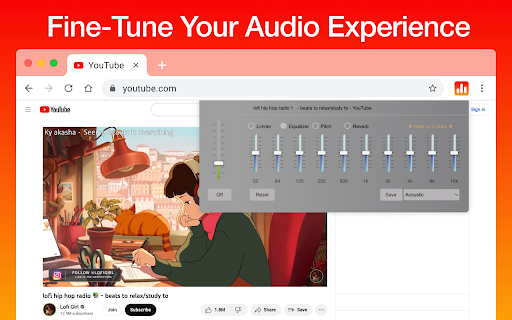
Audio equalizer is a lite extension that let you easily adjust audio settings (the balance between frequency components in an audio file) from a toolbar popup.
Bass Booster - chrome extension that help you to set a desired speaker volume degree for each individual tab in your browser. This app have a simple interface of sound volume control switch as it just possible with keeping all of its power in a light design. Stylish popup Volume Master with a volume switch with a list of tabs that a now playing audio content.
Volume Control
To take control over all that audio you need a power volume adjust tool with the ability to set individual volume settings for each tab. To solve that task we developed our audio volume control extension.
Chrome prevents you from going to a complete full-screen when using any extension manipulating with sound.
There's no way to bypass it and after all it's a good thing that keeps you safe. However you can improve the situation a bit by pressing F11 (on Windows) or Ctr+Cmd+F (on Mac).
Install, share with your friends and feel free to leave comments or requests for our volume booster app. We hope you find our Volume Booster useful!
Make a sound from your browser really awesome with this Sound Booster extension. Use it on your favorite websites - Youtube, Spotify, VK, Deezer ...
Volume Booster is an easy and convenient music tool for brilliant sounding of your favorite songs.
Just try to take advantage of this Equalizer and enjoy its benefits.
Volume Master extension
Optimize the sound according to the genre which you listening with equalizer for chrome browser.
Equalizer allows you to improve sound quality of your Chrome browser to get more enjoy of listening music and watching videos.
Volume Booster - chrome extension that help you to set a desired speaker volume degree for each individual tab in your browser. This app have a simple interface of sound volume control switch as it just possible with keeping all of its power in a light design. Stylish popup Volume Master with a volume switch with a list of tabs that a now playing audio content.
Volume booster for Youtube that explodes your system! Boost audio in any tab including Youtube, Twitch, and others. Sound booster that really works! The first and only Volume booster, that works with Youtube, Soundcloud, Pandora, and so on.
Extension Volume Booster Youtube includes:
Sound Booster. Level up sound more than 600% from standard sound power.
Sound Booster. Switch off automatically in normal mode.
Volume Master - Change the volume for each individual tab with sound booster.
Sound Booster - works great on all popular sites
Volume Control. Remembers previous sound settings.
Sound Booster. Simple and stylish popup window Sound Booster extension with volume control and list of tabs.
Volume Manager will amplify your sound at a maximum and provide you with better sound quality wherever you are!
Bass Booster - chrome extension that help you to set a desired speaker volume degree for each individual tab in your browser. Bass Booster have a simple interface of sound volume control switch as it just possible with keeping all of its power in a light design. Stylish popup Volume Master with a volume switch with a list of tabs that a now playing audio content. Volume booster and sound booter
Volume Control
Volume Control to take control over all that audio you need a power volume adjust tool with the ability to set individual volume settings for each tab. To solve that task we developed our audio volume control extension. Volume Control
Full screen Volume Master
Chrome prevents you from going to a complete full-screen when using any extension manipulating with sound so you can always see the blue rectangle icon in the tab bar (to be aware of audio is being manipulated). There's no way to bypass it and after all it's a good thing that keeps you safe.
Bass Booster
- Sound effect to enhance the sound of low frequencies;
- Preset Vocal Booster - boost the high frequencies of the sound.
Volume Controller extension helps you to set a desired speaker volume level for each individual tab in your browser. Websites are just bursting with media content such as videos, music, streams, audio and video ads. To take control over all that audio you need a power volume adjust tool with the ability to set individual volume settings for each tab. To solve that task we developed our audio volume control extension.
Want to turn up the Bass Booster?
Access the popup menu and pick a new preset.
The Default setting is meant to increase the Bass by a little bit so feel free to go higher.
Want to turn off Bass Booster?
Access the popup menu and disable Bass Boost.
This will disable Bass Boost on the current tab, without effecting any other Bass Boosted tabs.
It helps you to get rid of high volume *auto-play* videos while browsing facebook, twitter, web.whatsapp, youtube and any other streaming sites (html5 videos)
As you can see Volume Booster and Bass Boost is really simple to use while greatly improving your speakers/headphones, so download it now!
We hope you find our Volume Master useful! We are waiting for your feedback.
Latest reviews
- Leon
- pree dobroo
- Ash An
- SUPERB
- Alex B (Cool dude)
- Yo ts fire gng
- OnePunch NoobYT
- Yo ts fire gng
- Thilini Nisansala
- SUPERB
- ranb0W
- good
- Andrea
- shees better than the others i tried!!!
- Malik Ali
- good
- Bello Fire
- like a marshall system
- kimkim
- really good audio adjustment for the weekends songs
- Shary Vora
- ok
- Bruno Steffani
- wow
- Seyit ali Biçer
- dsad
- Matthew Mishak
- best ever
- SK7PER Panda
- I love this its the best
- Sebastian Corbett
- good
- manoj saini
- fully disgusting. BAKWASSSSSS app.
- Amrit Pal Singh
- good
- Karb
- Great when it works. Pitch change and reverb doesn't work anymore, Sliding bars also sometimes don't slide even if a pre-set is selected
- Aabir D
- awesome app
- Qasim Butt
- good
- Coco
- dont put marbles in your nose
- salman Alameri
- very good
- Adel Youssef
- nice
- Muthomi Pius
- Not bad
- Richard Kiffer
- Perfect
- jstts6 jstts6
- its str8
- Trey Anderson
- its str8
- Mark
- Awsome
- Justin Pope
- nice
- Somsuk kounsaweng
- good
- Zafar Equbal
- Don't Use............
- Ashutosh Tiwari
- GOOD
- Daniel Shinabarger
- Functionality is disabled unless you rate it 5 stars. Annoying and dishonest. Save yourself thee time and try a different eq.
- Jay Cie (Bry)
- On my chromebook, this extension does boost the volume, so 2 stars; I wish I could give it more, however: it will not stay set to the mode I select, rather it immediately reverts to and stays at "acoustic"! Lately also, even the volume slider doesn't increase the volume! If the developer cares to respond with suggestions that will work, I'll certainly consider revising my rating of this extension. Thank you. EDIT - removing and reinstalling solved the volume issue. However did not fix the preset issue. "Save" button does nothing, extension only uses "acoustic" setting except for a brief moment right after I set it to something else.
- Dom Jack
- copl
- Renaldy Haen
- Holy, suddenly I hear a 'new' sound from the same song I enjoy everyday, and the audio quality is still fine.
- の沁纏裂食懺鋼旋楓蓁閥伐犀且薩戟
- GOOD!!
- Aman Sayyad
- good
- link24 internet
- good
- Sudip Lama
- good
- Theo
- The best bass boster
- Marius
- the best
- Toni Abitbol
- cool cool
- Achiles Fernando Beriña
- It's amazing, easily to install & understand details.
- Michael Horak
- works great
- david smith
- one of the best sound boosters i have use .. does what it says it will loud bass clear.. NICE JOB!!!
- Joaquin Delgado
- amazing and would recommend
- m p
- Gordegous
- Malachi Childs
- immediately fell in love.