
Auto Pan by Window Position
Extension Actions
ウィンドウがディスプレイの中央より左側にある場合は左から、右側にある場合は右から音声が聞こえるように、パンを制御します。
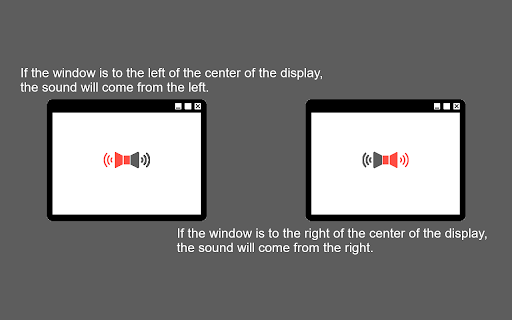
このChrome拡張機能は、ブラウザウィンドウの水平位置を画面中央から基準として、メディア要素(`<video>`と`<audio>`)の音声を左右のチャンネルに自動的にパンニングします。
## 機能
- 自動音声パンニング: ブラウザウィンドウの位置に合わせて音声が再生されます。ウィンドウが画面の左側にある場合は音声は左スピーカー/ヘッドホンにパンニングされ、ウィンドウが画面の右側にある場合は右スピーカー/ヘッドホンにパンニングされます。
- パンニング速度の調整: パンニング効果の強度を調整できます。
- 垂直パンニング対応(PannerNode): デフォルトでは、標準のステレオパンニングが使用されます。垂直パンニングを有効にすると、ウィンドウの垂直位置に基づいて音声に影響を与え、距離感をシミュレートできます。
- マルチモニター対応: パンニングの基準を以下のいずれかに設定できます。
- ウィンドウが現在表示されている単一のディスプレイ。
- プライマリディスプレイ(複数のモニターを使用している場合)。
- 接続されているすべてのディスプレイの中心。
## 使用方法
インストール後、拡張機能はバックグラウンドで自動的に動作します。アクセスしたウェブページの`<video>`タグと`<audio>`タグに自動的にアタッチされ、ウィンドウの位置に基づいて音声のパンニングを調整します。
### 設定
ツールバーの拡張機能アイコンをクリックするとポップアップが開き、以下の設定を行うことができます。
- 有効/無効: 自動パンニング機能を切り替えます。
- パンレート: 音声が左右どちらかに偏る度合いを調整します。
- 垂直パンニング (PannerNode): シンプルなステレオパンニングではなく、高度な垂直空間化モデルを使用します。
- マルチモニター: プライマリディスプレイを基準としたパン位置を計算します。
- マルチモニター (すべて): 全てのディスプレイを合わせた全体の境界を基準としたパン位置を計算します。
Latest reviews
- Stanley Cheng
- Great extension! Very underrated. It would be nice to have an influence slider. For example, if I have a video on the right most side, it plays 70% out of my right and 30% out of the left. Would be a nice addition. Still, great job!
- B P
- Extension works exactly as promised. It's great if you want to have two separate content in the BG at the same time. Thanks dev.
- Max Boonzaayer (Litruv)
- Works well! Mainly tried out with Youtube, would like to see.. a whitelist for sites, a smooth pan as you drag would be amazing (was already implemented whoops Thanks!) if it's possible to follow the position of pop out windows.