
Volume Master
Extension Actions
- Extension status: Featured
Volume Master helps unleash the power of sound Youtube, Spotify. Sound Booster and Bass Booster the it of any tab.
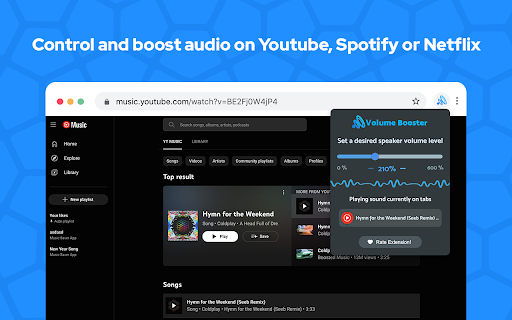
Volume Booster allows you to improve the sound quality in the Chrome browser to get more pleasure from listening to YouTube Music and watching videos. Bass boost to the full. Volume booster boosts by 600%.
Stylish Sound Booster popup with a volume switch with a list of tabs that a now playing audio content. Just regulate the sound in the current web tab through the slider.
Make a sound from your browser really awesome with this extension. Use the volume booster of it on your favorite websites.
How to use Volume booster Chrome extension:
1. Install Volume Booster
2. Pin it in the toolbar
3. Click on the Sound Booster extension icon and enable the volume booster with toggle button.
4. Then, click on the extension icon and choose the Sound boost range.
Sound Booster is an easy and convenient music tool for brilliant sounding of your favorite songs.
Just try to take advantage of this Equalizer and enjoy its benefits.
Bass Booster makes videos, songs, movies and more sound awesome by boosting your speakers or headphones.
Bass Boost is a simple to use Audio Equalizer that's got several settings to make Videos, Music, Movies, Gameplay, Anime and more sound incredible at the click of a button. It's like having expensive headphones/speakers for completely free, so download it now!
Volume Control
Take control over all that audio you need a power volume adjust tool with the ability to set individual volume settings for each tab. To solve that task we developed our audio volume control extension.
Equalizer
Audio Equalizer is a lite extension that let you easily adjust audio settings (the balance between frequency components in an audio file) from a toolbar popup. Equalizer for Youtube.
Sound booster, Volume booster, Volume, Sound, Audio, Bass, Equalizer, Increase volume, Increase sound, Amplify sound, Amplify volume, Bass Booster, Volume Master, Sound booster, Volume booster, Volume, Sound, Audio, Bass, Equalizer, Increase volume, Increase sound, Amplify sound, Amplify volume, Bass Booster, Volume Master.
Volume, Sound, Audio, Volume booster, Increase volume, Sound max, Volume Master, Bass Booster, Youtube, Spotify, SoundCloud, Facebook, Music, Video, Netflix.
Sound booster, Volume booster, Volume, Sound, Audio, Bass, Equalizer, Increase volume, Increase sound, Amplify sound, Amplify volume, Bass Booster, Volume Master, Sound booster, Volume booster, Volume, Sound, Audio, Bass, Equalizer, Increase volume, Increase sound, Amplify sound, Amplify volume, Bass Booster, Volume Master.
Volume, Sound, Audio, Volume booster, Increase volume, Sound max, Volume Master, Bass Booster, Youtube, Spotify, SoundCloud, Facebook, Music, Video, Netflix.
Sound booster, Volume booster, Volume, Sound, Audio, Bass, Equalizer, Increase volume, Increase sound, Amplify sound, Amplify volume, Bass Booster, Volume Master, Sound booster, Volume booster, Volume, Sound, Audio, Bass, Equalizer, Increase volume, Increase sound, Amplify sound, Amplify volume, Bass Booster, Volume Master.
Volume, Sound, Audio, Volume booster, Increase volume, Sound max, Volume Master, Bass Booster, Youtube, Spotify, SoundCloud, Facebook, Music, Video, Netflix.
Sound booster, Volume booster, Volume, Sound, Audio, Bass, Equalizer, Increase volume, Increase sound, Amplify sound, Amplify volume, Bass Booster, Volume Master, Sound booster, Volume booster, Volume, Sound, Audio, Bass, Equalizer, Increase volume, Increase sound, Amplify sound, Amplify volume, Bass Booster, Volume Master.
Volume, Sound, Audio, Volume booster, Increase volume, Sound max, Volume Master, Bass Booster, Youtube, Spotify, SoundCloud, Facebook, Music, Video, Netflix.
Sound booster, Volume booster, Volume, Sound, Audio, Bass, Equalizer, Increase volume, Increase sound, Amplify sound, Amplify volume, Bass Booster, Volume Master, volume booster is a browser extension to control and boost the volume of audio playing per tab.
Volume, Sound, Audio, Volume booster, Increase volume, Sound max, Volume Master, Bass Booster, Youtube, Spotify, SoundCloud, Facebook, Music, Video, Netflix.
When you open a site with audio, you get, at the most, two options to control the volume. The operating system provides one option, and it is always available. It changes the volume of the entire web browser, however.
The second option is provided by the browser or the site the audio is playing. You may get individual sound controls or use the browser's muting functionality to mute audio playback.
Volume booster adds sound control options to the browser. One of its main features is that it can change the sound of each tab individually.
If you happen to play a too-loud or barely audible video or audio clip in the browser in a tab, you may use it to either reduce the volume of that tab or boost the sound by up to 600%, all without changing the default volume of the web browser or impacting the sound in any other browser tab.
All you need to do is click on the extension icon in the tab that is playing audio. The extension displays a volume slider that you may use to change the volume. The icon of the extension indicates the volume level at any time so that you see it at first glance.
Boosting works similarly to reducing the volume, only that you don't stop at 100% but can jack the volume up to 600%. The change takes effect immediately so that you may adjust the volume as you see fit.
Another helpful feature is listing all tabs with audio playback in the interface. A click on a listing switches to the tab immediately so that you may control the audio or other functionality on that tab.
Volume Booster will amplify your sound at a maximum and provide you with better sound quality wherever you are!
Play music in your browser and adjust the sound to your headset or speakers just how you want it!
Click on the extension icon to adjust the sound level. You immediately get a more transparent and robust sound.
We hope you find our tool useful! We are waiting for your feedback and ratings! If you’re experiencing problems or isn't working on, please contact us.
Latest reviews
- Ryan Carter
- Perfect
- Hhhh Ghggg
- love it
- Trish OK (downunda)
- love this
- Shreya Mishra
- absolutely amazing
- Mousom Khan
- AMAZING
- Shorif
- i don't have speaker because it has problem this makes my problemless very helpful
- Jitendra Rattewal
- Best
- Mᴇᴅɪᴄᴀʟ
- actually works others do not even function
- N N
- Doesn't work on youporn. I don't have time to try on other websites, as there are numerous Featured extensions that might actually do something useful at https://chromewebstore.google.com/category/extensions/productivity/workflow The problem is there are thousands of featured extensions here in workflow folder, how can they all be featured, even these less useful ones?
- Star
- It's not working as good as it used to when I first started using this specific extension. Is this a glitch? If so is there a way to repair it because this extension was really good. 🙆🏽♀
- peter proker
- glitching
- blue ring
- I love the extension because it does work and i love the bass.
- Anvith Vikranth
- This does not work at all.
- Aidan metzger
- this extension is so tuff boi❤✌
- SHFESSE fgdserg
- Love this extension, the only one working in the web store. please make more lol.
- Honey Bunny
- Very good helped me make some Drill Music better. Very Helpful for many people
- Caroline Cox
- amazing quality
- gopal Sharma
- good one
- Agambir Hundal
- get
- Erica Mitchell
- I'm giving it three stars because I'm not sure if it's the extension or human error, but the sound turns right back down after I set it to 200 and then close the window. Do we have to keep the window open for it to continue playing a louder sound? I might just be clueless, idk. I just would like to have the louder sound, but be able to close the window to see all of my screen. Other than that, I like the sound quality when I set it to 200. It would just be better if I could keep it at the volume I set it to while still being able to work on my laptop. ***UPDATE*** I now see that I can minimize it. Yep, human error! LOL
- Theophilus Bartholomew
- Very helpful, nothing to complain about at all
- WILTON ROSALES
- nc extension
- Daniel Lisson
- awesome sound and perfect
- Md Hasan
- excellent
- fergarcia
- good
- Kevin Ramos
- tuff
- Roshni Roy
- good
- YVO
- Ever time I purchase something then I discover that I had actually bought into more than I am /was prepared to invest; it worries me. Such as sound and my lap-top and believing like my car one adds gas turn key and test brakes. It is a good thing I found this Volume Booster - Sound & Bass boost Volume Booster otherwise the profiteers would have me put - in my ear down on my keyboard to here a youtube video. Like check[ing for a late train a comming. Thank you for saving us....
- Abdul Rehman
- I LOVE
- Hadi Ansari
- good but voice distured or noised but it sound best on 200%
- VU Worrior
- nice
- True Go
- dont share data ok
- Mamtathebest Super blessed
- very nice
- Adnan Hodzic
- ok
- Aman Bhatti
- Doesn't work
- Tio
- I appreciate the effort and the work that you put it on, great app
- Devin Wilson
- when I increase it it still shows 100%
- Jayden
- makes my music way louder than other sound boosters
- Justin Peters
- Has helped me gain ear cancer but it was fun while it lasted 10/10
- Rick Lesser
- what am I missing? how does it work? no sound, no way to increase it
- El Mehdi CHAQROUNE
- good one
- Christopher Harmon
- even with bose indypendant still good
- Julio Andrade
- so loud my grandpa can even hear
- Jeffrey Esparas
- angass !!
- Vedant Mamarde
- The worst It never even works
- camden
- dam it fr works
- Homar Hermandez
- Thank you I love this app extension !!!
- bhandari giriraj
- good from the best
- Avaneesh Jungade
- great
- Tin MengLeang
- Dear Your Volume Booster And Sound The Best