
Chat with all AI models (Gemini, Claude, DeepSeek…) & AI Agents | AITOPIA
Extension Actions
- Extension status: In-App Purchases
- Live on Store
AI Agent Marketplace & AI Sidebar with all AI models (Gemini, Claude, DeepSeek & more) and hundreds of AI Agents
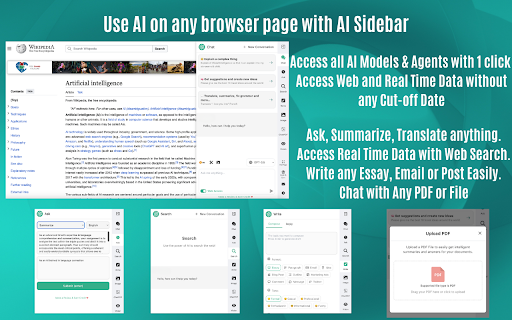
ChatGPT Sidebar & File Uploader is always with you as a clever AI assistant when you are browsing any web page, reading and writing any articles, blog posts, YouTube videos and more… ChatGPT Sidebar is everywhere while you are browsing on your Google Chrome Browser! You can also upload your PDF or any files and easily analyze the long documents, ask questions about them and use the power of ChatGPT for any of your file.
Advantages and capabilities of ChatGPT Sidebar & File Uploader:
📍Access ChatGPT-3.5 & GPT-4 from any browser page with an easy sidebar with ChatGPT Sidebar
📍Chat with PDF or any other file easily directly from ChatGPT conversation page
📍ChatGPT Sidebar can be used on any webpages to help with summarization, translation, explanation, rewriting, grammar check, codes explanation, etc.
📍ChatGPT for Google feature displays quick ChatGPT replies near the search results. It displays ChatGPT response alongside not only Google but many different search engines
📍ChatGPT for Google feature shows responses from ChatGPT alongside Google, DuckDuckGo, Baidu, Ask.com, Yandex.com and other search engines.
You can also start a chat with ChatGPT immediately after getting an answer.
ChatGPT for Google Features:
* Supports all popular search engines
* Chat with ChatGPT about the query and answer.
* Supports official OpenAI API (Both GPT-3.5-Turbo and GPT-3)
* Supports ChatGPT Plus and GPT-4 (GPT-4 requires manual enable in options)
Introducing the fresh-off-the-press, souped-up version of the ChatGPT Sidebar & File Uploader Chrome Extension! This gem has been polished and perfected to unleash an incredibly intuitive, powerful tool that enhances your file uploading and processing experience for ChatGPT, all from the comfort of your favorite browser!
You can access ChatGPT-3.5 & GPT-4 in every tab to ask questions, summarize, translate, get explanations, rewrite, check grammar, explain codes, and more...
Access to chat with PDF or any file. Get ready to unleash the power of your files! Do you have a stack of PDFs, Word documents, or Excel spreadsheets and want to extract the text content? Well, fret not! This superhero extension is now decked out with a shiny new feature to handle that with ease
And that's not all! Tucked away in a ZIP file, do you have PDFs, Word or Excel files? Our cutting-edge extension will swoop right in, unzip the files, and read the content in a flash. We’re going beyond ordinary boundaries here!
So, what are you waiting for? Install the ChatGPT Sidebar & File Uploader Chrome extension today, and revolutionize your file processing workflow with style and simplicity! There's a world of possibilities waiting just a click away!
Access via Chrome Browser
- Easily access from your browser's extension popup.
- There is no need to navigate to a separate website or application.
Dark Mode
- Offers a dark mode option for a more comfortable viewing experience in low-light settings.
- This can also help reduce eye strain.
Clipboard copy option
- Extension allows you to easily copy text from the conversation to your clipboard. This can be useful for pasting information into other applications or documents.
Make ChatGPT search responses on Google, Yahoo, Baidu, Bing, etc. Access to GPT-4 and Summary feature. ChatGPT Sidebar AI assistant is everywhere.
ChatGPT for Chrome extension enables users to utilize the power of ChatGPT alongside popular search engines like Google, Yahoo, Bing, DuckDuckGo, and others.
This clever and innovative ChatGPT Sidebar extension functions by displaying Chat GPT response alongside regular search engine results, allowing users to gain additional insights and perspectives on their searches.
The Chat GPT Sidebar extension offers various impressive features, including compatibility with all commonly used search engines, access to the official OpenAI API, and the ability to access ChatGPT directly from the extension's sidebar.
Additionally, users can enhance their reading experience through the extension's markdown rendering and code highlighting capabilities. The dark mode feature ensures comfortable browsing in low light environments.
ChatGPT: Interact with ChatGPT directly from the sidebar panel, entering your text or question and receiving a real-time response. ChatGPT is capable of understanding natural language and providing accurate and relevant answers to your queries. Supports official OpenAI API and gets fastest and better replies.
GPT-4: Access the most advanced model of OpenAI directly from your Google Chrome Sidebar. Solve complex problem, interpret code, generate detailed articles and more...
-----FAQ:-----
1. What is ChatGPT?
ChatGPT is a language model developed by OpenAI, it's a type of AI that is able to understand and generate human-like text. It's been trained on a vast amount of text data from the internet, so it has a good understanding of various topics and it can perform various natural language processing tasks such as language translation, text summarization, and text completion. Essentially, it's a computer program that can communicate with people in a way that feels natural and human-like.
2. What is ChatGPT Sidebar?
ChatGPT Sidebar is a Chrome browser sidebar that makes you easily access ChatGPT and GPT-4. It works by showing ChatGPT response directly from your Chrome Sidebar.
3. Is ChatGPT Sidebar free to use?
Yes, it is free to start using. You can upgrade to plans to access more querries.
4. What models are supported?
Currently, ChatGPT Sidebar supports ChatGPT, GPT-3.5 and GPT-4. More models and features are coming very soon
5. Do I need a ChatGPT/OpenAI account?
No, you don't need to have a ChatGPT account to use this extension. Official OpenAI API makes faster and better results without being affected by any regional or rush hour restrictions.
6. What is ChatGPT for Google feature?
ChatGPT for Google feature is a browser extension feature that enhances search engines with the power of ChatGPT. It works by showing ChatGPT responses alongside normal search engine results.
We hope you find our extension useful! We are waiting for your feedback and ratings! If you’re experiencing problems or isn't working on, please contact us.
Latest reviews
- Lil Jeff
- This is amaizing!
- abaan firoz
- good
- ALDIAN PRASETYA NUGRAHA
- Thats great
- BossyPantsTheater
- Super good
- Robert Berres
- simplicity and range
- Imtiaz Jafari
- nice
- blaine black
- great app thats easy to use, helpful and very accurate, so far its been amazing
- Emilka
- super
- Ben
- sigma
- Diego Casiano
- amazing for what its needed
- Sonja White
- Anything to make things easier.
- Reilly Rodriguez
- very helpful and insightive
- Anwithaa R
- very helpful.
- Redwanul Haq Ramim
- nice
- wyatt hardy
- its cool
- Rahman Ashikur
- waste of money
- Vas
- tuff
- Nay the great
- Very usefull extention helped me to study for my exams , it was very easy to use.
- Muh Arizky
- good
- Distrito San Juan
- Super
- Nicholas Muriithi
- very helpful and extremely fast
- Kate
- Check it out its very helpful
- Hyper Shinobi
- amazing
- Tricom Tech
- runs out of credits fast, nothing new to add to other AI
- Ariel Pierce
- best app for everything! it helped me find the perfect tattoo!
- Makena Bygrave
- It was very fast and helpful for school work
- Kent Nyiau
- Good but credit run out easily
- toluwanimi umoh
- Amazing
- Daiwa Toki
- Great Add-on with precise analysis and consolidation.
- Aaron
- this saves me tons of time and energy. I really don't know what I would do without it
- Wiktor Wieruszewski
- good
- You S
- great
- Henry
- cool
- chris vandomelen
- not bad
- Minh Vu
- write a good review to get a point
- Clinton De Mendonca
- Not bad!
- LaylNoìr
- its very great
- Local Mac 3.0
- ok
- Johnnno Whiteman
- Just getting used to the in's and outs of how to get the best out of the app without wasting all my credits in my 1st couple of hours learning. Looking really good so far, easy to use and understand the processes without getting frazzled. Time will be the proof, so expect to be updated.
- Johnno “Johnno71w” Wasket71
- Just getting used to the in's and outs of how to get the best out of the app without wasting all my credits in my 1st couple of hours learning. Looking really good so far, easy to use and understand the processes without getting frazzled. Time will be the proof, so expect to be updated.
- HARISH SHRI RAM.T.S
- super good
- Yash
- great experience and usefull in vairous ways
- Josh Thompson
- it is great
- Danger Gaming
- nice and not recommend. all fivestar reviews for 30 free credits
- 真中久雄
- test
- Upendra Pokharel
- it is great, but when i open a youtube video, when it summarizes i notice that it mostly just does not know anything about the video and just asks me to summarize(optional), and when it does summarize it just gives the most random summary, one time i was listening to a song on youtube and it gave a summary that the video was talking about artificial intelligence when it was clearly not, so when using youtube and you want a summary of the video, i recommend using youtube's built in gemini ai bot for summary and questions about the video
- Bian Senyang
- it can have agents and can is a great app( if it has an App).
- Violet Davis
- I need credit
- Cicada Scabbard
- good good!!
- BONTHA NIKHIL
- good