
Custom Fields for Google Calendar™
Extension Actions
Create Custom Fields in Google calendar™
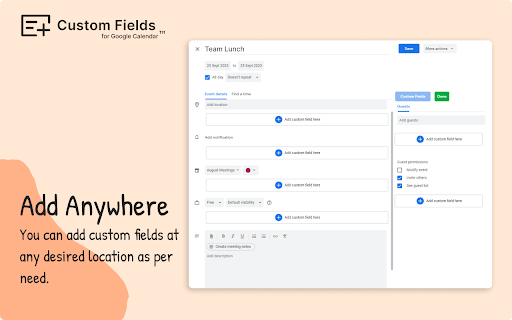
▶ Using Custom Fields for Google Calendar™ add-on you can create and manage custom fields that doesn't exist in the regular Calendar interface.
▶ It supports a range of field types including Dropdown menus, Date Pickers, Color Pickers, Checkboxes, Multiple Choice options, and Long/Short Text entries.
▶ Role based access: Only users with edit access for the event are able to create or update the custom fields, while others will have view-only access, just like other standard fields.
▶ A simple user interface to manage the fields. Admin can quickly add or remove fields from an event.
Need Help ?
--------------------
Email: [email protected]
Website: https://tabgraf.com
Release Notes
--------------------
03 Mar 2024 - Enhanced version with additional features released. Guests can now access and view the fields even without the add-on installed.
Latest reviews
- Nick Aubin
- Made a couple custom fields, on one event. After that, tried another schedule entry and the custom field control just continues to spin and spin, not loading on any other events I try to enter. Nice in theory, it failed miserably in reality.
- rpco12miadp
- Why cant I delete a field globally? I delete a field on one date and it is still on the other dates.
- Nick Osborne
- Liking this so far! Only question I have is on meetings I didn't schedule. The plug in seems to just spin and won't load the default fields.
- Rizwan
- It’s a game-changer for anyone who wants more control over their calendar events! 😊
- Hruday Ranjan
- This add-on is fantastic for managing fields like Dropdowns, Date Pickers, Color Pickers and many more. It's a game-changer for customizing my calendar experience! 👍
- Brendan Dodgson
- Is it possible to populate custom fields with created by and created date?
- B&T Window Specialists
- easy to use and set up on computer but need to be able to update fields from mobile which doesn't seem to be available
- Justin Barca
- This app was much better than I expected based on the ratings. I didn't get spammed with demands that I review it. I hoped that the extension would embed the custom fields in the ics data under the extendedProps field so that a custom web app consuming this data could display a URL for the event on the event card. However, when I look at the ics file download for the event after adding a custom field, it doesn't contain the custom data I entered. I'm guessing this means the app is storing the data separately under my google account and all these fields will only be viewable to my user on a machine with this extension which is not very useful to me.
- Jonas Luckmann
- When installed and activated, a feedback popup emerges. Your only option is to give feedback, all other buttons (like close, ask later or never ask) are fake. Even after writing a review you cannot use the extension. When looking at the source code, you can see that the button "add custom field" is disabled. When removing the "disabled" tag, you can click the button and are given the options to create a field, yet if you try to create a field, a notification pops up claiming that you do not have access to this function. All in all a promising idea, shame it is a total scam.
- Jonas Luckmann
- When installed and activated, a feedback popup emerges. Your only option is to give feedback, all other buttons (like close, ask later or never ask) are fake. Even after writing a review you cannot use the extension. When looking at the source code, you can see that the button "add custom field" is disabled. When removing the "disabled" tag, you can click the button and are given the options to create a field, yet if you try to create a field, a notification pops up claiming that you do not have access to this function. All in all a promising idea, shame it is a total scam.
- Jacob Theunisz
- The button to add a custom field appears, it offers three choices, but none of them seem to work. Looks like they cannot open a dialogue in Brave (a Chrome variant). Same with Chrome. Security problem?
- millvillagepickleball001
- Nice concept. I got it to work, then tried it from my office. It seems the end viewer must also have the Chrome extension enabled for the fields to show. This, of which, the event creator has no control and the end user would not see the details. Only the creator, right? Bummer :{
- fahd sekkat
- It doesn't work
- Molly Sano
- Customize button never appeared, even after following instructions.
- Brett Norton
- Doesn't work. Custom button never appears.
- SONU KUMAR
- Good extension, enables various other fields for more detailing of the event.
- SONU KUMAR
- Good extension, enables various other fields for more detailing of the event.
- Michael Babbitt
- no information about how to use even in a search, does not appear usable
- Michael Babbitt
- no information about how to use even in a search, does not appear usable
- Gianluca Muchetti
- I cannot use it: i've installed the extension but any additional field can be added to the google calendar. Need some help
- Gianluca Muchetti
- I cannot use it: i've installed the extension but any additional field can be added to the google calendar. Need some help