
Web2Markdown - Markdown Web Clipper
Extension Actions
- Extension status: In-App Purchases
- Live on Store
Export any web content to Markdown format
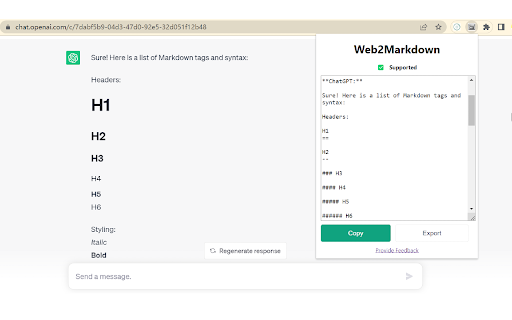
🚀 Description
Web2Markdown lets you convert the current web page into clean, readable Markdown with one click.
It preserves key structure like headings, text, links, and images so you can save, organize, and share content more efficiently.
🆕 What’s New
- New subscription website: https://web2markdown.pro
- Save directly to Obsidian (Pro)
- Save directly to Notion (Pro)
- Smart metadata insertion (title, description, keywords, cover image, source URL) (Pro)
💪 Supported Sites
Works on almost all websites and blogs.
Most pages use a universal parser, while some sites are specially optimized for high-quality Markdown export, including:
1. ChatGPT (chatgpt.com / chat.openai.com)
2. notion.site
3. medium.com
4. dev.to
5. zhuanlan.zhihu.com
If you find parsing issues on any site, please send feedback and we’ll improve support quickly.
⚒️ How to Use
1. Click the Extensions icon in your browser toolbar, find Web2Markdown, and pin it
2. Open any page and click the pinned Web2Markdown icon
3. The converted Markdown appears instantly in the panel; copy it or download as `.md`
4. Enable/disable metadata insertion in settings; sign in to use Pro features (Obsidian/Notion saving)
🔐 Privacy
- Conversion runs locally in your browser
- Web page content is not uploaded or stored during conversion
- Pro features require account sign-in
💎 Free vs Pro
- Free: One-click conversion, copy to clipboard, download `.md`
- Pro: Save to Obsidian, save to Notion, smart metadata, enhanced parsing for complex sites, priority support
- Pricing: https://web2markdown.pro/pricing
⏰ Support
- Website: https://web2markdown.pro
- Email: [email protected]
- Community: https://discord.gg/AU24DzrC
- Privacy Policy: https://web2markdown.pro/privacy
- Terms: https://web2markdown.pro/terms
Latest reviews
- Leonidas Gavran
- Using this in Vivaldi with the built in reader mode to make an app agnostic markdown copy of web pages to paste into my notes program (Notesnook). Results look significantly better than what I get with the native Notesnook web clipper, and unlike some options, this keeps the images as well as text and formatting. Simple, clean, straight forward; exactly what I was looking for!
- Ggol Afred
- It can export Markdown almost perfectly. Since MarkDownload is no longer maintained, this extension is the best alternative I have used.