
Sheets to JSON
Extension Actions
- Extension status: Featured
Sheet to JSON adds a lightweight JSON export button right into your Google Sheets toolbar. Click it, configure your options, and…
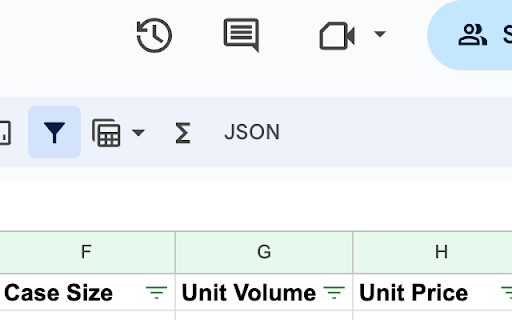
Sheet to JSON adds a lightweight JSON export button right into your Google Sheets toolbar. Click it, configure your options, and download perfectly formatted JSON in seconds.
Why Sheet to JSON?
- Works where you already are — no need to copy data into an external converter
- Your data never leaves your browser. Everything is processed locally
- Supports custom headers, nested objects via dot notation, type conversion, whitespace trimming, and empty row filtering
- Exports the active sheet tab with the correct file name automatically
Perfect for:
Developers pulling mock data, teams maintaining config files in spreadsheets, analysts converting reports for APIs, or anyone who needs spreadsheet data as JSON without the hassle.
Latest reviews
- Pedro Ermida
- My use case was pretty basic, but it did exactly what it promised, and exactly what I needed. What a time and life saver
- Seva Medvedovskyi
- It has a big issue - when I do not have access to a document your extension hides request access panel. Please fix asap
- Peter van der Zouwen
- Doesn't work
- Pierre Dumas
- Great! Saves me a lot of time. I always use it like that: 1) click "download json", 2) open json in notepad++, 3) select all, 4) Ctrl-C, 5) paste in vscode Suggestion: add button "copy json". 1) click "copy json" 2) paste in vscode
- Ken Nakai
- Does a great job. Just has bugs here and there. @dev If you attempt to access a sheet that you don't have access to yet (you get the "Access Denied" screen), you're modifying the page such that you can't see the UI to request access any more. Just a big JSON button along the left side of the page.
- Spencer Trumbore
- This addon did exactly what it claimed it would and I'm thrilled. Thank you.
- Ahmad Subhan
- Helpful tool, thank you. It converts sheet to json perfectly.
- Steven Price
- Like others, recent update interfered with my use case. JSON file used to be created from whatever sheet tab is currently active. Now, it just uses the first tab, regardless of which tab is active. Please fix!
- Bedilbek Khamidov
- It worked flawlessly for such a long time I just forgot that this extension could be faulty. However, you disappointed me, after your latest changes and your fancy additions, now sheet selection doesn't work, it's exporting json every time for the first sheet
- Denis Ushankov
- after last update always downloads first sheet instead of active. ruined.
- Griffin Brooks (Broskibble)
- Does exactly what I need, and exactly what it says
- Egor Vinogradov
- It did successfully export one of my spreadsheet but threw an error in the console when exporting the other one: getJSON.js:32 Uncaught (in promise) TypeError: Cannot read properties of undefined (reading 'split') at csvToJson (getJSON.js:32:16) at getJSON.js:113:28 For context: in my CSV I had string, numeric & json-as-string values. Maybe the error has to do something with quote marks or commas inside the cells.
- Chris Hefley
- Doesn't appear to work. Installs in Chrome, but clicking it on a google sheet tab does nothing. Tried all the usual troubleshooting steps. Uninstalling.
- Stan Géant
- Does what it promises.
- Nour Homsi
- It does exactly what it says. I would suggest more improvments to the extension like: - adding the ability to export data based on columns in addition to rows - multilevels json tree
- Kerim
- what a life saver, nice extension but the file name should be the table name i think
- Gaoqiang Zheng
- Perfect. Save me a lot of time to import data from a sheet to my program. Thank you. I also check the source code of this plugin. Clean and safe.
- Himanshu Agarwal
- Perfect if all your data is in string format. For numbers you can write a little extra code and parse it so i dont see any issues with the way the extension works. Its perfect.
- cuddlewuffle
- not sure why everyone is saying it doesn't work? this is perfect for my purposes, works perfectly for me, thank you so much !!!
- Joseph Whale
- It "works" but it will convert everything into strings which... isn't particularly useful
- Korutz
- Doesn't work, nothing happens when clicking on its icon.
- Ilya V
- Doesn't work
- Karol Pál
- I felt like this extension deserves a higher ranking. It does one thing and it does it well. Useful.
- Andrea Giannoni
- Exports everything as a string, so not quite useful
- meowyih1
- Very simple, very easy to use, exactly what I need.
- Oleksii Popovskyi
- This extension is simple and it works. Downloads all data from sheet as JSON file. But it isn't possible to configure it. There is add-on to convert sheets 2json with more options.
- Shawn Deprey
- Just simply doesn't work at all. I get the following error: TypeError: Cannot read properties of undefined (reading 'split') at csvToJson (getJSON.js:32:16) at getJSON.js:113:28 csvToJson @ getJSON.js:32 (anonymous) @ getJSON.js:113 Promise.then (async) getJSON @ getJSON.js:112 Show 3 more frames Show lessUnderstand this error
- E. O.
- doesnt work, 3k rows. After click nothing happens
- Joseph Adariku
- Beautiful been stressing myself throughout how to find a solution thanks for this mate pls make it so we can convert a large number of sheet duplicates not just one but all
- Aleksandar Prlinčević
- It worked great and saved me a lot of time
- Paulius N
- It does not work with 10000 raws.
- Nguyễn Thị Trang
- not working. pls fix it
- Puffed Rice Crackers
- Works flawlessly! Thank you!
- Cezkarma Gaming
- Works perfectly for me :) using Opera GX
- 구너구너
- I would appreciate it if the name of the sheet could also be included in the name of the saved file.
- Florian Schmitt
- Same problem as Jade White described
- Felipe César
- It just doesn't work to me. I click and nothing happens
- MTG Dubina
- Could you export smth like this { "Priority": ["High","Med","Low"] } with this plugin?
- Alzter
- "JSON" button does nothing. Tried exporting a document's second sheet with about 200 rows - no JSON file downloaded.
- Will Shaw
- I'm using Sheets to generate/manage game data. Having the option to save to JSON has made the process much more flexible for me. Thanks for the plugin, it works great!
- Jamey Play
- useful 👍👍👍
- Joran Freire
- Good idea but not work. I tried in sheet with 16 columns and 3900 rows.
- В`ячеслав Дмитровський
- Works fine! Thanks for this extension!
- Vlad Anisov
- Great tool, very useful for any development purposes.
- Александр Радуль
- Does not work.
- Paul Hazard (appa561)
- Same issue as another user - clicking extension icon does nothing... have first row as column headings
- Paul Hazard (appa561)
- Same issue as another user - clicking extension icon does nothing... have first row as column headings
- Michal Jareš
- Doesn't work for me at all. The button shows but clicking it does nothing. Tried to click it when nothing selected or with some cells selected. I would love to give it a good review but it needs to work at all.
- Michal Jareš
- Doesn't work for me at all. The button shows but clicking it does nothing. Tried to click it when nothing selected or with some cells selected. I would love to give it a good review but it needs to work at all.
- Nate Tarasiuk
- This makes downloading from Google sheets super easy!