
Smart Picture in Picture
Malware Detected
This extension has been flagged as potentially malicious.
Extension Delisted
This extension is no longer available in the official store. Delisted on 2025-09-17.
Extension Actions
- Malware
- Removed Long Ago
- Unpublished Long Ago
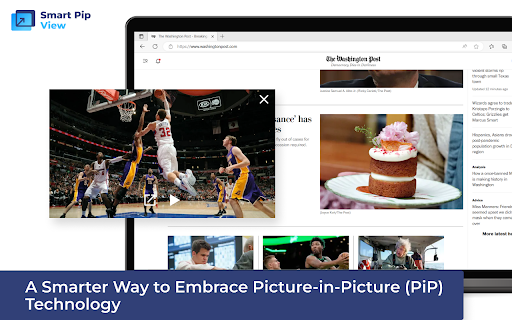
Maximize Your Screen Space Efficiency with Smart Picture in Picture: A Smarter Way to Embrace Picture-in-Picture (PiP) Technology
أصبت من التجول بين العديد من الألسنة بينما تحاول مشاهدة الفيديوهات؟ انهي عصر الفوضى واستقبل المستقبل المتعدد المهام! 🚀
مقدمة Smart Pip View، الملحق المتصفح الذي يزيد من مساحة الشاشة والكفاءة مثل ما لم يكن قبل ذلك. 💻📈
💡 استمتع بطريقة أكثر ذكاءً للاعتناء بتكنولوجيا الصورة في الصورة (PiP)! 💡
✨ الميزات التي تجعل Smart Pip View تبذلون الملحق الذي يجب الحصول عليه: ✨
🔹 استخدم وضع Pip بنقرة واحدة على رمز شريط الأدوات. قم بالتبديل بين العمل والترفيه دون أن يفقد نبضة واحدة. 🎯
🔹 استمتع بأيقونات مريحة في مشغل الفيديو على المنصات الرئيسية مثل YouTube. اشترك، استعرض والدردشة في وقت واحد، كل ذلك في نافذة واحدة. 🎬💬
📌 ملاحظة هامة: ابق على التشغيل المستمر لضمان وظيفة Pip دون فواصل. لا أغلاقات عشوائية أو مزاحمات مزعجة واحدة! 🙌
Introducing Smart Picture in Picture (PiP) Technology - the revolutionary browser extension that maximizes your screen space and efficiency like never before! 🚀
Say goodbye to juggling multiple tabs while trying to watch videos. With Smart Picture in Picture, you can experience a smarter way to multitask. 💻📈
✨ Here are the amazing features of Smart Picture in Picture that make it your must-have extension: ✨
🔹 Activate Picture in Picture mode with a single click of the toolbar icon. Switch seamlessly between your work and entertainment without missing a beat. 🎯
🔹 Enjoy convenient Picture in Picture icons in the video player on major platforms like YouTube. Watch, browse, and chat simultaneously, all within a single window. 🎬💬
🔹 Keep your video tab open to ensure uninterrupted Picture in Picture functionality. No more accidental closures or frustrating disruptions! 🙌
🔹 Enjoy a clutter-free experience with Picture in Picture technology. Maximize your efficiency and make the most of your screen space. 📈
🔹 Smart Picture in Picture technology works with all major browsers. You can enjoy the same great experience on Chrome, Firefox, Safari, and more. 💡
🔹 Enjoy Picture in Picture mode on all major video streaming platforms. Netflix, Hulu, YouTube, and more - Smart Picture in Picture has you covered. 📺
🔹 Enjoy Picture in Picture mode on all major social media platforms. Twitter, Facebook, Instagram, and more - Smart Picture in Picture makes multitasking a breeze. 📱
🔹 Enjoy Picture in Picture mode with audio and video calls. Zoom, Skype, FaceTime, and more - Smart Picture in Picture enhances your communication experience. 🤙
Experience the future of multitasking with Smart Picture in Picture. Get the revolutionary browser extension today and say goodbye to the clutter! 🤩
Latest reviews
- Hoschen
- Add a Hotkey (Q)
- Brandon Hardman
- The video takes out properly, but the player itself doesn't have enough settings. It would be nice to standardize the viewer itself. I have no other comments.
- Caleb Williams
- Picture-in-picture is implemented as simply and conveniently as possible. It is enough to press only a small button on the video and it moves to a separate window.
- Eva Martinez
- Almost perfect implementation. I still need to add more settings, but in general I am satisfied with everything. I use this plugin constantly when watching videos.
- Cecilia Anderson
- For a week of fairly active use, I have no complaints. Perfectly copes with the removal of video in a special separate window. Super expansion!
- Michael Baker
- Taking the video to a separate window is a very good idea. I think that this plugin will be very useful to many users. Personally, I use it during every surfing session.
- James Gilbert
- For some reason, it does not work on all sites. HTML5 video separates from the tab without problems, but it can't work with a flash drive. But in general, I will put 5.
- Caleb Chandter
- 1 button and any video in a separate window. I've been wanting such an extension for a long time. The developers came up with a great idea, a great idea.
- Alex Babcock
- A very light and functional extension for watching videos from the Internet. It's cool that you can no longer switch between tabs during browsing.
- Nancy White
- If someone does not have a second monitor, then I recommend this extension. Completely solves the problem of simultaneous video viewing and surfing, allowing you to separate the player from the tab.
- Michael Austin
- I wish you success in the development of the project. It turned out to be a really relevant and unique extension. I could not even think that it would be possible to take out any video in a separate player.
- Thomas Moore
- A big request to developers is to port the plugin for Firefox. As for me, a high-quality addition for taking the video to a separate window.
- Gregory Donovan
- I use this plugin both at home and at work. A convenient service, since with it you can pull videos from absolutely any sites into a separate window.
- Katrin Otter
- Everything works fine, I have no complaints. Qualitatively performs the separation of the video from the web page. I use it almost every day.
- John Miller
- I've tried a lot of similar extensions, but it certainly copes best with taking the video to a separate window. Convenient, however.
- Daniel Grant
- The HTML5 video works perfectly. 9 out of 10 videos can be pulled into a separate window. It is commendable that it is free and without advertising.
- Stefan Batler
- Free extension without any advertising. The picture in the picture implements qualitatively. Now I watch videos online only with the help of it.
- Kate Hammel
- The only working extension for taking videos to a separate player. No crashes and bugs, it works pretty stable. 5+!
- Robert White
- It would be nice if the developers ported this plugin to other browsers as well. It has become very convenient to watch videos in online format.
- Gregory Adams
- Cool plugin! Now there is no need to watch videos in a separate tab anymore. You can put it in a separate window and continue surfing.
- Patric Nelson
- I installed it and I don't regret it. Now I can easily take out the video and watch it in a separate mode. I advise everyone to try it. A convenient thing.
- Craig Cagney
- Works very well!