
Video - Stories
Extension Actions
- Live on Store
Download Instagram stories, save any IG video, photo and Reels. Easily repost to your feed with an Instagram downloader or saver.
Introducing InstaSave: Your Convenient Instagram Content Downloader
InstaSave is a user-friendly tool designed to assist you in effortlessly downloading various types of content from Instagram. Whether it's videos, photos, Reels, Stories, or IGTV, we've got you covered!
With InstaSave, you can easily download your own Instagram content and save it for future reference. Our platform supports the download of both individual videos and multiple videos from your Insta feed.
Do you need to download captivating photos from Instagram? Look no further! InstaSave enables you to effortlessly save single images or multiple photos from Instagram galleries.
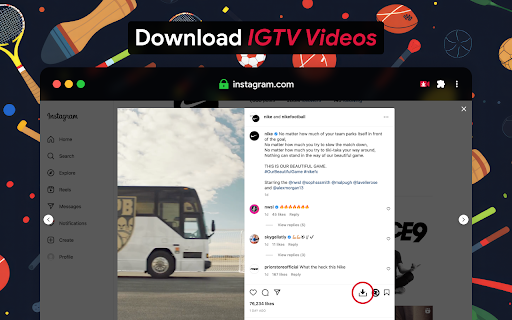
Furthermore, if you're a fan of IGTV and can't watch a long video immediately, worry not! InstaSave lets you download IGTV videos to your computer, ensuring you can enjoy them later without an internet connection or fear of them being deleted.
Have you ever come across an intriguing Instagram story that you wish to keep? InstaSave has the solution for you! Our platform allows you to download Instagram stories, ensuring you can archive and view them at your convenience.
Rest assured, our platform is a safe and easy-to-use Instagram downloader. It automatically downloads stories and videos by copying the link or sharing them. Plus, you can download content from both public accounts and your own personal profile.
Why choose InstaSave as your go-to Instagram downloader? We pride ourselves on providing a high-quality experience, offering fast downloads and efficient services. When it comes to downloading Instagram content, third-party websites like InstaSave are the best option.
Instagram is home to millions of captivating photos and videos, making it the world's most popular photo app. With the increasing amount of captivating content, having an Instagram video downloader is a must-have.
Introducing Insaver: Your Trusted Instagram Content Downloader
Insaver is a photo, video, and story downloader designed specifically for Instagram. As you scroll through the Instagram app and come across photos and videos you'd like to share with others, Insaver comes to your aid.
This easy-to-use downloader allows you to save Instagram videos, photos, stories, and Reels directly to your phone. Insaver ensures a safe and simple downloading process, automatically saving videos and stories when you copy their link or share them.
The features of Insaver include photo and video downloading from Instagram, easily saving stories, highlights, and Instagram Reels videos. It also supports downloading videos from Instagram and IGTV, even from private accounts.
Insaver allows you to copy tags and descriptions from Instagram, making it convenient for reposting and sharing downloaded files. With this app, you can enjoy offline viewing of videos downloaded from Instagram anytime, anywhere.
Batch downloads are made possible with Insaver. Simply tap into the profile pictures, copy the link, and the app will automatically download all the videos and stories in batch.
Rest assured, our downloader is safe and easy to use, providing a smooth experience for downloading Instagram stories, videos, and photos. Download Insaver now to effortlessly save and enjoy IG content!
Disclaimer:
The ownership, intellectual property rights, and other interests of the videos, photos, IG stories, Reels, and highlights on the Instagram platform belong to their respective publishers or owners. Please obtain permission and indicate the content source when using the downloaded files.
Insaver is not affiliated with Instagram.
iGram: Your Reliable Instagram Media Downloader
iGram is an online web tool that simplifies the process of downloading Instagram photos, videos, Reels, and IGTV videos. It offers a user-friendly experience on various devices, including mobile phones, tablets, and computers.
With iGram, you can effortlessly download Instagram photos, whether it's a single post image or multiple photos from carousel posts.
Downloading Instagram videos is made easy with iGram. It supports the download of individual videos as well as multiple videos from carousel posts on Instagram.
If you enjoy watching IGTV videos but don't have the time to watch them immediately, iGram allows you to download IGTV videos to your device. This way, you can watch them later at your convenience, even without an internet connection or the risk of them being deleted.
For those who love Instagram Reels, iGram has got you covered. Our platform enables you to download your favorite Reels videos, so you can enjoy them anytime, anywhere.
If you come across carousel or album posts on Instagram with multiple photos or videos, iGram is the perfect solution. You can download multiple photos or videos from Instagram galleries effortlessly.
iGram is a reliable Instagram downloader that supports various file formats. When it comes to images, the most common format is JPG, while for videos, the popular MP4 format ensures high quality and manageable file sizes.
You can access iGram from any device with a browser, including mobile phones, smartphones, tablets, notebooks, laptops, or PCs. It is compatible with operating systems such as Mac OS, Windows, iOS, and Linux. iGram works seamlessly with popular browsers like Chrome, Firefox, Opera, Safari, and Chromium, offering both desktop and mobile versions.
When using iGram, there are no limits on the number of videos you can download. You can download as many videos as you desire, making it a versatile tool for Instagram content enthusiasts.
Please note that iGram only supports downloading content from public accounts. Respecting user privacy and copyright, downloading private videos through iGram is not available. However, the iGram team is currently working on a browser extension for desktop browsers to assist with downloading private posts directly from Instagram.
At iGram, we prioritize the quality of the content you download. The image quality depends on the original upload, with the maximum resolution typically being 1080x1350 pixels, the limit set by Instagram. For videos, most downloads are available in HD (720p) quality.
Rest assured that iGram respects the rights of Instagram and its users. It is not associated with Instagram and operates solely as a tool for downloading Instagram content.
In summary, iGram is your trusted companion for downloading Instagram photos, videos, Reels, and IGTV videos. With its user-friendly interface and support for various devices and file formats, iGram makes the process of downloading Instagram content quick, easy, and reliable.
Instagram Video Download
Download Video Instagram, Photo, Reels, Stories, IGTV online
Instagram video downloader
FastSave was created to allow you to Instagram Video Download your own content. FastSave supports downloading videos for some videos and many videos from Insta.
Instagram photo downloader
Instagram Photo Downloader from FastSave allows you to save any photo or collage from Instagram without any difficulty. With FastSave you can download a single post image as well as download multiple Instagram photos.
IGTV downloader
IGTV is a long video, in case you can't watch it right now, you can download IGTV video to your computer, to make sure you can return to watch later, no network connection required or delete IGTV.
Instagram Story Download
Instagram stories are a unique way for anyone to share their everyday life with photos and videos with everyone. Sometimes you want to archive a story you like but the feature is not supported in the app. FastSave was created to solve that problem; to help people download Instagram stories and watch them online.
Instagram Story Viewer
IGTV is a long video, in case you can't watch it right now, you can download IGTV video to your computer, to make sure you can return to watch later, no network connection required or delete IGTV.
BEST TOOL INSTAGRAM DOWNLOADER
FastSave is an efficient Instagram downloader made to get high quality content off Instagram in seconds. The best way to download Instagram content is through third-party websites like the FastSave downloader.
Every day, millions of photos are posted on Instagram. This makes it the most popular photo app on the planet. You often find images that you simply have to keep. And the Instagram video downloader is needed for you right now.
Video downloader for Instagram
About this app
While scrolling of Instagram app and want to share photo & video with others, this is the time that Photo & Video downloader & Story downloader for Instagram – Insaver came to help you.
Photo & Video downloader & Story downloader for Instagram – Insaver is the easiest video downloader to download Instagram video and IG stories.
You can save Video & Photo & Story & Reels from Instagram and IGTV to your phone with Insaver story downloader.
Insaver story downloader for Instagram is safe and simple to use. 100% Automatic Instagram story download by copying link or sharing videos.
Try this super-fast & easy video downloader for Instagram & story downloader for Instagram & Insta reels downloader app now!
Get Instagram Stories, Videos, Photos from Instagram by copying link.
① Copy the link of Video & Photo & Reel from Instagram.
② Instagram story & video will be downloaded automatically.
Save Instagram Stories, Videos, Photos from Instagram by sharing.
① Click "Share to" and choose Insaver story downloader.
② Instagram story & video will be downloaded automatically.
Features of video downloader & story downloader for Instagram.
☆ Photo & video download for Instagram.
☆ Story & highlight & Instagram reels videos easily saving.
☆ Video from Instagram & IGTV downloading supported.
☆ Get video and image from private account.
☆ Instagram Picture Downloader & Insta post downloader.
☆ Watch 𝗼𝗳𝗳𝗹𝗶𝗻𝗲 videos anytime anywhere.
☆ Copy tags and descriptions from Instagram.
☆ Safe & easy to use!
☆ Video & photo from Instagram download in batch.
Insaver story downloader & video downloader for Instagram & story downloader app is the easiest and safest app to save stories & download video & save reels video & Instagram photos from Instagram. Download this fast video downloader & story downloader to save IG video easily!
Disclaimer of Insaver story downloader:
- The ownership, intellectual property rights and any other interests of the Video, Photo, IG Story, Reels Video even Highlight on the platform belong to its publishers or owners. Please obtain permission before download and use the content and indicate the source of the content when using the downloaded files.
- This video downloader is not associated with Instagram
Video downloader for Instagram helps save Instagram video & photo & IG story & reels.
Our insta story downloader can download all from Instagram, Instagram lite & IGTV quickly and easily.
Use our Instagram story downloader to download Instagram photos / videos to local gallery & view them offline & share with friends & re-post IG videos / photos to get more likes!
Insta video downloader & story downloader & reels downloader for Instagram: small, simple & safe.
3-in-1 downloader for Instagram!
-- Story downloader: download stories from Instagram.
-- Video downloader for Instagram: save videos from feed or IGTV.
-- Insta Reels downloader: download Instagram reels video with single click.
Download from Instagram by copying link.
• Copy the link of Video, Photo, IG Story, Reels & Highlight
• Open Video Downloader for Instagram : download Instagram files automatically
Download from Instagram by sharing .
• Click "Share" & choose video downloader for Instagram: download reels Instagram.
• Instagram story downloader will download files automatically!
Download Instagram story & video in batch .
1. Tap into the profile pictures & copy the link
2. Insta downloader will download insta videos & IG stories in batch automatically!
Our downloader for Instagram has all-round features.
• Download & save Instagram, Instagram lite & IGTV video & photos.
• Save & highlight Instagram story with our Instagram story downloader.
• Download Instagram reel (short video Instagram).
• Download video & image from private account.
• Re-post & share downloaded files easily.
• View insta videos downloaded offline anytime.
• Download videos from Instagram in batch.
• Small & safe downloader app for IG.
Video downloader for Instagram: download Instagram videos, insta stories & IGTV videos easily and swiftly. Our insta story downloader allows you view downloaded files offline & re-post & share them on your account.
Disclaimer:
• The ownership, intellectual property rights and any other interests of the Video, Photo, IG Story, Reels Video even Highlight on the platform belong to its publishers or owners. Please obtain permission before download and use the content and indicate the source of the content when using the downloaded files.
• This video downloader is not associated with Instagram.
Download Instagram Videos and Photos
iGram is an online web tool that helps you download Instagram Photos, Videos, Reels, and IGTV videos. iGram is designed to be easy to use on any device, such as a mobile phone, tablet, or computer.
Photos Downloader
Instagram photo downloader provided by iGram is a great tool for saving images from Instagram posts. With iGram, you can download a single post image and multiple Instagram photos (carousel).
Videos Downloader
iGram is created to enable you to download IG videos from your personal page. iGram supports video downloading for singular videos and multiple videos from carousels.
IGTV Downloader
IGTV is a long video type. If you can’t watch it now, you can download IGTV videos to your device to be sure that you can return to watching later, without the need to be online or in case the IGTV can be deleted.
Reels Downloader
Reels is a new video format that clones the principle of TikTok. Download Instagram Reels videos with the help of iGram. Our Instagram Reel downloader can help you to save your favorite Reels videos.
Carousel / Album Downloader
Carousel, also known as Album or Gallery posts type with multiple photos, videos, or mixed content. If you need to download multiple photos from Instagram, the iGram is the best to download Instagram gallery.
What is an Instagram Video Downloader?
It’s an online tool (web application) that lets you download Instagram photos, videos, reels, and IGTV videos. In case you need to use it later offline. The iGram Instagram downloader is the best tool for downloading from Instagram.
What type of file formats does iGram support for downloading?
The most convenient these days is the jpg file format for downloading images. As for the videos, the .mp4 file format is still considered the most popular worldwide, ensuring high quality and a small video file size.
Latest reviews
- Umair Ashraf
- Why does it require access to all websites?
- Don Draper (MadMan)
- the picture i download is not HQ can you fix this . thanks
- Manny Avalos
- Fantastic downloader for IG You have to click on the pic/video to download you cant download thru thumbnail doe but other than that its awesome!!!!
- Sacre Bleu
- doest NOT work
- Фахад Сулейманович
- Not working
- Niko Lehto
- Does not work anymore
- Iman Khan
- It doesn't work
- Pamela Chambers
- I used to absolutely love this extension but it stopped working. I would have rated it a 5 but can't now. I will gladly ammend my review if it gets fixed.
- Захар Бокий
- The "download" feature stopped working completely 3 days ago! Please fix! Also when there is a carousel of photos/videos, sometimes it could not download the 3rd and the 7th image, instead downloaded a copy of an image previous to that one (2nd and 6th respectively), but not always. Also no support center enabled on the webstore extension page, so cannot report bugs, only via this review.
- Walério “LelowDias” Dias
- stop working
- Alejandro Perez Muñoz
- It was all good but stopped working since yesterday
- Simo Laakso
- Was an excellent extension but has stopped working now. Download button appear but nothing happens when you click it. Please fix!
- Nurfa putra
- Stories download does not work, please update guys :(
- Miri Babayev
- Please update the extension. Story downloads are not working anymore (neither from feed nor from profile)
- Daniel Garcia
- could you please update the extension. starting 6/13/24 I can't download stories the normal way or through a user's profile.
- Nikola Petrović
- Downloading some images, not working properly: when more images in post, it mistakes some of them, and donwload the same ones multiple times.
- Eric
- Trash. Not only does it interfere with other sites - it screws with Twitch, for one - but when I try to change the app permissions so that it only works on Instagram, it crashes Chrome. Uninstalled.
- Michael
- It works for stories from the start page but not if you open a story inside a profile. Similarly, if you open a post by clicking on it, the download button doesn't appear, only if you open a post in a new tab.
- Shadow
- The Best Extension for downloading Insta reesl etc.... 100% recommended .... fast and eazy..... Thumbs Up!!!
- Maxim Lamanovskiy
- Somehow this extension breaks scroll on twitch and sometimes to save some post you need to open it in a very tricky way. But saving stories and posts from your feed works greate!
- Oleksandr Pylypchak
- Works very good. But it makes some websited (not even related to Instagram) to use blue background where it was transparent. Example - perplexity.ai . Try it. The slogan on main page has this issue. Please make your extensin not to touch any other website except Instagram. At the moment solved maually - by restricting in extensin's properties in Chrome.
- Mune NightWalker
- With a bind in keyboard will be perfect!
- Elisa Johnston (Average Advocate)
- I tried at least five other similar extensions. Not one worked. In addition, some wanted me to make an account. I was about to give up but decided to try one more. To my surprise, this one worked as promised and I didn't have to sell my life away. Pleased.
- Tomas Santiago-Lopez
- It is working properly. It is as easy as downloading, installing, refreshing the IG page and the little arrow appears to download the image or video. Taking off a star because it is not downloading the original version of the picture. I still have to manually do that.
- NILAM KALITA
- Please enable/add the option to one click post download. for example when I click it would have both the option - to download individual picture as well as whole post in one click.
- Megane Journey
- So simple & very useful. Thank you.
- Vishal Gupta
- dose not working, Not apearing download button on photos ! Unistallingggg !
- MANDRILL Gaming
- It only works for the first few pics and then the download button no longer appears.
- Gary Quiring
- It only works for the first few pics and then the download button no longer appears.
- Block Grass (GrassblockYouge)
- it doesn't work
- Gilmar viana de souza
- very good , but when i try to download all from instgram profile, i don't want to download any videos, i want to download all the pic only. how can i do this?
- Gilmar viana de souza
- very good , but when i try to download all from instgram profile, i don't want to download any videos, i want to download all the pic only. how can i do this?
- Serge S
- Absolute madlad(s), actually found a solution to the new IG format, and it works efficiently and perfectly for bulk downloads, well done!
- Serge S
- Absolute madlad(s), actually found a solution to the new IG format, and it works efficiently and perfectly for bulk downloads, well done!
- Paul Suarez
- Really helpful but be careful guys not to download too many images, Instagram can block you for downloading too many image.
- Paul Suarez
- Really helpful but be careful guys not to download too many images, Instagram can block you for downloading too many image.
- Gauthier Duprez
- You can find the download option near the follow button and don't forget to wait..it will take sometime to download
- Gauthier Duprez
- You can find the download option near the follow button and don't forget to wait..it will take sometime to download
- Henrique Lima
- Itss da best insta downloder extension ever loved it thanks it really helps
- Jarosław
- Works exactly as advertised
- Jarosław
- Works exactly as advertised
- 潘一然
- Fix Video Download Not Working Getting Error IG Blocking
- 潘一然
- Fix Video Download Not Working Getting Error IG Blocking
- Admon Comercial
- Outstanding, i have no words for this, awesome
- Admon Comercial
- Outstanding, i have no words for this, awesome
- Yrnehap AP
- After updated It's not working with Chrome. Whenever I download reels section videos.nnIt shows nRequest did not succeed. If you are using Firefox go into you privacy settings ans select then standard setting (https://support.mozilla.org/en-US/kb/content-blocking). If that is not the problem you tried to download to many imagesn and instagram has blocked you temporarily.nnTypeError: Failed to fetchnnAnd nI am using Google Chrome.n??
- Yrnehap AP
- After updated It's not working with Chrome. Whenever I download reels section videos.nnIt shows nRequest did not succeed. If you are using Firefox go into you privacy settings ans select then standard setting (https://support.mozilla.org/en-US/kb/content-blocking). If that is not the problem you tried to download to many imagesn and instagram has blocked you temporarily.nnTypeError: Failed to fetchnnAnd nI am using Google Chrome.n??
- qz c
- Tested today and the bulk download for videos worked
- qz c
- Tested today and the bulk download for videos worked
- Gustavo Menezes
- I Love You, I am very glad now.your extension is very very very nice,wow wow wow