
CRX id
ngaoohdgcaeojdngpdhaafnccgcbhlgl
ngaoohdgcaeojdngpdhaafnccgcbhlgl
Description from extension meta
💬 Comment-AI 💬 Feeling the pressure to leave a meaningful comment on a post, but struggling with the right words? Introducing…
Image from store
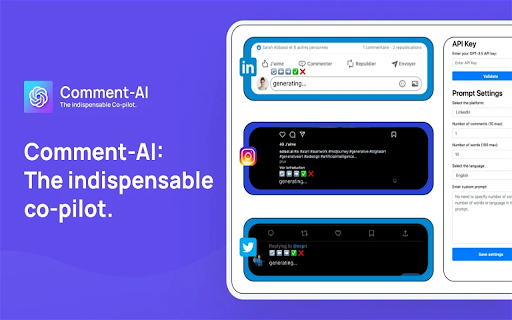
Description from store
💬 Comment-AI 💬
Feeling the pressure to leave a meaningful comment on a post, but struggling with the right words?
Introducing Comment-AI, your copilot that crafts engaging comments for you, amplifying your presence and engagement across social platforms.
What does it do? Comment-AI is a Chrome extension that crafts engaging and relevant comments for LinkedIn, Instagram, and Twitter, helping you shine and establish genuine connections.
Never let words escape you again. With Comment-AI, enhance your online presence, establish genuine connections, and engage meaningfully across social platforms.
🥳 Key Features 🥳:
- Unlimited custom prompts
- LinkedIn comment generator
- Instagram comment generator
- Twitter comment generator
- Multilingual support
- Word count control
- Comment count control
- Add/edit/delete custom prompts
📘 How to Use It? 📘:
1. License Validation
- Validate your license with your email and license key.
- Add and validate your OpenAI API Key (only GPT-3.5 Turbo is supported currently).
2. Prompt Settings
- Choose your platform (LinkedIn, Instagram, or Twitter).
- Name your prompt.
- Set the number of comments to generate.
- Set the number of words per comment.
- Select the desired language for the comments.
- Add a custom instruction for the AI to follow.
- Save your settings.
3. Comment Generation
- Select the text of the post you want to comment on.
- Click on the comment zone; a menu "🔄 ⬅️ ➡️ ✅ ❌" will appear at the top.
- Click on the generate button "🔄" and let the AI generate your comments.
- Use "⬅️" and "➡️" to navigate through the generated comments list.
- Use "✅" to select and validate your comment. You can refine it if desired.
- Post your comment 🥳.
4. Notes
- When you generate a comment for a post, you must always validate (✅) or cancel (❌) the comment before moving on to another post. Otherwise, the menu will not appear if you try to generate a comment for another post without validating (✅) or canceling (❌) the previous one.
- By default, the system prompt is used if you don't add a custom prompt. Each platform has a default system prompt, so there is no need to add a custom prompt unless you prefer to do so.
- If you add a custom prompt, you can select it from the prompt gallery.
- To make your OpenAI API Key work, you need to enable billing on your OpenAI dashboard -> https://platform.openai.com/account/billing/overview
- If your OpenAI API key initially works and then stops, please try to generate another API key and validate it in the Comment-AI settings.
5. Support
- If you encounter any issues, please send us an email at [email protected]
Latest reviews
- (2025-06-24) Bilal Majeed: buy license to use
- (2023-08-03) Valentin Heftman: Super efficace ! Ça me fait gagner un temps fou et très très simple à utiliser
- (2023-08-02) Melvin Signol: Fonctionne très bien, très intuitif et simple à configurer, je garde cette extension dans mon top 3.
- (2023-08-02) Tobi Tobi: Très pratique comme extension, 50 commentaires écrit en 10 minutes sur LinkedIn ! C'est magique !!
- (2023-08-02) r rinaley: Très simple à utiliser et me fait gagner 1 à 2 heures par jour, c'est l'outil parfait pour rédiger rapidement des commentaires sans avoir à y réfléchir pendant des heures pour avoir l'air intérressante!
- (2023-08-02) Agence Personal Brand-in: J'ai testé plusieurs outils de ce genre, et celui-ci est de loin le plus efficace sur le marché. Je recommande
- (2023-08-02) Sabrina Pezzei: J'utilise cette extension depuis peu et c'est déjà un incontournable ! Elle facilite et accélère grandement la gestion de mes commentaires sur les réseaux sociaux. Pour ceux qui ont besoin d'une présence constante pour leur business, c'est un atout majeur. Simple à utiliser, efficace et rapide, je la recommande. Bravo à l'équipe derrière cette trouvaille.
- (2023-08-02) Thibault chancerelle: Super outil, très pratique pour gagner un temps énorme ! Les résultats sont là, le reach augmente et la qualité des commentaires est vraiment bonne !
- (2023-07-31) Alexandre CHIABAI: Excellent et super pratique ! Mon reach a bien monté
Statistics
Installs
757
history
Category
Rating
4.6 (10 votes)
Last update / version
2023-11-22 / 1.5
Listing languages
en