
Free Screenshot Capture & Annotation Tool
Extension Actions
- Extension status: Featured
Useful extension for taking screenshots and adding annotations to them. Visualize, annotate, and share screenshots in a few clicks!
Free Screenshot Capture & Annotation Tool
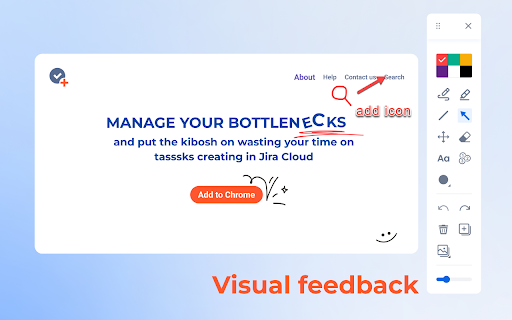
Easy-to-use extension for taking screenshots and adding annotations to them. Visualize, annotate, and share screenshots with your team members in a few clicks!
🖌️ Color palette of the most used colors
🧰 All the necessary annotation tools - line, pen, geometric shapes, text, etc.
✒️Ability to add annotation on the live web page
🟢 The ability to delete all recent actions with screenshot markups
💻 Download ready-made images to your PC or copy them to a clipboard
🔝Are you a Jira user and want more features?
Try TaskCompose for Jira Cloud. It's a simple and functional tool for visualizing bug reports, JPD ideas, or regular Jira issues. Send visual feedback from any Chrome tab directly to Jira without distracting from your workflows.
[Atlassian Marketplace]:
https://marketplace.atlassian.com/apps/1231078/taskcompose-for-jira-cloud?hosting=cloud&tab=overview
[Chrome Web Store]:
https://chrome.google.com/webstore/detail/taskcompose-for-jira-clou/kfbnpkfjhmbadkpaidjhabanbfapdmnp
Latest reviews
- Joanna Rm
- Exactly what I need as an online tutor, an extension that lets me add text, draw using a pen (and highlighter), and add very simple shapes and lines. I tried other tools and they were too fancy for me. This one is just right for me. Thank you to the developers.