
ChatGPT and Zoom to Fill
Extension Actions
- Extension status: Featured
ChatGPTand Zoom to Fill video and change aspect ratio video removing black bars on Youtube. Zoom controller video and summary video…
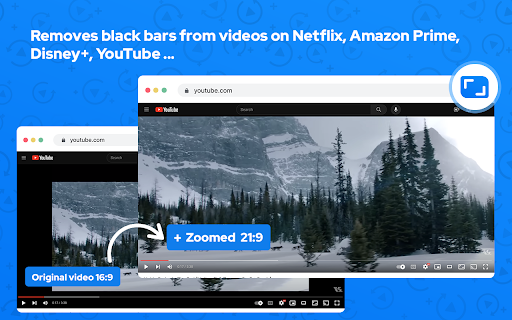
Zoom video extension is designed to eliminate black bars from videos across popular streaming platforms like Netflix, Amazon Prime, Disney+, HBO Max, YouTube, and more. Additionally, it provides the option to adjust the aspect ratio of any video, enabling you to enjoy content in full screen on your ultrawide monitor.
Why do you need Ultrawide Video extension?
It's for everyone who wants power over the video aspect ratio. This extension is primarily for Ultrawide Video monitors, but that does not mean it's only good for it. You can manipulate the video's size that contains horizontal or vertical black bars and let the video fill your entire screen for a better experience.
Here's how to utilize it:
1. Install the extension from the Chrome Web Store.
2. Navigate to a website containing videos.
3. Click the extension icon located in the upper right corner of your browser.
4. Choose your desired aspect ratio.
The video will be resized to fit the chosen aspect ratio.
Although primarily intended for ultrawide screens (21:9, 32:9), this extension is compatible with any resolution and video. It proves particularly beneficial for 16:9 screens, enhancing the experience with 4:3 videos. Select a predefined aspect ratio (16:9, 18:9, 21:9, 32:9). Selecting it again will reset the video aspect ratio to the original size.
This extension enables the support for 21:9 monitors on YouTube, Netflix and others video sites full screen mode.
It is great for wide aspect ratio videos, that have black bars at the top and bottom and don't scale correctly.
Features automatic aspect ratio detection (not all sites are supported — support may vary from site to site)
Supports primarily youtube, vimeo, twitch, netflix, but will try to work on any website
Supports both cropping and stretching
Works with youtube theater mode
Automatic aspect ratio detection
This feature ensures that video will be cropped without you having to lift a finger. It runs continuously and will even detect aspect ratio changes that happen in the middle of the video.
You can also use shortcut keys to do everything, they can be customized on Settings page. Define single keys for multiples aspect ratios or define multiple keyboard combos separately also.
Very simple, if you want to use the player button (available for that site):
Click on the button to zoom, this will use your predefined aspect ratio.
Scroll on the button, to manually adjust your zoom level.
▸ Works on all video streaming platforms
▸ Works on all embedded videos
The browser action popup of this extension also incorporates ads from Use ChatGPT.AI. ChatGPT or Chat GPT Openai
Notable features include:
Elimination of black bars from videos on various websites.
Ability to modify the aspect ratio of any video.
Compatibility with ultrawide monitors.
Speed controller simply handle playback speed while watching videos. Video speed controls allows you to speed up or slow down any video during the watching. No standards or limits. Just increase and decrease the playback speed, advance and rewind video as many times as you need.
Video Speed Controls extension will adjust the playback speed of any HTML5 video in the current tab. Just click on the extension and slide the bar to adjust the playback speed.
Works on Facebook Video, Twitter, YouTube, Netflix, and many more services.
The only text zoom extension that works!! Saves your zoom setting for each domain.
What is the Picture in Picture (PiP) mode and how it will be useful for you? This mode lets you play any video in Picture-in-Picture (PiP) mode, and it works on all platforms. Floating player or picture in picture mode. Picture-in-Picture - floating video, floating player
Zoom to Fill - ultrawide video
Removes videos black bars on Netflix, Amazon Prime, Disney Plus, HBO Max, Youtube by changing to ultrawide video aspect ratio.Zoom video, change aspect ratio of any video, removing black bars on Netflix, Amazon Prime, YouTube, HBO. Ultrawide video.
Zoom video, change aspect ratio of any video, removing black bars on Netflix, Amazon Prime, Disney Plus, HBO Max, Youtube. Ultrawide video aspect ratio. Video controller and zoom control.
Zoom video, change aspect ratio video removing black bars on Netflix, Youtube. Ultrawide video, zoom page, zoom controller, speed video and video downloader. Video zoom. Zoom to Fill video and change aspect ratio video removing black bars on Youtube. Zoom controller video and summary video Chatgpt. Picture in picture mode.
Zoom to Fill video, change aspect ratio video removing black bars on Youtube. Zoom controller video and ultrawide monitor. Picture in picture mode and full screen. zoom controller, Ultrawidify, Zoom to Fill - Ultrawide Video, Zoom Page, Ultrawide Video, Zoom To Fill, Video Fullscreen, Zoom Video, zoom tool, Video Speed Controller, zoom controller video, Zoom Text, full hd, Turn Off the Lights, ChatGPT, full screen, speed video, Summary with ChatGPT, Zoom Chrome Extension, Video Transformer, summary video, video downloader, video speed playback, videos black bars, Netflix, Amazon Prime, Disney Plus, HBO Max, Youtube, Disney+, ultrawide video, picture in picture, floating video, pip mode, aspect ratio video, video, music, music downloader, music download, ultrawide monitor, video download, video recorder, video notes, video zoom, video screen recorder, Disney Plus Ultrawide Fullscreen Support
Zoom tool for zoom video, change aspect ratio video removing black bars on Netflix, Youtube. Ultrawide video, zoom page, zoom controller, aspect ratio video and ultrawide monitor.
Video Transformer change aspect ratio video removing black bars on Youtube. Zoom page video and ultrawide monitor. Floating video mode and full screen. Video download
Install Email Zoom Text Reader by cloudHQ for free, and enjoy magnified text in your emails, as you see fit.
Your support is appreciated; if you find the extension valuable, kindly consider rating it with 5 stars on the Zoom to Fill extension.
Latest reviews
- nezar recio
- Unable to detect monitor
- Sh Thánh Thiện
- good
- J Pake
- I've never had this work for me at all, and that are no instructions or settings that change anything at all. Everything is greyed out. A waste of time.
- Ahmad Taia
- wsows
- Julius
- doesnt work
- Emmanuel Mozu
- looks kinda wonky at the bottom, please align and make it the right aspect ratio and zoom, otherwise--quite exceptional how did you do it?
- Bob Bao
- why can not works since chrome 147.0.7727.24 anymore?
- Wesley Herrin
- No longer works on any website at all.
- K VIKAS
- good
- Lars Porter
- GREAT for Netflix. Wish it worked for crunchyroll/all video
- Georges Tippols
- Works perfectly for me on macOS, thank you! I sometimes play videos of hikes or mood videos while writing and this extension helps to fill up the screen perfectly without black bars.
- Marzook islam
- does not work
- Ajax The Great
- doesn't work on my anime site
- Dilawar A Saiyad
- please ratio properly
- Sunny Shopsy
- nice
- Rocky Balboa
- good
- MD.MONZURUL AHOSAN MILON
- good
- Vishal Meher
- Must Needed ChromeExtension
- K
- good
- Jarl Ùlfursson
- nice
- Ivan N Kuznetsov
- Excellent product, does as in the description, in my evaluation fail to expand some posts in X.
- THE BOSS Pawar
- nice app
- Onara
- Buggy, breaks a lot of sites. Even ones that dont have videos. controls disappear after a few hours of being installed and needs to be reinstalled for it to work again. It also cant auto fill height, only width, resulting in a lot of cropping in some situations.
- Jeetu Srivastava
- why it isn't working in incognito mode
- Jesper
- some videos is converted from 4:3 to 16:9 i miss a funktion that kan "resize" the videoplayback back to 4:3 in realtime.
- Jonathan Gill
- Two 4 Nine and Staff Meeting Mr Jonathan Paul Gill A Supported Life
- Jafar
- Not working
- NITESH RAM
- NOT WORLING
- Nashir CS
- Not like this
- free fire status
- awsome
- Noah Davis
- good
- Ray F
- Needs a feature to pan / move your viewpoint.
- Bonnie
- NOT BAD
- Swathi Juntipalli
- nice
- Alessandro Piras
- Very bad, not an ultra wide adapter. Its cropping the image cuttin top and bottom band
- CurrentValueMusic
- Finally an easy way to zoom amazon prime video!
- Clint W
- works great, but it every once in a while adds an extra button onto the youtube hotbar which is just really anoying. sometimes it adds two extra, so there are three zoom buttons on my hotbar. can by temporarily fixed by refreshing page but seems to always come back
- kris
- amazing
- Sanjeet Sharma
- nice
- Bá Trọng Nguyễn
- vip
- Marcin Matyszczak
- sometimes works, sometimes does'nt
- Shahid Suleman
- best
- Hjsohwoha
- good
- Arch Koven
- I can't set or choose between aspect ratios. If I can it's not described how.
- Gawaskar
- good
- Saurabh Pardeshi
- New youtube player zoom icon mis placed. add this code in css to fix. button.zoomtofillBtn1>svg{padding:0 !important;}
- Kantaphat 5555
- Okay
- Yusuf Ata
- Perfect, thank you!
- Hiccups Hudson
- Works sometimes. Sometimes it says "video not detected" and it does nothing. not really reliable.
- A. Zori Comba
- it glitches and flickers. can't use it anymore.