
Video Speed Control - Zoom Gold
Extension Actions
- Extension status: Featured
Zoom to Fill video and change aspect ratio video removing black bars on Youtube. Zoom controller video and summary video Chatgpt.…
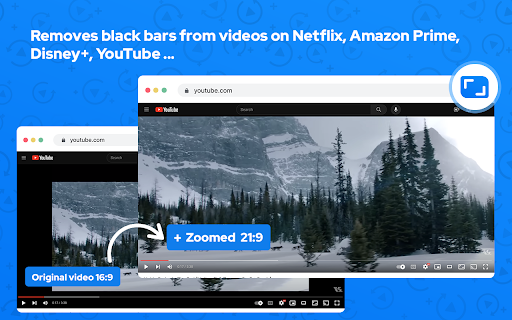
Zoom Video Chrome extension is designed to eliminate black bars from videos across popular streaming platforms like Netflix, Amazon Prime, Disney+, HBO Max, YouTube, and more. Additionally, it provides the option to adjust the aspect ratio of any video, enabling you to enjoy content in full screen on your ultrawide monitor.
Here's how to utilize it:
1. Install the extension from the Chrome Web Store.
2. Navigate to a website containing videos.
3. Click the extension icon located in the upper right corner of your browser.
4. Choose your desired aspect ratio.
The video will be resized to fit the chosen aspect ratio.
Although primarily intended for ultrawide screens (21:9, 32:9), this extension is compatible with any resolution and video. It proves particularly beneficial for 16:9 screens, enhancing the experience with 4:3 videos.
Notable features include:
Elimination of black bars from videos on various websites.
Ability to modify the aspect ratio of any video.
Compatibility with ultrawide monitors.
Zoom to Fill - ultrawide video
Removes videos black bars on Netflix, Amazon Prime, Disney Plus, HBO Max, Youtube by changing to ultrawide video aspect ratio.Zoom video, change aspect ratio of any video, removing black bars on Netflix, Amazon Prime, YouTube, HBO. Ultrawide video.
Zoom video, change aspect ratio of any video, removing black bars on Netflix, Amazon Prime, Disney Plus, HBO Max, Youtube. Ultrawide video aspect ratio. Video controller and zoom control.
Zoom video, change aspect ratio video removing black bars on Netflix, Youtube. Ultrawide video, zoom page, zoom controller, speed video and video downloader. Video zoom. Zoom to Fill video and change aspect ratio video removing black bars on Youtube. Zoom controller video and summary video Chatgpt. Picture in picture mode.
Zoom to Fill video, change aspect ratio video removing black bars on Youtube. Zoom controller video and ultrawide monitor. Picture in picture mode and full screen.
Zoom tool for zoom video, change aspect ratio video removing black bars on Netflix, Youtube. Ultrawide video, zoom page, zoom controller, aspect ratio video and ultrawide monitor.
Video Transformer change aspect ratio video removing black bars on Youtube. Zoom page video and ultrawide monitor. Floating video mode and full screen. Video download
Video Speed Controller - Speed up or slow down videos on any web.
Video Speed Controller enabled faster or slower to play video. Now you can easily slow down or speed up videos with flexible configuration.
Increase the video speed if you are trying to skip past the boring parts and want to skip to the action scenes/critical parts of the video.
Save time today when you are watching videos by slowing them down or speeding the videos up. speed control, speed controller.
Thankfully, video speed controller lets you speed up or slow down videos quickly and easily. Thankfully, Video Speed Controller lets you speed up or slow down videos quickly and easily. Save time today when you are watching videos by slowing them down or speeding the videos up. video speed playback
Video downloader is the easiest and fastest way to download online videos from mainstream websites, including Facebook, Vimeo, Twitter, Dailymotion, Instagram, vk.com, ok.ru, Youku (youku.com), TikTok and others. Facebook Video Downloader
Use this professional video downloader for Chrome browser to get video and audio from websites you like. speed control, speed controller.
Download videos from websites Facebook, Instagram, Vimeo, Twitch etc.. Simply save them to your PC and watch it later
Install Video Downloader and Music Downloader for free!
Video downloader is not a Youtube Downloader. Due to restrictions of the Google Web Store Policies and Developer Program Policies we can not download Youtube Videos. Thank you for understanding.
Warning:
Please note this extension is NOT made by Google and is made by an independent development team. All copyrights belong to their respective owners. Google doesn’t endorse or sponsor this Chrome extension. HTML5 Video Speed Control for Chrome™ is not owned by, is not licensed by and is not a subsidiary of Google Inc.
We hope you find our Playback Video Speed tool useful! We are waiting for your feedback and ratings! If you’re experiencing problems or speed controller isn't working on, please contact us.
Your support is appreciated; if you find the extension valuable, kindly consider rating it with 5 stars on the Zoom to Fill extension.
Latest reviews
- Angus Yao
- looks good??
- peter lustig
- Very disappointed especially seeing so many good reviews. It's not working at all. when I go to youtube or any other side and want change settings nothing work on the monitor ratio I just have a X above it. video ratio always says not detected. under these small windows I can change aspect ratios etc. I can't click on any of it. when I hoover over it shows a blocked sign like the street symbol.
- Tim Space
- Before using the extension, you are required to leave a rating
- Domantas Meškauskas
- on https://www.youtube.com/watch?v=4J3-nTmGzk0 not working
- MrMrHiggins
- Doesn't work.
- Dragutin Perišić
- Does not function at all. It's dead. Try UltraWideo instead. Thank me later.
- Caleb Guyatt
- good
- dadasaheb nikam
- not working
- Bushman 412
- it stopped working
- nezar recio
- Unable to detect monitor
- Sh Thánh Thiện
- good
- J Pake
- I've never had this work for me at all, and that are no instructions or settings that change anything at all. Everything is greyed out. A waste of time.
- Ahmad Taia
- wsows
- Julius
- doesnt work
- Emmanuel Mozu
- looks kinda wonky at the bottom, please align and make it the right aspect ratio and zoom, otherwise--quite exceptional how did you do it?
- Bob Bao
- why can not works since chrome 147.0.7727.24 anymore?
- Wesley Herrin
- No longer works on any website at all.
- K VIKAS
- good
- Lars Porter
- GREAT for Netflix. Wish it worked for crunchyroll/all video
- Georges Tippols
- Works perfectly for me on macOS, thank you! I sometimes play videos of hikes or mood videos while writing and this extension helps to fill up the screen perfectly without black bars.
- Marzook islam
- does not work
- Ajax The Great
- doesn't work on my anime site
- Dilawar A Saiyad
- please ratio properly
- Sunny Shopsy
- nice
- Rocky Balboa
- good
- MD.MONZURUL AHOSAN MILON
- good
- Vishal Meher
- Must Needed ChromeExtension
- K
- good
- Jarl Ùlfursson
- nice
- Ivan N Kuznetsov
- Excellent product, does as in the description, in my evaluation fail to expand some posts in X.
- THE BOSS Pawar
- nice app
- Onara
- Buggy, breaks a lot of sites. Even ones that dont have videos. controls disappear after a few hours of being installed and needs to be reinstalled for it to work again. It also cant auto fill height, only width, resulting in a lot of cropping in some situations.
- Jeetu Srivastava
- why it isn't working in incognito mode
- Jesper
- some videos is converted from 4:3 to 16:9 i miss a funktion that kan "resize" the videoplayback back to 4:3 in realtime.
- Jonathan Gill
- Two 4 Nine and Staff Meeting Mr Jonathan Paul Gill A Supported Life
- Jafar
- Not working
- NITESH RAM
- NOT WORLING
- Nashir CS
- Not like this
- free fire status
- awsome
- Noah Davis
- good
- Ray F
- Needs a feature to pan / move your viewpoint.
- Bonnie
- NOT BAD
- Swathi Juntipalli
- nice
- Alessandro Piras
- Very bad, not an ultra wide adapter. Its cropping the image cuttin top and bottom band
- CurrentValueMusic
- Finally an easy way to zoom amazon prime video!
- Clint W
- works great, but it every once in a while adds an extra button onto the youtube hotbar which is just really anoying. sometimes it adds two extra, so there are three zoom buttons on my hotbar. can by temporarily fixed by refreshing page but seems to always come back
- kris
- amazing
- Sanjeet Sharma
- nice
- Bá Trọng Nguyễn
- vip
- Marcin Matyszczak
- sometimes works, sometimes does'nt