
变色龙-一键给网站变装
Extension Actions
An extension to help you change what your website look like.
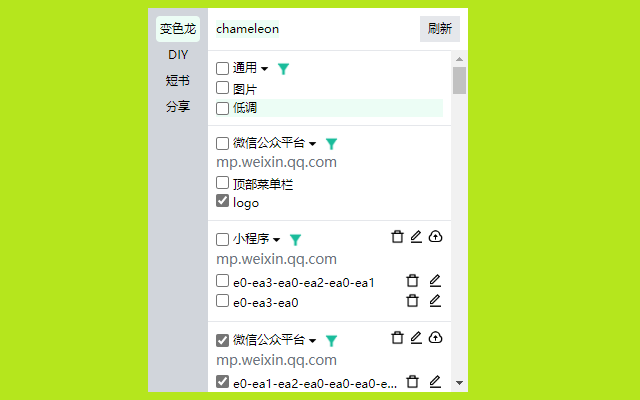
Chameleon: One-Click Website Restyler is a powerful and user-friendly browser extension that enables you to instantly customize the appearance and layout of any website you visit. Whether you want to create a distraction-free reading environment, hide unwanted page elements quickly, or highlight and personalize parts of web pages relevant to your workflow, Chameleon offers all these capabilities with ease and minimal effort.
This extension operates by injecting dynamic custom styles and rules into webpages, giving you precise control over which content is visible and how it looks without requiring any coding knowledge. Using its intuitive popup interface, powered by Vue.js, you can toggle the visibility of page components, modify fonts, colors, spacing, and more, or apply entire style themes tailored to your personal preferences. You can even save, rename, and switch between multiple appearance profiles for different sites, making it simple to manage your customizations.
Chameleon’s design ensures that all your changes are temporary and only affect your current browser session or until you decide to revert them, so it never permanently alters the websites you visit. This flexibility makes it ideal for simplifying complex or cluttered web pages, focusing on essential content, enhancing accessibility, or assisting with tasks like web development and content troubleshooting.
Behind the scenes, Chameleon leverages Chrome’s message-passing framework to efficiently coordinate content injections and keep track of active customizations in real time. You access the extension’s functionality via a convenient toolbar icon, where the popup panel offers batch controls for managing all modifications on a site. Whether you’re a professional aiming to boost productivity, a researcher seeking cleaner reading layouts, or a power user customizing your browsing experience, Chameleon consolidates advanced styling power into a sleek, lightweight package.
Key Features:
- Instant toggling to hide or reveal any webpage element with a simple click.
- Apply dynamic style changes such as fonts, colors, spacing, or highlights with customized CSS rules.
- “DIY” controls that let advanced users define specific selectors and CSS for fine-grained personalization.
- Save, rename, and switch between multiple appearance profiles tailored to different websites.
- Vue.js-powered popup interface providing a seamless and responsive UI for managing styles and visibility.
- One-click restoration to quickly revert all changes and return the page to its original look.
- Intuitive batch controls for enabling, disabling, or clearing all modifications on a site in one step.
How It Works:
1. Install Chameleon via your browser’s extension manager.
2. Visit any webpage and click the Chameleon icon to open the popup panel.
3. Review the active page elements and use visibility toggles to hide or reveal content instantly.
4. Modify or apply style themes through the interface, targeting text, backgrounds, layouts, or other elements.
5. Save your customized appearance as a profile for the site, rename it, or switch to another profile as needed.
6. To revert changes, use the restore function or simply toggle off individual modifications.
7. For advanced customization, use the DIY section to input your own selectors and CSS rules for precise control.
Privacy: - No personal data collected. Chameleon only modifies your local browser view and does not access or transmit your browsing history or personal information, ensuring maximum privacy and security.
Latest reviews
- en
- 1.请问倒计时是干嘛用的2.请问如何关闭,我还不太会用这个
- 乐
- 偶然间发现的插件 十分的好用 NICE