
SEO Spider Tools
Extension Actions
SpiderNow's Technical SEO and Web Audit tools are designed to help website owners discover and improve On-Page SEO issues.
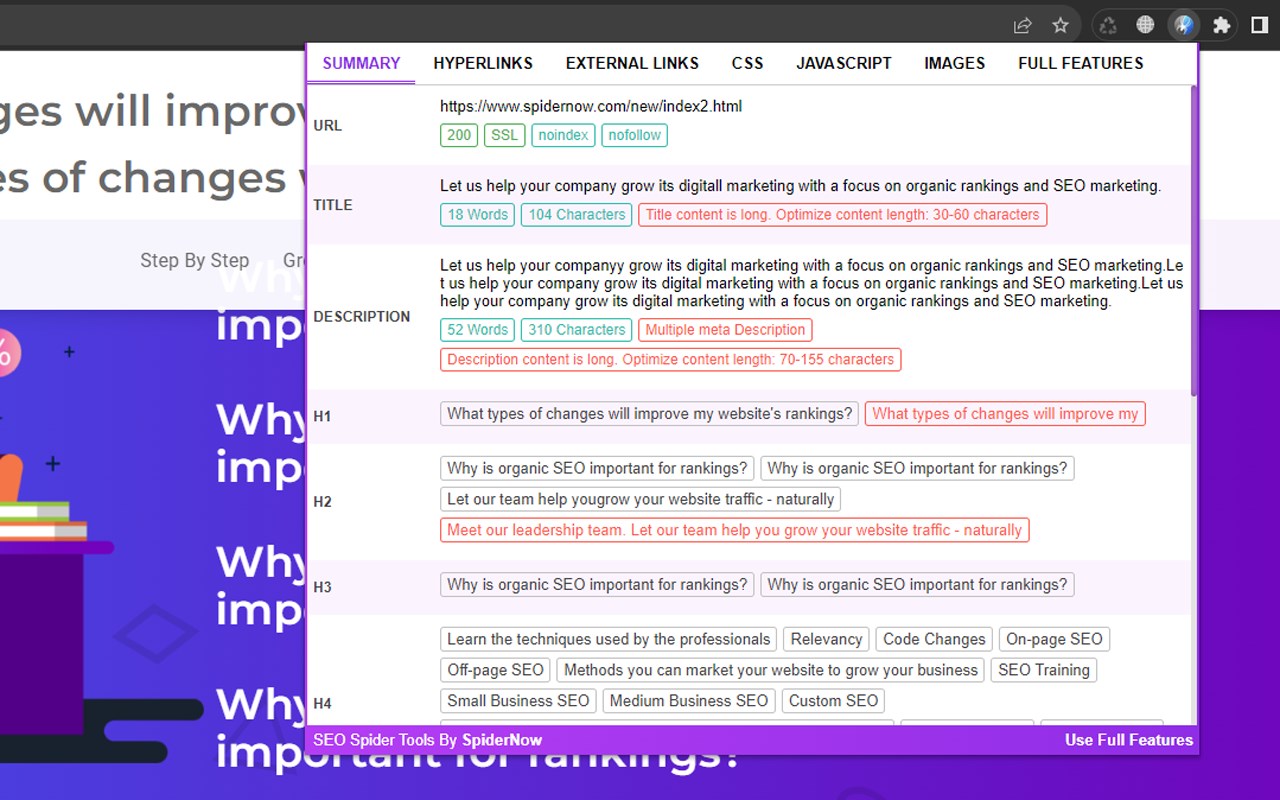
Our SEO tools are a free extension for Google Chrome browser. It will help you discover SEO issues, fix errors, and improve your search engine rankings.
This free extension is like having an SEO sidekick right in your browser. It will help you analyze all of your pages for SEO and help you discover ways to boost your rankings in the search engines. It quickly captures every element of your website in real-time and then highlights issues and errors that need attention. This can range from meta, link, css, scripts tags, poor optimization, page speed, performance and other unknown factors within seconds.
Now daily SEO tasks can be easier to manage so install our free extension today!
USE OUR TOOLS TO CHECK FOR:
Meta Robots & Directives:
- Discover blocked URLs blocked by robot.txt protocol, noindex, follow, nofollow, noarchive, nosnippet
- Show blocked resources in rendering mode
Inlinks & Outlinks:
- Display all pages that the URL links to
- Display all of the pages linking to a URL
- Scans for anchor text and if the link is a follow or a nofollow
Page Status:
- Displays if page is broken such as a 404
- Displays Server Default Port
- Displays Server Type
- Shows if page is secure with SSL or non-SSL
- Displays URL Response Time and Code
- Server Errors such as no responses, 4XX client & 5XX server errors
- Display issues with on ASCII characters, underscores, uppercase characters, parameters, or long URLs
- Show file size of URLs and Images
- Display Page Speed and Load Time
HTML Elements:
- Displays the number of each html elements occurring on the page
Images:
- Scans for Alt tags under 100 Characters
- Scans Current Page & Site for duplicates Images
- Displays Broken Images
- Discover Missing Alt Tags
- Scans Current Page & Site for duplicates Alt Tags
- Shows issues with Multiple Alt Tags
CSS:
- Scans for Broken CSS Links
- Scans for Current Page & Site Duplicates CSS
- Displays External CSS
Javascript:
- Scans for Broken Javascript Links
- Scans for Current Page & Site Duplicates Javascript
- Displays External Javascript
Hreflang:
- Scans for Duplicate Hreflang
- Displays Broken links
- Discover Redirect 301, 302, etc.
- Scans for Broken hreflang tag attribute
- Displays missing hreflang links
- Displays incorrect languages codes
Hyperlinks:
- Displays hyperlinks on the scanned page and connected pages that are broken
- Scans for Current Page & Site Duplicates
- Display redirect chains and loops
- Discover Redirect 301, 302, etc. such as permanent, temporary, JavaScript redirects and meta refreshes
- Displays External Links, status codes and source pages
- Display links from other pages that point to the scanned page
- Shows what Hypertext are used for the Hyperlinks for internal and external links
Canonical Tags:
- Scans for Missing Canonical Tag
- Scans to see if Canonical Tag does or does not match the page’s URL
- Scans for Current Page & Site Duplicates of Canonical Tag
PageSpeed Insights:
- Scans for scores for Core Web Vitals metrics of mobile and desktop devices
Download Htaccess:
- Generates custom file for high-level configuration of your website
- 301 Redirect File or Directory
- Rewrite to www
- Caching Javascript, CSS, and Images
- Prevent Hotlinking
- Custom Error Pages (400, 404, 500, etc)
- Change default directory page
Crawl Depth:
- Displays the crawl depth for each page
Content:
- Scans for the Word Count that are less than <250 words
Rich Snippets:
- Scans for incorrect Schema Markup
- Display issues with Structured Data
Title:
- Matches if Title is the same as H1 Tag
- Scans for Current Page & Site Duplicates
- Scans for Missing Title tag
- Displays Content Under 30 Characters
- Displays Content Over 60 Characters
- Shows issues with Multiple Title tag
Description:
- Scans for Current Page & Site Duplicates
- Scans for Missing Meta Description
- Displays Content Under 70 Characters
- Displays Content Over 155 Characters
- Shows issues with Multiple Meta Description
Meta Keywords:
- Scans for Missing Meta Keywords
- Scans for Page Duplicates
- Shows issues with Multiple Meta Keywords
H1 Tags:
- Scans for Current Page & Site Duplicates
- Scans for Missing H1 Tags
- Displays Content Under 10 Characters
- Displays Content Over 60 Characters
- Shows issues with Multiple H1 Tags
H2-H6 Tags:
- Scans for Missing H2-H6 Tags
- Displays Content Under 10 Characters
- Displays Content Over 60 Characters
- Shows issues with Multiple H2-H6 Tags
Improve Content:
- Quick alerts to notify of SEO issues for Title, Description, H1 Tags, H2-H6 Tags, and Content
- Keep original content whiles modifying text
- Displays Characters Count
- Adds Recommended Limits
- Displays Word Count
- Shows all Unique Words
- Displays Repeated Words
- Shows the number of Sentences used
- Displays the Number of Lines
- Scans for Keyword Density
Latest reviews
- 露露
- good
- omor
- SEO Spider Tools by SpiderNow is a must-have Chrome extension for on-page SEO. It provides user-friendly insights and recommendations, making website optimization a breeze. Highly recommended!
- bryan
- Excellent tool for discovering Technical SEO and Website Audit issues. Highly recommend to any web developer or digital marketer.
- Mamun
- As a web developer, SEO Spider Tools Extension has become my secret weapon. It streamlines the SEO analysis process, making it incredibly efficient and helping me enhance website rankings effortlessly. Highly recommended!