
AI Image Detector & Fake Picture Check Online
Extension Actions
Most Accurate AI Image Detector, Ai Image Checker & Fake Image Detector Chrome Extension
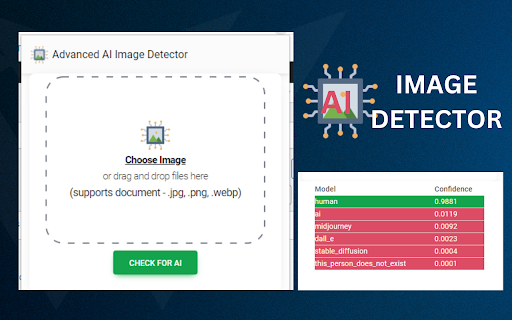
This is the most impressive and accurate AI Image Detector, Ai Image Checker & Fake Image Detector Chrome Extension.
First, you need to add the extension to your chrome browser, like a other extension. Then, when you want to check a picture, just click on the extension's icon. Next, you'll choose a picture from your computer and put it into the extension. Our clever AI Image Detector & Fake Picture Check Online (that's like a smart Ai detection tool) will quickly look at the picture and tell you if it thinks the picture was made by a AI, not a person. It does this by studying things like how the picture looks and the patterns it sees in the picture.
✅ How To Use AI Image Detector & Fake Picture Check Online Extension?
Step-1: Install the extension , then click the extension icon.
Step-2: You can see the upload interface. So upload any images. Then Click the "Check For AI" Button.
Step-3: After few secund, It will give you a accurate result, Its a real image or fake image. Enjoy!
✅ AI Image Detector, Ai Image Checker & Fake Image Detector Features
- User Friendly
- Easy To Use
- Just 1 Click and Save Few Bucks
- Regular Updated
- 100% Working
So, there you have it! Happy Checking, and enjoy!