
Paint Tool - Eyedropper
Extension Actions
- Extension status: Featured
- Live on Store
Color picker, color history. Live smart color picker tool. Quickly grab HEX, RGB colors. Gradient generator, color palette and font…
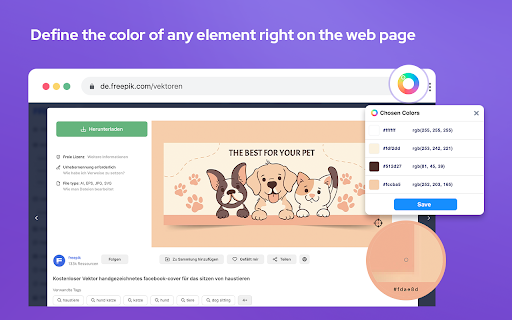
Color Picker and Eyedropper Tool is a must-have browser extension for web developers, designers, and anyone who needs to choose colors from a webpage or extract a website's color palette.
Whether you're creating a website, designing graphics, or working on a digital project, Color Picker will make the process of color selection easier and faster.
Features:
- Employ zoom technology to select and store multiple colors from any website;
- Tailor your color picker keyboard shortcut in the settings (default: Cmd/Ctrl + Shift + e);
- Set the color picker as the default choice in the options;
- Archive your preferred colors and gradients; a single click on any color stores its HEX value in your clipboard;
- Discover variations such as shades, tints, complementary hues, and other color combinations for any chosen color;
- Generate linear or radial gradients with an unlimited number of stops;
- Explore a vast collection of exquisite gradients, modify them, save them, and conveniently copy their CSS code whenever necessary;
- Obtain color palettes from any gradient you create;
- The site palette feature retrieves all the colors present on any webpage;
- Personalize the color type for automatic copying.
Great for any designer, the Color Picker (Eyedropper) is a Chrome extension that easily allows you to identify the Hex colour code of any UI element you hover your mouse over. It's great for quick access to colours you gain inspiration from when browsing online.
Eyedropper
Use the Eyedropper by right-clicking on the page and selecting "Pick a color on the page". You can also use the Eyedropper button on the Eyedropper tab of the extension's popup.
Color Picker
Use the color picker by clicking and dragging the markers around the palette. The color selections are shown together with their Hex code values in the boxes below the palette.
The color picker will also display the colors to different formats (i.e., HEX, RGB, HSV, HSL, CMYK).
- Eyedropper
- Style guide generator
- Color picker
- Color palette builder
- Get HEX/RGB/HSL values
- Random color palette generator
- Color history
- Copy colors to your clipboard
- Tints and shades for any color
- Light and dark color theme options
- The ability to generate unique URLs for referencing and sharing palettes
This extension stores the last six selected colors and represents the color in HEX, RGBA, HSVA, HSLA, and CMYK formats. You can press a button to copy the vcurrent color value into the clipboard.
Screenshot tool and paint online tool
- Paint tool - Draw on any webpage in your browser.
- Paint on web - Make shapes with the magic marker.
- Paint tool - Write with the text tool.
- Paint tool - Take screenshot to share you creativeness
Alternative color and web developer tools you may like if Chroma's missing a feature you want:
* ColorZilla
* CSS Peeper
* Colorpick Eyedropper
* Dopely Colors
* Visbug
* Site Palette
* Amino: Live CSS Editor
* Fonts Ninja
* Designer Daily Report
Ultimate Color Picker Tool चा वापर करून सहजतेने आकर्षक डिझाईन्स तयार करणे सुरू करा. color picker, pick color , grab color, color palette, generate palette, hex, colorzilla, eyedropper, color scheme, image color , web color picker, online color picker, picker tool,
color picker, pick color , grab color, color palette, generate palette, hex, colorzilla, eyedropper, color scheme, image color , web color picker, online color picker, picker tool,
color picker, pick color , grab color, color palette, generate palette, hex, colorzilla, eyedropper, color scheme, image color , web color picker, online color picker, picker tool,
color picker, pick color , grab color, color palette, generate palette, hex, colorzilla, eyedropper, color scheme, image color , web color picker, online color picker, picker tool,
color picker, pick color , grab color, color palette, generate palette, hex, colorzilla, eyedropper, color scheme, image color , web color picker, online color picker, picker tool,
color picker, pick color , grab color, color palette, generate palette, hex, colorzilla, eyedropper, color scheme, image color , web color picker, online color picker, picker tool,
color picker, pick color , grab color, color palette, generate palette, hex, colorzilla, eyedropper, color scheme, image color , web color picker, online color picker, picker tool,
color picker, pick color , grab color, color palette, generate palette, hex, colorzilla, eyedropper, color scheme, image color , web color picker, online color picker, picker tool,
color picker, pick color , grab color, color palette, generate palette, hex, colorzilla, eyedropper, color scheme, image color , web color picker, online color picker, picker tool,
With Color Picker Tool - Geco Grab Colors from any website With The Color Picker Extension. With Colour Picker you can find color reading on any point of the browser. Simply copy the code and paste it for your use. It offers the HEX and RGB codes on any element.
For proper work RELOAD page
Color Picker revolution tool for designers.
Now you can easily pick any from any website with our new extension. Eyedropper tool will get color palette from any webpage you need. It's a pretty useful tool for web developers or web designers. This extension is pretty simple to use and it has simple and user-friendly interface. We provide you and amazing and useful eyedropper tool so you can get RGB colours from any webpage. Extract palette from web pages while you're browsing the web. There are three color formats available: RGB, CSS, and HSL.
This program is a Colour Picker, or an EyeDropper, also a Color Picker or EyeDropper depending on how you wish to spell it.
- Identifying the RGB HEX CMYK
Whether you're a using extension to generate conversion focused ad creatives, or just looking to add some color to your everyday browsing, the ColorPick is the perfect tool.
Try using our software Color Picker to find the color codes for any pixel today.
Latest reviews
- Scott Patrick
- Works good. You can easily find a colour in Hex or any other colour code in your tab. I use it quite alot and yeah it's good lol. No complaints are of now of me just downloading it.
- troiesmes serd
- This is the best Chrome tool for color recognition.
- Denice Clyde
- Beautiful extension. Well thought out and designed. This is the color...everything... app/extension I was looking for. Will save so much time
- Eura Cinderella
- I’ve been using this extension for about a year now, and I haven’t encountered any bugs. Definitely a 5★ from me
- Didi Ranmedas
- Exactly what I was looking for. No more need to save an image from a web page, then upload to a website. Just click the icon, click 'pick', click the place on the web page - and BOOM! You're presented with a menu in which you can copy the code.
- Ajmat Minting
- It is so helpful. It can be use in any color pick in chrome
- osbald0073
- Seems to be the best all around color picker extension. works well and looks good. you can add keyboard shortcuts to pick colours right away.
- Surekha Surekha
- color picker doesnt work at all
- Mike Elias
- How does this have more than one star? Nothing works.
- Jayden Lawson
- Doesn't let you use Eyedropper, so it's false advertising.
- Shubham Palmate
- worst tool , Eyedroper function doesn't work
- King Legitto
- Not working. "Eye dropper is not allowed on this page"
- Deepak sinha
- the best eyedropping tool and colour picker with ease, one of the best on world.
- Dineth Liyanage
- Literally inserted a png into the browser to load the local file and it still says "Eyedropper not available on this webpage"
- Rachel Kaplan
- This app is worthless, useless, and all of the above. Anytime I try to select the eyedropper on ANY webpage, I get the "404" cartoonish error that says it can't access the colors. On ANY webpage? What good is the tool if it can't work?
- Gustavo Rubio
- When I go over to "save" the chosen color from the eyedropper, the extension pop-up disappears.
- Brad H
- Color picker doesnt work on this page.
- Robert Schwager
- Not sure if bug but years ago things just worked! Developing on local server on local IP and I get "Sorry, but eyedropper is not allowed on this web page". Color picker settings -> "Allow access to file urls" displays greyed out view permissions. Chrome browser is setup with "Allow access to file URLs". For years these extensions and plugins worked fine. In recent years, most are broken as are a lot of things now days!
- Sean Thompson
- "colour dropped is not allowed on this page" - then what good are you!?
- Oliver Mayer
- completely useless
- Raghad Hafez
- useless
- Edy Pau
- this is good
- Ashley Sowerby
- Also kind of wild that an extension named "eyedropper tool" doesn't actually let you eyedrop on ANY site. I've tried my own website, I've tried multiple different open source sites, etc - and it's a 404 for all of them. Which is wild because the previous picker extension I had never had that issue, shame that the UI on this is great - but functionally useless.
- Dream Watches Brigitte Bardot DrW
- Doesn't let me use the eyedropper tool in my local or any website
- Icon Chua
- What a useless extension. Eye dropper and site colors tool doesn't work. The only SPECIFIC things people would want to use a color picker extension in the first place.
- Danish ali
- Doesn't let me use the eyedropper tool in my local or any website
- Stuart Rose (viper9x)
- does not work, cannot pick colours from current running page.
- Alex Gade
- "not allowed on this page" what a load of garbage. At this point I'm better off using the color picker built into windows.
- george balboa
- this wins them all! ive tried too many to admit...dont waste your time...get this one!
- Giacomo Sepe
- Makes it super easy to work with colors
- Costin Dragomir
- Eyedropper doesn't work for me, the page just "freezes" and I need to hit Esc to get back to it.
- Zohair Mansoor
- Color Picker is not working
- Nishka A
- Horrid
- Dan Semaya
- Can't distinguish between Gmail PWA and Google Chat PWA. If I want my Gmail title bar to be red and my Chat title bar to be green it's not possible with this extension. It treats them both as the same app.
- Leandro Perdomo
- Nice extension, easy to use and good amount of features.
- Claire Archer
- It's generally a helpful too. BUT, it needs ability to access multiple saves or at least a place to store them so we can access them again. Currently, you must save, then copy/paste for each one. When I changed the settings to have the color picker eye dropper tool be the first to appear, my browser kept locking up. I had to undo this. So now, I must select the color picker extension, select the eyedropper tool, copy, go to my notes and paste, then come back and do it again. On a positive note, it does read website colors well.
- sharfu
- very helpful amazing
- Guilherme Vilas Boas
- Top
- Moustapha Sakho
- works fantastic !
- Waffiq Aziz
- Sadly not working on several sites, it says "Sorry, but eyedropper is not allowed on this web page."
- Christyn Walker
- Overall, this is probably the best color picker extension currently available. Cons are very minor and largely just complaints about it being tedious to use at times, but probably still less tedious than other options. Pros: Select multiple colors on a page without having to reselect the eye dropper after choosing each color Saved color swatches Gradients and color combonations for each saved color CSS code for color gradients Cons Can't batch download or copy/paste list of saved color info (rgb or hex codes) Can't batch remove saved colors If you turn on the option to auto use the eyedropper when opening the extension, you have to pick a color first. If you open the extension and want to access a different menu, you have to choose a color, go to the swatch list and delete the color you just chose first (if you don't care if that color stays on your list of saved colors, this probably won't bother you)
- Michael Lu
- nice tool
- eshal
- nice
- Brittney Zellner
- Doesn't work for most websites. Just says "Sorry but eyedropper is not allowed on this webpage". Blehh
- Ayon Bit
- Good
- Robert Hu
- worthless. didn't work for most sites i wanted to use it for
- Flash 5
- Using it now and very useful tool. Completely free. Love it
- TheTopAdventure
- Can't use the color picker on most pages
- Page Refresh
- Have used this extension for years now, always does a decent job!
- Brayden Smith
- Very easy to use. Recommend 10 out of 10 to everyone.