
Anything Copilot: AI, Multi-tab Sidebar, Split-Screen
Extension Actions
AI, right where you need it. Free in the sidebar & Mini Window.
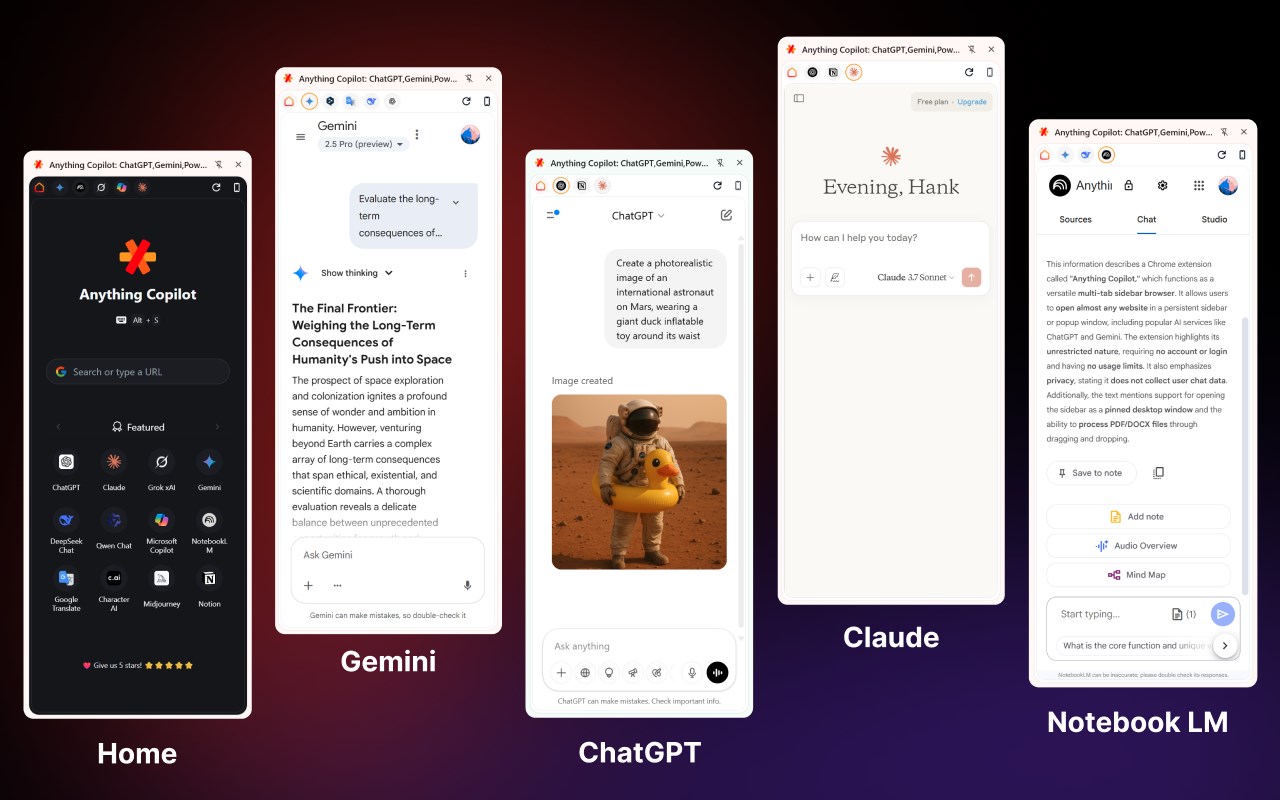
This is a unique AI Copilot extension, unique because we do not directly provide an AI model; however, you can open almost any website in a sidebar or popup, like ChatGPT, Gemini, Microsoft Copilot, Kimi, and more.
Anything Copilot acts like a "universal shell" or "universal sidebar," serving as a versatile assistant.
✨✨ Completely Unrestricted
With Anything Copilot, there are almost no restrictions. No account needed, no login required, and no usage limits.
You can open chat.openai.com in the sidebar and talk unlimitedly with ChatGPT 3.5 for free, or open any other AI website you like.
💪💪 Multi-Tab Sidebar
You can open multiple pages in the sidebar at the same time. For instance, you can open ChatGPT, Gemini, and Google Translate simultaneously and switch between them freely.
🔏💪 Privacy
Since we do not directly provide the AI model, we do not save or collect any of your chat content. Open trusted websites in Anything Copilot without worrying about privacy issues. Using Anything Copilot does not require registration or login, nor does it need an email or phone number.
🚀💻 Desktop App Support
Want to use ChatGPT while working in Word, Excel, or PowerPoint? It's possible. Open the official ChatGPT website, then click to open in a popup through the Anything Copilot extension, and you will have a "pinned ChatGPT window." Isn't that great? You can also use shortcuts to maximize or minimize this pinned window.
📄🤖 PDF DOCX File Support
The free version of ChatGPT does not support reading files, but Anything Copilot offers additional support. Simply drag and drop your files into it, and you can read the content and chat with AI. This feature is also completely free and unrestricted.
🪄🪄 More Fun, More Possibilities
The ways to use Anything Copilot are unlimited. Whether it's AI, translation, videos, novels, music, you can try opening them in the sidebar or popup to unlock endless possibilities.
Install Anything Copilot and explore more efficient ways of working that suit you. If you have any suggestions or issues, feel free to contact us at any time; we are very eager to hear from you.
Latest reviews
- if
- 建议: 1.增加切换显示和隐藏快捷键(显示时应该是用户拖拽后的大小窗口) 2.当前恢复和最小化建议恢复到用户拖拽后的大小窗口 3.缩小的窗口可以再小些,窗口标题栏是否可以隐藏 超级棒的插件,爱不释手
- Waleed
- This extension is outstanding has the potential to be an essential feature in any browser. 4 stars rating only because: In Edge browser every time I try to open Copilot it says "copilot.microsoft.com refused to connect." Also, there are couple of feature requests to the developers to make it a powerful extension: 1- Make tabs "Pinnable" and locked so no to close them by mistake. 2- Make each tab site independent from browser's log ins ex. I have 2 Gemini accounts I want the one in the tab different from the one in the browser, each time I change the account in the tab it changes the profile of google in the main browser. 3- Make an extra page "Favorite" like Featured, Recent and Bookmarks page that's customizable so user can add or delete sites manually. Finally, kudus to the devs on this outstanding extension.
- Reyansh
- Best ever! Unimaginable! Perfect experience! Love it!
- David
- Very good - but, as an added feature request - can you make it so the pop up Window opens to the sidebar instead? That would make it much more useful.
- Lan
- 5c5810fd.weaksharedptr.com注册就送永久免费流量!节点多,又快又稳,晚高峰流畅看8K视频!专线GPT网飞油管等!(手机电脑全平台互通)
- HuanYang
- The Copilot window is super easy to use and can really help us use AI conveniently in other app.