
Photo Editor Online
Extension Actions
- Extension status: Featured
- Live on Store
Online image editor lets you create, edit images, graphic design using HTML5 technologies. No need download or have obsolete flash.
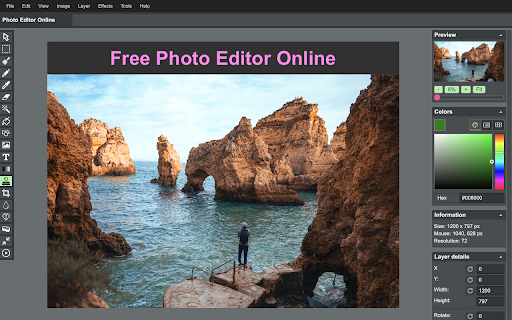
➤ Features
🔹Files: open images, directories, URL, data URL, drag and drop, save, print.
🔹Edit: Undo, cut, copy, paste, selection, paste from clipboard.
🔹Image: information, EXIF, trim, zoom, resize (Hermite resample, default resize), rotate, flip, color corrections (brightness, contrast, hue, saturation, luminance), auto adjust colors, grid, histogram, negative.
🔹Layers: multiple layers system, differences, merge, flatten, Transparency support.
🔹Tools: pencil, brush, magic wand, erase, fill, color picker, letters, crop, blur, sharpen, desaturate, clone, borders, sprites, key-points, color zoom, replace color, restore alpha, content fill.
1. Basic: resize, crop, flip, image adjustments, apply filters, add stickers, support layers, paths, multiple files and pixel art.
2. Layer Styles: drop shadow, color and gradient overlays.
3. Transform: rotate, scale, move.
4. Text: insert and edit your text. Many beautiful fonts.
5. Pen: create shapes or paths by bezier curve.
6. Painting: brush, pencil, eraser tools.
7. Selection: copy, cut, delete, fill, and stroke.
8. Flood Fill/Gradient: fill area with single color or gradient.
9. Eyedropper: sample colors from image.
10. Tuning: blur, sharpen, and smudge.
11. Works with Google Drive.
- Edit photos
- Crop images
- Rotate images
- Add watermarks
- Reduce image file size
- Change image dimensions
- Convert to image
- Convert images to documents
➤ Privacy Policy
By design, your data stays at all times on your Google account, never saved in our database. Your data aren’t shared with anyone, including the add-on owner.
We complies with privacy laws (especially GDPR & California Privacy Act) to protect your data.
Latest reviews
- Myron Edwards
- This is something I really like as a Photographer' Something Simple-Basic' Easy to use and Very hand' Don't change a thing about it..... :)
- t leyva
- can you share a tutorial?
- Archibald
- good app for me. Thanks
- Сергій
- it is very bad
- YomiLisa
- Image editing is very simple, you can easily create the effect you want.
- Mikhal
- An excellent tool for online image processing, easy to operate and effective.
- Jesse Rosita
- Easy to use, no difficulty image processing tool!
- Lin Blacky
- Simple and helpfull