
Speech Translator
Extension Actions
- Extension status: Featured
Translate any video, audio or livestream in real-time.
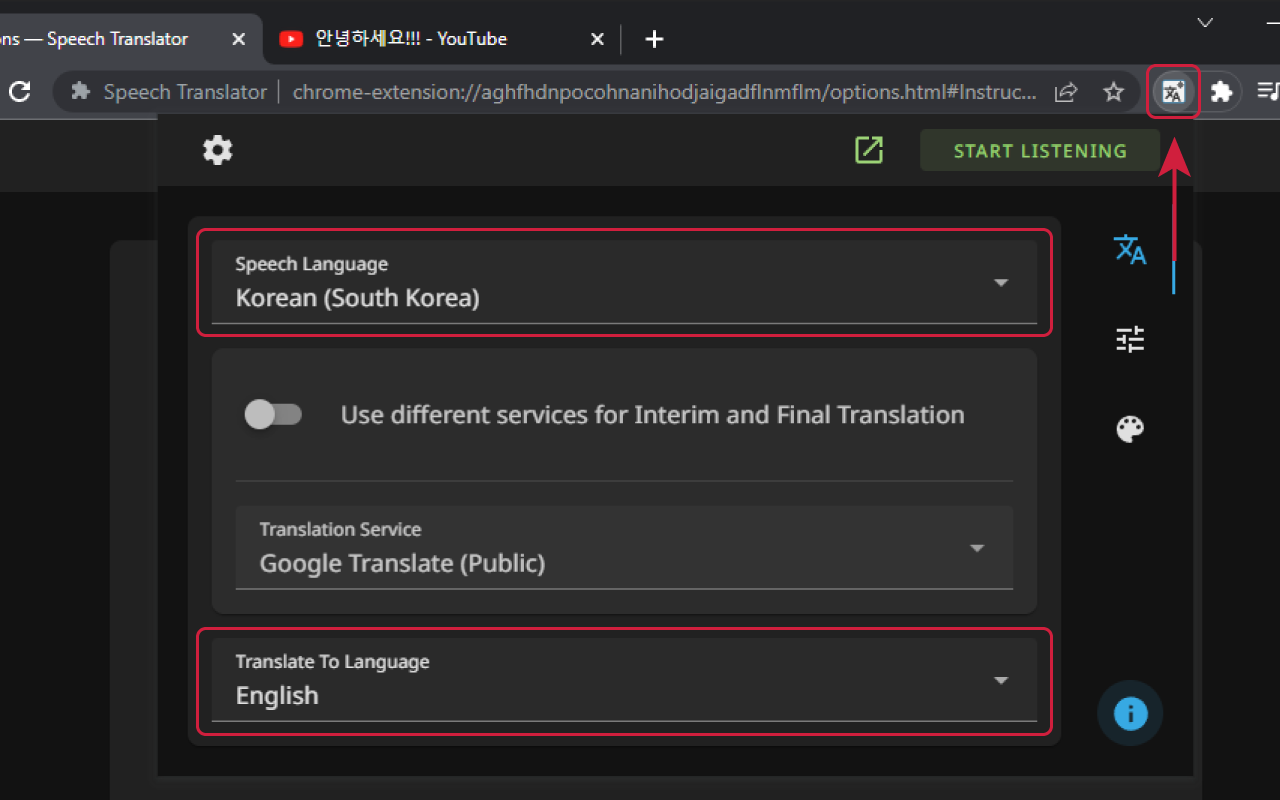
This extension uses speech recognition technology, powered by Microsoft, to convert speech from any source into text: the transcribing process. Then it translates the text from one language to another using the selected service.
You can use it for:
— 🎞️ Transcribing and translating livestreams, videos, calls, etc.
— 🎤 Transcribing and translating your speech for a livestream overlay in OBS (for livestreamers)
— 🖥️ Real-time computer-assisted translation (basically human translation)
— 📖 Practicing language learning by dictating the text and reading the translation
— 🔠 Creating translated subtitles or captions for videos or podcasts
— 👩💻 Creating a non-machine translation using the textual version of spoken words (called transcript)
— 👂 Enhancing accessibility for people with hearing impairments
The extension can be used on Android with Kiwi Browser. But please keep in mind that the extension is not designed for video translation on mobile devices and for mobile usage in general. You may experience some limitations and issues on Android devices, due to technical reasons. If you want to enjoy full functionality on mobile devices, please consider to fund the mobile app development. This will ensure that all features of the extension work correctly on mobile devices.
Latest reviews
- FTS
- 一直在用,并且识别和翻译非常快速准确,但昨天还可以正常使用,没有更改任何设置的情况下,文本框里识别不到源语言,也没有译文,多次卸载重装仍然无法使用
- Yonghyun
- Transparency doesn't work on dark mode. It turns white instead of transparent.
- Denise
- I installed Microsoft Edge developer just to make this work on VK videos to translate from Russian to English - spent hours doing troubleshoot to no avail. Everything checks as shown in the troubleshoot images but no text, none in the box, none in the pop-up window. I tried different apps and the ones that worked took a while to translate only a minute of an uploaded video - tts has come a long way but speech to text is still in its early ages... Tried this on Microsoft Edge 140 running on Linux Mint 21.1
- Ivy
- 蛮好用的
- Brice
- Simple didactique efficace Il faudrait encore améliorer la rapidité de traduction mais s'est aussi le challenge des plateformes de traduction
- Magnus
- One of my laptops has a sound card with a "Stereo Mix" loopback input and then I just followed the good step-by-step instructions. Laptop number two runs Windows on ARM and I just can't make this work. For number three I had to tinker with the "Virtual Audio Cable" loopback sound driver which was trickier, and then it was a real drain on the battery. The transcription engine in Edge is much better with Korean than the basic and free translation engine, Google Translate. Fortunately, the extension has a paid option, where I currently pay some $13 a month to step up to Naver's Papago service which gives me a translation that still is difficult to comprehend at times but at least I know what they are talking about, and still much better than the auto-translated subtitles I get for some of the Korean YouTube VODs.
- Duck
- My good sir, I've been trying to use this extension on chrome for years. It never worked past couple of sentences, i've tried many solutions and ideas to fix it. Interestingly the internal chrome live caption was glitching in the same way. Finally I though of trying it on Edge and wouldn't you know, a continuously flowing translation. ps:I've seen u have tickets open on github for the same issue.
- リカ
- この拡張機能はとても便利で使いやすいです!素晴らしい機能です。字幕の翻訳に多少の間違いはありますが、意味の違う単語が翻訳されていたり、文字が間違っていたりすることもあります。言い方を変えてみたりするといいかもしれません。この拡張機能はとても簡単に設定できます。言語の変更も簡単にできます。そして世界中の人と交流できる素晴らしい機能です。無料で使える便利な機能です。無料で使える万能な拡張機能です。皆さんにおすすめできます。。テキストの色を変えることができます。レビューを書いて何度でも無料で使えます。とても便利です。皆さんにおすすめします。OBSで使えるのでライブ配信にとても便利です。英語や他言語が苦手な方にはぜひおすすめします。素晴らしい拡張機能です 音声はボイスチェンジャ―でも利用できましたが! 2025/03/08より音声翻訳機能がエラーで動作しなくなりました。再インストール、アンインストールを何度も試しましたが直りません。
- law
- good
- 茵
- 很好用,goooooood
- mehdi
- A great tool. A must for everyone who works with different websites and different languages. it is simple yet powerful.
- Game
- Отборное ******. Хуже дерьма чем это - я еще не видел. Ничего не работает. Полный отстой! Залезь в мусорный бак!
- Psycros
- I'm not sure if there's any real difference between the Edge and Chrome versions of this extension but either way it works better in Edge. I really wish there was a Firefox version, however: I've yet to find a functional real-time subtitling addon for that browser. FF has an addon called Chrome Store Foxified that lets you install Chrome addons and Waterfox is already testing built-in support so it might only be a matter of tweaking the Chrome versions to get it working. Of course, Chrome itself seems to have issues with Speech Translator, which seems odd. ALSO: I can't figure out how to use that developer site so I'm posting this here: on Edge the translator window resets to its default size and position about every other time I start Edge. I can't figure out what sets this off.
- Psycros
- I'm not sure if there's any real difference between the Edge and Chrome versions of this extension but either way it works better in Edge. I really wish there was a Firefox version, however: I've yet to find a functional real-time subtitling addon for that browser. FF has an addon called Chrome Store Foxified that lets you install Chrome addons and Waterfox is already testing built-in support so it might only be a matter of tweaking the Chrome versions to get it working. Of course, Chrome itself seems to have issues with Speech Translator, which seems odd. Also, I can't figure out how to use that developer site so I'm posting this here: on Edge the translator window resets to its default size and position about every 3 or 4 days on average. I can't figure out what sets this off.
- YH
- 외국 방송 볼 때 애용했는데 갑자기 작동이 안 됩니다 ㅠㅠ
- Stanimir
- very interesting and useful!
- Wyatt
- Great work! but I haven't been able to use it since chrome remove the ability to change the mic input device.
- Psycros
- I'm not sure if there's any real difference between the Edge and Chrome versions of this extension but either way it works better in Edge. I really wish there was a Firefox version, however: I've yet to find a functional real-time subtitling addon for that browser. FF has an addon called Chrome Store Foxified that lets you install Chrome addons and Waterfox is already testing built-in support so it might only be a matter of tweaking the Chrome versions to get it working. Of course, Chrome itself seems to have issues with Speech Translator, which seems odd.
- Otávio
- Works 100% fine! i'm using it to transcripts my meetings, it will be cool if add a option to download the transcript?
- Jin
- It looks useful, but I cannot get this started. I cannot even press Start Listening button. Plz fix this issue
- 진찬
- 내가 써본 speech Translator 중에서 UI도 깔끔하고 성능도 좋으며 편의성까지 잡은 앱입니다. 강력 사용 추천합니다.
- Benjamin
- Hands down the best real time speech to translated text extension ever. Especially if you go into the advanced features. After months of toying with the extension here is what i think are the best settings: * News: * Max letters: 500 (concise, factual sentences common in news) * Delay: 1500 ms (allow for slight processing delay for accuracy) * Talk Shows: * Max letters: 1000 (longer dialogue typical in discussions) * Delay: 2000 ms (compensate for rapid, extended speech) * Movies: * Max letters: 750 (varied dialogue length) * Delay: 1750 ms (balances dialogue delivery and subtitle reading time) * Comedy Shows: * Max letters: 350 (short, punchy lines typical of comedy) * Delay: 1000 ms (quick translation for timing of jokes) * Documentaries: * Max letters: 1200 (long, informative sentences) * Delay: 2500 ms (complex terminology often requires more time)