
Find & Replace for Text Editing
Extension Actions
CRX ID
mogefjlnnldblkakpbakdaffphhjfjba
Status
- Extension status: Featured
- Live on Store
Description from extension meta
Adds search & replace tool for input fields and editable text content.
Image from store
Description from store
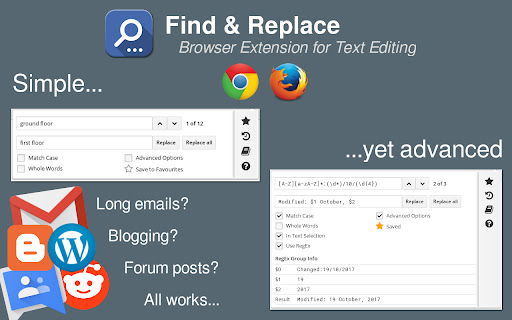
Find & Replace for Text Editing is an extension that allows you to search and replace text in input areas, directly in your browser. It works for any editable text, and automatically highlights all found occurrences as you type in your search term. Use it for composing long emails, blog articles, or forum posts.
Extra Features:
* Save to Favorites
* History
* Text Templates (click to paste into page)
* Regular expression info previews
* Occurrence highlighting
Search Options:
* Match Case (case-sensitive search)
* Whole Words
* Regular Expressions
* Limit search to text selection
* Include single-line inputs in search
Shortcut to Open: Ctrl+Shift+F (Mac: Cmd+Shift+F)
Latest reviews
- Mike Urban
- Really useful, fast and lightweight extension which has saved me a ton of copy and pasting into a text editor.
- Lennard Kowalik (Len)
- Copied the following from another review... The app just doesn't function, it shows that there are 2 results for what I search, but doesn't highlight them when I click the arrow keys and doesnt replace them when I hit replace.
- Quairon Nailo (Beware the Quairon)
- Missing the option to use named capturing groups in replacement, like (?<sentence_end>\w+\.) and then use $<sentence_end> for replacement. If it had that it would be five stars.
- Kazi Bellal
- Very helpful extension.
- Austin
- Downloaded to speed up editing in legendkeeper. The app just doesnt function, it shows that there are 14 results for what I search, but doesnt highlight them when I click the arrow keys and doesnt replace them when I hit replace.
- Yusuf Takwil Aziz
- so helpful!
- Vana Avgerinou
- Very useful to me, have been using it with emails for two years.
- Moudi Pueyo (MLS)
- only work with the text I am writing and not all text in the page !
- Andrew Fisher
- Great tool! Worked for me so far. Thank you dev!
- Brett Armstrong
- Straight forward and very useful as somebody who has to fill templates constantly and doesn't want the hassle of going through one at a time.
- Mats Wetterlund
- Doesn't work for Jira text fields
- Ricardo Ribeiro
- Been using this for years, it's precious. I use it for Wordpress posts in Chrome.
- Sabrina Kordis
- In theory this could be an awesome process. However, when I tried to use the function on multiple different occasions today it would identify the word I wanted to but when I tried to replace the word it would just delete it. I had to restart multiple times because of this malfunction.
- Aaron Mackler
- Whenever I use it, the text just reverts back to the old version of it...would be amazing if that didn't happen. It also closes if you just click to a different field.
- Milos Atm
- This used to be the best plugin ever. As of recently it stopped working. Not sure if its because of a chrome update or something?! So much potential, but it just doesnt work. Will update to 5 stars if it ever gets fixes
- *_* Corumeach
- Absolutely not working in Nuclino text editor. It searches the whole website regardless if I select some text before or not. It even starts to highlight the very first letter over the whole page while I am typing in the Search field. And then keeps everything highlighted blue, shows the number of matches but replaces nothing at all. After that I can reload the page or load any other page in the editor, the extension is stuck with that last "search" and will not accept any new input anymore. Unfortunately not a helper for me. (Nuclino also needs a replace function badly).
- Dave Land
- "It does what it says on the tin!" I use it frequently and it does what I need. The fact that it supports regex replacement is a bonus.
- Origaming Parks
- Tried this on Clickup + Arc + Macbook. As soon as I put a word into the Find field, it automatically runs the command to replace the text. By default the Replace field is empty so you can imagine the horror of seeing words suddenly disappear without me clicking the button to run the Replace command. I was freaking out if the text was gone. Fortunately I was able to Undo the changes. Never again.
- Aline Moroz
- Works well, but is there a way to prevent the widget from closing when I click anywhere in the window? I don’t want to have to open it every time I need to find a word. (I’m using it on a website with editable text boxes, so I have to click on them to open the widget and then get the text replaced.)
- Jon Rodriguez
- Seemed to work fine but then the edits go back to the original when I change screens.
- Bryan Sandy
- Absolutely amazing. Works perfectly for every task I need. None of the others come close to this functionality.
- Abdulrahman Seyada
- Great extension, only one that works flawlessly.
- André Deiß
- Extension does not work on Facebook
- iMaks
- Solved my all problems in a site I work for where they don't have Find and Replace in their code.
- Amia J BooMaster
- It's back! Wondered what happened. Has saved me (from myself) many 'o times!
- andrei0292
- I use this with woocommerce to edit products detail, and this copy and paste works super mega giga cool , 5 stars are the worst rating possible , if there were more stars i absolutly give them more
- Scott Nimmo
- Thank you for putting this extension back in the store. I have just bought you drink! Kindest regards, Dr. Scott
- Giovanni NS
- Perfect extension! I was seeking an extension like this for a long time and all previous ones failed, until I found this one that does the work perfectly.
- Kirk Patrich
- Perfect work! The previous version has been removed from the store. Thanks to the author for returning it.