
Mercury: Degiro Portfolio Tracking, Visualizations & AI Metrics
Extension Actions
- Extension status: In-App Purchases
- Live on Store
Track & Visualize your Degiro portfolio performance with AI, an amazing dark theme while being privacy focused.
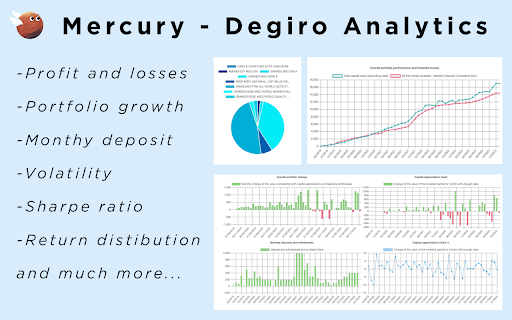
# Mercury - Degiro Portfolio Tracker with AI Forecasting
Experience the power of AI forecasting to visualize your Degiro portfolio's performance over the next 20 years. Mercury offers a comprehensive suite of features designed to optimize your investment strategy and provide deep insights into your portfolio's performance.
## Key Features
**Performance Tracking**
- Effortlessly monitor your portfolio's performance with real-time updates and historical analysis.
**Investment Monitoring**
- Track total invested amounts with precision, including deposits and withdrawals.
**Portfolio Composition**
- Stay informed about your portfolio's asset distribution through intuitive visualizations.
**Month-to-Month Evaluation**
- Analyze performance changes with and without considering deposits for accurate growth tracking.
**Advanced Statistics**
- Dive deep into comprehensive metrics including:
- Gaussian distributions
- Sharpe ratio
- Yearly returns
- Volatility analysis
- Sortino ratio
- Drawdown analysis
- Rolling returns
- Performance heatmaps
**AI Forecasting**
- Leverage advanced Monte Carlo simulations to project your portfolio's potential performance over the next 20 years with confidence intervals and multiple forecasting methods.
**Personalization**
- Tailor your experience with a sleek dark theme and customizable interface.
## Privacy & Security
**Privacy Priority**
Mercury respects your privacy, ensuring that your personal data is handled securely and transparently.
**Direct Data Sourcing**
All necessary data is sourced directly from your Degiro account—no third-party intermediaries.
**Strict Data Confidentiality**
Your information is securely stored locally in your browser, with no disclosure to third parties. Your data never leaves your device.
**No External Operations**
Mercury operates solely within your browser, without any external account operations or modifications to your Degiro account.
## How to Use
Mercury does not require your password or login information.
1. **Open Degiro**: Navigate to your Degiro account in your browser and ensure you're logged in.
2. **Fetch Data**: Click the "Fetch Data" button in the Mercury extension. Since Mercury doesn't have access to your Degiro login credentials, you need to fetch data while the Degiro page is open and you're authenticated.
3. **Use Offline**: After fetching, your data is imported and stored locally. You can use Mercury even when offline or after closing the Degiro tab.
4. **Explore Insights**: Navigate through different tabs to view your portfolio performance, statistics, and AI forecasts.
## Use Case & Limitations
**Ideal For**
Mercury is specialized for tracking long-term portfolios, particularly Dollar-Cost Averaging (DCA) strategies. It excels at monitoring steady, consistent investment patterns over extended periods.
**Limitations**
If you are an active trader who frequently buys, sells, deposits, or withdraws, the numbers may not be perfectly accurate. Degiro does not disclose all transaction details, and frequent trading activity cannot be easily incorporated into Mercury's calculations.
**Supported Currencies**
EUR, USD, CAD, AUD, CHF, GBP
## Terms & Conditions
By utilizing the Mercury Chrome Extension, you acknowledge and agree to Mercury's terms and conditions.
---
**Mercury** stands as the ultimate Degiro Portfolio Tracker and Visualizer, providing a seamless solution for monitoring your portfolio growth and investment performance.
**Keywords**: Portfolio Management, AI Forecasting, Degiro Portfolio Tracker, Investment Monitoring, Portfolio Visualization, Advanced Statistics, Privacy Protection, Data Security, Personalization, Investment Performance, Financial Analysis, Monte Carlo Simulation, Risk Metrics
Latest reviews
- Hedvika Tomečková
- It was not working but after I send a email to the developer he proceeded to fix it and now is amazing!
- Kannan Mavila
- Same as some other reviewers: installed the app, clicked 'fetch data'. Kept spinning but nothing happened. Restarted chrome, resintalled extension, nothing changed. Did the extension stop working?
- Dario
- 5 stars until it stopped working, displaying only the cash and nothing else. Contacted multiple times but haven't had any response.
- v H
- Unfortunately no data was loaded after I clicked fetch. And I waited a long time.
- Pieter Vanslambrouck
- Extension can only be used with a subscription of 2.99 EUR/month. I tried it and it works decently well, but the features are limited. The AI simulation is hard to interpret, there's no documentation.
- nuno rolo
- Does not work
- Marek Klučka
- Althout I appreciate the effort, as long as it returns incorrect numbers, it doesn't make sense to use, neither pay. What doesn't fit or could use development: - total equity value + cash is wrong and doesn't return correct value to the account - pie chart is not greatest visualization tool especially when having many positions. Some filter with dropdown or something would be probably better - some dynamics between visualizations could be nice (if I filter out position in overview, total could be evaluated as well) - seems like many online tools are badly working with DeGiro mainly on the cash side of thing - probably due to the "flatex" account? - some date range picker in with taking that time range into account will be nice I will watch the development closely though and I want it to succeed. Fingers crossed, good enough start
- Serafeim Loukas
- great extension
- Diego Ianni
- Amazing app for automate financial graphs from your Degiro account