
Udemy Playback Control
Extension Actions
CRX ID
jcmmegbigehepgkipgbbeppciahdocko
Status
- Extension status: Featured
- Live on Store
Description from extension meta
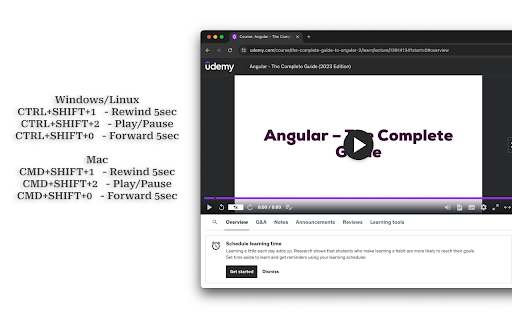
Use global keyboard shortcut to control Udemy video playback on separate monitor/tab.
Image from store
Description from store
A Chrome extension designed for Udemy learners. It enables global keyboard shortcuts for playback, this is especially handy when you're following instructions (like coding in an editor) and Udemy is playing on a separate monitor or split screen. Without this extension, you'd have to switch to the Udemy tab or monitor to control playback. It is very useful in case you find yourself constantly pausing/playing, or rewinding videos.
*NOTE: It will only work if one tab of Udemy is opened. Close multiple tabs and Reload the video page if it's not working*
Latest reviews
- Karolis Kerpys
- Imagine how bad service provider has to be in order for me to install plugin for a simple play/pause button
- J M
- Extremely simple, works, and the keys can be rebound. I have a play/pause media key on my keyboard, but with Udemy's weird video player, it doesn't work on their site naturally. Ironically, with this addon, I just rebound the pause media key to MY pause media key and it works lol. Redundant, but fixed the problem.
- Aniket Agarwal
- not working for me! Can you help me to use this effectively?
- Scott Underwood
- Works perfectly right away, love it when that happens!
- Brandon Webster
- So simple and soooo useful! Thank you, Raja! I use Logitech gaming mouse and keyboard, so I just created a quick macro and assigned to whatever button I want for even easier one click pause/play functionality.
- Greg C
- Thank god for this extension and shame on the Udemy developers for missing such a FUNDAMENTAL feature in a video-based learning platform. Unbelievable. Works well on macos for me - be sure to reload your Udemy tab after installing.
- Cheyne Stahlhut
- Works! Would be great to be able to do a re-bind function for to media keys :)
- Kemal Daysal
- Works perfectly as intented in Udemy! Could be better if it lets to enter a one-button key shortcut instead of two-button key shortcuts. I've managed to achieve this by defining a keyboard macro which emulates pushing one button results as pushing CTRL + 0.
- juhohyv
- Works! 5/5
- Henry Reyes
- Not working on MacOS. Had high hopes after reading other reviews.
- Saket Growth
- You have no idea how much this influences the user experience of learning a course on Udemy. As a person, who always takes notes while watching the lecture simultaneously, this plugin saves a lot of time by not having to switch back and forth between pausing the video and writing. This makes me really efficient.
- Fuad
- Perfect solution to a very annoying problem.
- N M
- mac user. only the forward key is working but not other commands working for me unfortunately..
- Ghassan Fs
- This is a udemy QOL extension that i don't think i need but boy am i glad it exist.
- Gaston Matias Villagra
- thank you so much! this is great! I was going crazy because of this hhahaah
- ArRoN DarK
- Please add a way to change the hotkeys. Amazing extension.
- Geeta Relwani
- This extension is a saviour
- Piyush Jamwal
- Very helpful
- Piyush Jamwal
- very useful tool helps practice coding while learning