
Calfrenzy - Free Online Appointment Scheduling Software
Extension Actions
- Extension status: Featured
- Live on Store
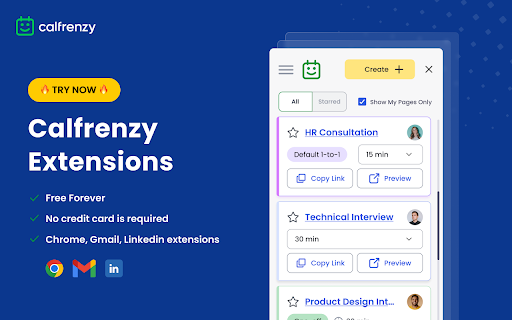
Schedule 1-to-1 or group meetings directly from your browser. Manage and share booking links instantly with a single click.
Premium Online Scheduling Meets Fair Pricing.
Key Features:
⮕ Quick Access to Booking Pages - View and manage your personal or group booking pages directly from the extension.
⮕ Easy Link Sharing - Copy and share booking links instantly, enhancing collaboration and scheduling efficiency.
⮕ Customizable Booking Pages – Tailor your booking pages to match your branding, with options for background colors, logos, and custom URLs, giving a professional appearance to your bookers.
⮕ Meeting Buffer – Set buffer times between meetings to avoid back-to-back scheduling, giving you time to reset between appointments.
⮕ Gmail and LinkedIn Integration – Share booking links directly through Gmail and LinkedIn messaging, making it easier to schedule meetings within your existing communication tools.
⮕ One-Click Navigation - Directly open booking pages and group settings in the Calfrenzy app for full-feature access.
⮕ Simplified Event Creation - Quickly create new booking pages or schedule group events, with immediate redirection to the main app for detailed setups.
⮕ Automatic Time Zone Conversion - Automatically adjust meeting times across different time zones, ensuring seamless coordination for global interactions.
New Features & Advanced Booking Page Controls:
⮕ Tentative Bookings – Allow bookers to request appointments that require your approval before confirmation, giving you more control over your schedule.
⮕ Daily Booking Limits – Prevent overbooking by setting a daily limit on appointments, ensuring a balanced schedule.
⮕ Redirect After Booking – Automatically direct bookers to a specific webpage (e.g., a thank-you or info page) after they schedule a meeting.
⮕ Full-Screen Booking Page Preview – Preview how your booking page will appear to others in full-screen mode, ensuring a professional look.
⮕ Toggle Booking Page On/Off – Easily turn your booking page on or off, with the option to display a custom message when it’s turned off, providing flexibility for downtime or scheduling blocks.
⮕ Custom Email Reminders & Notifications – Personalize and schedule up to three email reminders for participants before their scheduled events, reducing the chances of no-shows.
⮕ Advanced Group Management – Create and manage groups, invite members, assign organizers, schedule group events, and lock group memberships, simplifying team coordination and event planning.
Benefits of Calfrenzy Scheduling Software:
⮕ Enhanced Productivity: Manage your schedule directly from your browser to save time and enhance productivity.
⮕ Efficient Scheduling: Quick actions for booking and group management streamline your scheduling process, .promoting effective time management for both individuals and teams.
⮕ Organizational Oversight: Keep a comprehensive view of your appointments and group activities without leaving Chrome.
⮕ Real-Time Reminders & Notifications – Send automatic email notifications and reminders, ensuring your participants are well-informed about upcoming meetings, reducing no-shows and confusion.
⮕ Full Integration – Sync your events with calendars like Google and Outlook to avoid scheduling conflicts, ensuring all your meetings are in one place without any overlap.
Ideal for:
Professional schedulers, recruiters, team coordinators, project managers, freelancers, digital nomads, and anyone who needs to efficiently manage meetings and group activities.
Installation Set-up:
1. Install the Chrome Extension
2. Sign Up for Free: Visit https://calfrenzy.com/ and sign up for a free account, then create your booking page.
3. Configure Extension: Enter your Calfrenzy email in the Chrome extension pop-up to link your account.
4. Access Booking Pages: Now, you can view all your public booking pages directly from the extension and share them easily.
Connect with Us:
Website: https://calfrenzy.com/
LinkedIn: https://www.linkedin.com/company/calfrenzy/
Facebook: https://www.facebook.com/calfrenzy
YouTube: https://www.youtube.com/@Calfrenzy
X: https://x.com/calfrenzy53224
Support:
Email: [email protected]
Chat Support: Available directly through our website for real-time assistance with any questions or issues.
Latest reviews
- Wednesday
- If scheduling is part of your job, this makes life easier.
- nicole bourne
- Clean, fast, and does exactly what I need. This extension just quietly does its job, and I love that. Sharing booking links directly from Chrome — especially in Gmail — has saved me so much time.
- Olecia Bond
- Calfrenzy integrates with LinkedIn and Gmail, and it speeds up the process of sharing my booking link with people I want to talk to.
- Alisa Maiboroda
- Calfrenzy is a versatile scheduling tool that enhances productivity and simplifies the scheduling process for professionals and organizations. Highly recommend.
- Олександр Козак
- Fantastic scheduling app! It’s user-friendly, intuitive, and packed with features that make managing my time a breeze.
- Rostyslav Kovalevskiy
- Calfrenzy is a powerful yet user-friendly scheduling tool designed to streamline booking processes and enhance productivity. If you need a reliable, customizable scheduling solution, Calfrenzy delivers professional results with ease.
- Natalia Thompson
- I love using the Calfrenzy extension; it's convenient and time-saving. It helps me manage multiple calendars in one place, and I can share the booking link directly in Gmail, which allows me to stay productive. Plus, the company consistently adds more advanced features and customer support is top-notch.
- Irish Sailago
- I highly recommend Calfrenzy to anyone who needs quick, seamless scheduling.
- Melfreda Sosoban
- I started using Calfrenzy after a friend recommended it, and it’s really made a difference in how I handle scheduling. Before, I managed everything manually and utilizing Google Calendar, which worked, but wasn’t ideal. I work as a virtual assistant and run a small furniture business on the side, so balancing multiple schedules was getting tricky. With Calfrenzy, I can organize my work, business, and personal calendars all in one spot, which has made my day-to-day a lot smoother. The Chrome extension has been a huge help, too—it’s great being able to drop my booking link directly into Gmail and even LinkedIn without leaving the platform. Didn’t realize how much I needed that combo until now. Thanks, Calfrenzy!
- Richard Tamala Jr
- I am one of Calfrenzy's scheduling software beta users and even at the early stage of their app, it's already showing great potential. A lot of features have been added now since I started using it and it's only getting better. Despite being free, their support is excellent and they listen to feature suggestions. I only started using it because it's free but as a software engineer and tech project manager, it helped me a great deal and even when they decide to charge for it, I know I am still going to use it.
- shari lewis
- For someone new to scheduling software, Calfrenzy is incredibly easy to use. The Chrome extension is a bonus, schedule appointments directly from any webpage you're on, making the whole process even simpler.