
Touch Drawing App
Extension Actions
CRX ID
knegnmjmhjjnmpfidlhnjcajmbmhdnbm
Status
- Live on Store
Description from extension meta
Draw by simply touching your chromebook pixel screen. Changelog: 1.2: - Does support experimental pressure - Added an easter egg
Image from store
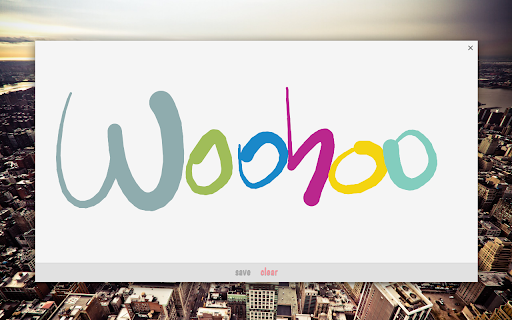
Description from store
Draw by simply touching your chromebook pixel screen.
Changelog:
1.2:
- Does support experimental pressure
- Added an easter egg
Latest reviews
- Grace Kaiser
- not what i wanted
- k
- was hoping for a drawing app
- Anonymous
- I disliked that you can't really choose colors, it just randomizes through colors of the rainbow. Also, you cannot change the size of the lines.
- Nathan Clouthier
- I was looking for an app that would allow me to draw w/ a touch screen, this looked promising until I started to draw then I realized what age that this was intended for. Not good if you want to draw and make things actually look good, very good for a younger child.
- Sarah liza
- it dose not even work i mean just terrible what a shame
- goth broccoli
- this motherfracker doesnt fricking work
- Lily M
- What. Was. That. It said compatable for my device, ummmm, ITS NOT TOUCHSCREEN! It sadi with a pixel screen... I have a pixel screen YOU CANT USE THIS APP
- Sam Glaza
- Not for an art student. The description made it seem like a legit drawing program. Would be good for kids or toddlers though
- Jude Wade
- its terrible, if you do not have touch screen this is useless
- Farrin Paglia
- aaaa
- Sam S.
- yeah, this thing sucks if your an art student. I was looking for a program for drawing beginners, but what I got was a program for drawing toddlers. If you want to use it for toddlers or special ed or something, go right ahead, but don't make me tutor the class
- Lucy Liu
- I hated it has no use with out touch screen stuff
- Dorijan B
- omg i thought it would let me like touch my computer screen but NO!
- Taha Ali
- not works u fools
- George Egerton
- does not work
- Dan Holli (DanHolli)
- I love it it works on my Acer C729P TOUCHSCREEN Chromebook. IT WON'T WORK ON NON-TOUCHSCREEN COMPUTERS BECAUSE IT WONT SENSE A TOUCH the above caps would be all bold if i could have it be because of not very smart people that think that this app must use magic or something like that
- Morgan Crocker
- it doesn't evan work for me
- Isabella V.
- no work
- Matthew Whitman
- Didnt work on my chrome book. it sucks, dont get
- Laney Turner
- horrible and doesn't work at ALL
- Benny Worm
- Why is this on the chrome store and you can get in on a chromebook but it doesn't even work? What the heck?! Doesn't even work!
- Ethan Pike
- it is note good to jot notes down on
- Xavier
- I can't even draw!
- Blue Tea (Tapash)
- STUPID
- Mike Swierenga
- Works as advertised on ASUS Flip Chromebook. Would be nice to have a pallete to choose color, but won't complain about a free app that works well.
- 加藤諒(Aeit)
- Doesn't work at all ... crap
- abigail mccoy
- it doesn't work u have to have tuch screen it is stupid
- Anonymous
- useless
- Anonymous
- Fail. I say that this a hoax because I tried to touch my screen. Didn't even work. I'm surprised I even tried this, whoever made this is an idiot.
- Heather Ross
- Hey everyone, Just thought I'd let everyone know...you NEED to have a chromebook with TOUCHSCREEN for this app to work! lol I just tried it with my Lenovo N20P (touchscreen) and it works fine. Sure, it is definitely missing some features and I really have no use for it, but why would anyone actually think this app would suddenly give them touchscreen capabilities. smh lol not being mean, just stating the obvious. ;-) Also, just because I have a touchscreen, I still need special touch screen apps to be able to do things like draw, write, etc on screen. Just like android/IOS, you can't just draw on the home screen without taking a screenshot and drawing on the picture. Same thing applies here. Sorry for the rant.
- michelle W.
- DON'T WORK FOR CHROME BOOK OS!!!!
- I'm A dead channel
- this is wroth no a thing it is so crappy i never want to see it ever again !!!!!!!!!!!!!!!!:( :( :(
- Jade Kent
- it doesnt work.
- George Hopf
- it says to touch screen but it is not working
- madison perry
- stupid
- Olivia Young
- it doesnt even work
- Dash Board
- kyle possed tis one too :)( mostash
- Warden Mama
- it doesn't work whyyyyyyyyyy.......
- Jay Woodward
- it won't even work on my chromebook. Waste of time, I say.
- xiomara.mp4
- does not work :P
- Emily Simmons
- it won't work on my compututer and i can not get rid of it it will not let me get rid of it
- Rowan Wallace
- I have a lenovo spa 2, and while this worked for my computer, it was the most useless app I have ever downloaded. There appears to be no way to control what colour you use (it changes with each stroke), and there is no way to adjust pen size. No eraser. As someone else said in their review it is way to simplistic and really just a fingerpainting app.
- The Cowardly Paladin
- While it is a cool idea, there is no option or feature for non-touchscreen chromebooks.
- Kaisa Lien
- is it even possible to delete?!
- Kathryn Wilcken
- its boring
- Jamie U
- It doesn't work on my HP Chromebook...
- Collin Dean
- I cant use it but still...I dont think its too good. Well its just I dont have a touchscreen.
- Berta Masterwood
- Doesn't work, not even on my chromebook. But how could it, if your screen isn't touchscreen? If your screen isn't touchscreen, it wouldn't work because it wouldn't be able to feel the pressure or whatever. That's all I got to say about this app. Wouldn't waste my time downloading this.
- Anonymous
- I dont get it when i put my finger on the screen nothing happens oh well please fix this 0_0||
- Imari pt2
- doesnt work how do i delete it?