OpenOffice Impress on rollApp
Extension Actions
- Live on Store
Powerful open source presentation authoring application in the cloud (no download or installation required). Powered by rollApp.
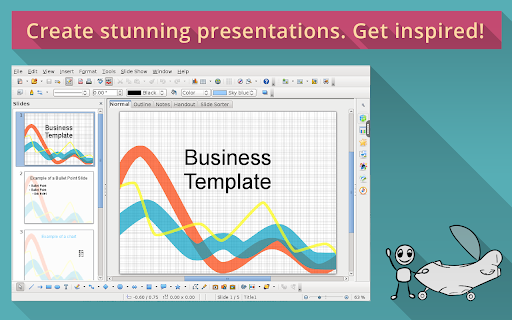
OpenOffice Impress is just one of more than 230 applications available in the cloud on rollApp. Check out the full list at https://www.rollapp.com/apps.
PLEASE NOTE:
- Working with files requires creating account with rollApp and connecting cloud storage (Google Drive, Dropbox, OneDrive or Box)
- Free rollApp account allows to access your files in read-only mode. Please, subscribe for rollApp Premium to be able to save files
Apache OpenOffice Impress provides the fastest, most powerful way to create effective multimedia presentations. Your presentations will stand out with 2D and 3D clip art, special effects, animation, and high-impact drawing tools.
Latest reviews
- RAJENDRA KHUDE
- I love it is so helpful in my School work .thanks
- Harshita
- i love it it is so helpful in school work as well as in proffesion work
- Edwin Humberto Loza Sanchez
- h
- Andrew Beto
- Nice job! I got new way to make my presentations.
- Edo Minaira
- A really fun app. Opens power point presentations, works with Dropbox files.
- Slava Rahimich
- It works right out of the box. Nice!
- Irina Mitchell
- Although this is a very old program, it looks like this approach represents the next generation of services.
- Aime Lombard
- My presentation works very well here.
- Glenn Springer
- Nice app for view presentations saved in cloud.
- Sam Sawn
- It connects to Google Drive, Box and Dropbox and allows to work with your files over there.
- Vladislav Scoville
- I did my presentation on chromebook and then saved it on dropbox. Regular app for students.
- Glenn Dutli
- I've used Impress app for five presentations with variety of elements like transitions, slide titles, a lot of pictures and even with some video clips. Multimedia depends on speed of your Internet. So this is not easy part. But generally speaking, quite satisfactory.
- Alexander Mirovko
- It's super easy to connect to cloud storages.
- Emma Erdman
- We have Microsoft PowerPoint at school, but at my house i have open office impress. Sometimes I use OO Impress on my chromebook. using this app, I'm always sure I can open my presentation with Microsoft or OpenOffice.
- Roddy Spindler
- I was surprised, but even slideshow works fine.
- Ingrid Anderson
- If I use it via Google Drive, I'll be able to open my file on any device. That's important for everyone, who works on different devices for biz purpose.
- Jose Connor
- As I understand, a OO Impress makes impossible to apply any effects on parts of a subject. It consider table is a single object for Impress. However, you may save it and open using different software on rollapp. Users have many options. It makes experience very positive.
- Brianna Morris
- I have downloaded desktop version couple weeks ago, but couldn't open email attachments with MS PowerPoint 97-2003. It was the first time when I've experienced such problem. I ended up with this app since it was able to complete this task.
- Vlok Burger
- This app isn't for fancy presentations, but if you need to make sure that you have a program for opening your presentation in every situation, this is right place.
- Dug Christopherson
- I'm pretty sure this app is the best presentation bang if you work with cloud based files.
- Emily Hochevar
- Out of all office programs, I'm active presentation builder and I find it to be more enjoyable to use than Microsoft counterparts.
- Andrew Lund
- I've made my presentation on Chromebook. Thanks.
- Maria Gordon
- slide show makes me feel that this is real Microsoft tools.
- Thomas Brunt
- Good one!
- Roxana Buttler
- Good app. I may recommend to try
- Ashley Allen
- I'm glad I found this app. What can be better OpenOffice? Only way to be free from Microsoft
- Heli Hernandez
- I wish there was more storage options
- Netz Dick
- I've tried this app 5-6 months ago and it would crash often. Now this is better. Stable and much faster, but still not perfect. I give 5 stars for significant effort, but actually this 4 stars app.
- Jake Green
- The only problem I see is export formats. Export to PDF was OK, but when you choose "Export notes" option, you're actually create two separate pages for each slide -one with notes and one without notes. That's confusing.
- Juan Suarez
- Support efforts to make software available on the cloud
- Sarah Boehmer
- It's free and it's a cloud app. That's what I need
- Florence Kong
- This is seriously helpful app
- Arika Zingof
- Old school tool
- Thomas Bergmani
- I've made good slideshow
- Wisseme Lerari
- I found it as good tool for 4shared, because sometimes I need this sort of software to open files. It's free, so I don't need to pay for rarely used software
- Matthew Warren
- I always found OpenOffice rather slow, but this tool isn't bad. I like it.
- Jessica Krishman
- Limited set of cloud storages as the main disadvantage
- Dino Nucci (Dino)
- This must be a joke. I loaded it and there are ZERO buttons, just an empty browser window
- Brooke Clark
- I cannot see the notes because the slide is too small to see clearly my notes.
- Hunter Hull
- I don’t think this is for something serious like homework. Maybe for reading book online and similar things
- Malini Kumar
- Works well. Exactly what I was looking for.
- Tana Grant
- Once I opened app, it took me a few minutes to create a presentation. I used graphics for each slide. Good alternative to installation.
- Adam Canad
- It took me some time to completely understand how to work. Now it is working not bad, but to make some things, it takes time. I have couple suggestions: 1) feedback button; 2) quick tutorial; 3) time counter, because I don't understand when time out, so I don't want to loose my data
- Sergio Nuzzi
- This apps sucks!