
To-do List
Extension Actions
- Extension status: Featured
รายการสิ่งที่ต้องทำ - แอปรายการที่ต้องทำและตัวจัดการงานที่เรียบง่ายและฟรีในเบราว์เซอร์ของคุณ
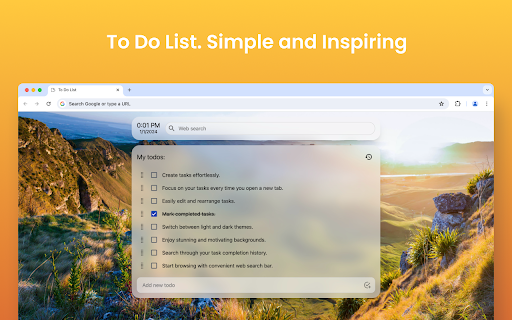
คุณเหนื่อยกับการดิ้นรนเพื่อติดตามงานของคุณ ทำตามกำหนดเวลา และจัดระเบียบอยู่หรือเปล่า? นั่นเป็นเหตุผลที่คุณควรใช้ "รายการสิ่งที่ต้องทำ" เรารู้ว่าแอปพลิเคชันรายการสิ่งที่ต้องทำอาจซับซ้อนเกินไป! ดังนั้นเราจึงแนะนำให้คุณรู้จักกับส่วนขยาย Chrome แบบมินิมอลของ "รายการสิ่งที่ต้องทำ"
❓ To-do list คืออะไร?
แอพรายการสิ่งที่ต้องทำเป็นเครื่องมือที่ใช้ในการจัดระเบียบงานและช่วยติดตามงานตามเวลาจำกัดที่กำหนด ดังนั้น ข้อดีของการใช้รายการสิ่งที่ต้องทำคือการติดตามและจัดลำดับความสำคัญของภาระงานของคุณโดยไม่ลืมอะไรเลยจะมีประโยชน์
คุณสมบัติที่สำคัญของส่วนขยาย "รายการที่ต้องทำ"
✅ ใช้งานฟรี (ไม่มีค่าใช้จ่าย)
✅ รองรับทั้งธีมมืดและธีมสว่าง
✅ เพิ่มและแก้ไขงานได้ด้วยคลิกเดียว
✅สามารถดูประวัติงานที่เสร็จสมบูรณ์ได้
✅ ค้นหาประวัติงานที่เสร็จสมบูรณ์ได้อย่างง่ายดาย
✅ คุณสมบัติลากและวางเพื่อเรียงลำดับและมอบหมายงานใหม่
✅ แถบค้นหาที่ใช้งานง่าย เข้ากันได้กับเครื่องมือค้นหายอดนิยมทั้งหมด
✅ ออกแบบเค้าโครงรายการสิ่งที่ต้องทำพร้อมพื้นหลังที่สวยงามเพื่อสร้างแรงบันดาลใจให้กับตัวเอง
✅ มีรายการสิ่งที่ต้องทำออนไลน์ที่เรียบง่าย เรียบง่าย และสะดวก เพื่อจัดระเบียบงานด้วยการคลิกเพียงไม่กี่ครั้ง
คุณจะติดตั้งส่วนขยาย "To-Do List" ได้อย่างไร
1️⃣ เมื่อคุณอยู่ในหน้าส่วนขยายของเบราว์เซอร์ Google Chrome ให้คลิกที่ตัวเลือก "เพิ่มลงใน Chrome" บนหน้าส่วนขยาย
2️⃣ เมื่อการติดตั้งเสร็จสมบูรณ์และเพิ่มลงในส่วนขยายของคุณ แท็บใหม่จะเปิดขึ้นมา
3️⃣ในแท็บใหม่ที่ส่วนขยายเปิดขึ้น ให้กดปุ่ม "เก็บไว้" สิ่งนี้ช่วยได้จาก Chrome ที่ปิดการใช้งานรายการสิ่งที่ต้องทำ
4️⃣ แค่นั้นแหละ! ตอนนี้ได้เวลาเพิ่มงานของคุณและเพลิดเพลินไปกับประสิทธิภาพของแอปพลิเคชันแล้ว
ทำไมต้องเลือก "รายการที่ต้องทำ"?
▸ จัดระเบียบอยู่เสมอ
▸ คุณจะไม่พลาดวันครบกำหนดหรือกำหนดเวลา เนื่องจากคุณทราบรายการงานที่คุณควรทำ
▸ มีบันทึกย่อช่วยเตือนทั้งหมดไว้ในหน้าเดียว
▸ ติดตามโครงการและงานต่างๆ ของคุณ
▸ รับประกันประสิทธิภาพการทำงานสูงสุดในกิจวัตรของคุณโดยการเพิ่มงานลงในปฏิทิน Google ของคุณ
ลองใช้ส่วนขยาย "รายการที่ต้องทำ" ของ Google Chrome เพื่อทำให้การจัดการงานง่ายขึ้นและเพิ่มประสิทธิภาพและประสิทธิผลของคุณ
↪️ การออกแบบที่เรียบง่ายและใช้งานง่าย:
แอปรายการสิ่งที่ต้องทำต้องใช้งานง่าย! ดังนั้นส่วนขยายของเราจึงมีอินเทอร์เฟซที่ใช้งานง่ายซึ่งไม่น่ากลัวมากนัก ศูนย์ของเรามุ่งเน้นไปที่การแสดงงานทั้งหมดอย่างมีประสิทธิภาพด้วยรูปแบบที่สะอาดตาและใช้งานง่าย
🔥 แอปจัดการงานที่เข้าถึงได้:
ส่วนขยายของเราช่วยให้คุณสามารถเพิ่มและแก้ไขงานได้ด้วยการคลิกเพียงไม่กี่ครั้ง! ดังนั้นคุณสามารถสร้างงานใหม่หรือแก้ไขงานที่มีอยู่ได้อย่างง่ายดาย ไม่มีเค้าโครง เมนู หรือแบบฟอร์มที่ซับซ้อน เพียงใช้งานง่าย
🏃 งานลากและวางเพื่อจัดลำดับใหม่:
คุณสามารถควบคุมงานของคุณตามลำดับความสำคัญได้เพียงแค่ลากและวาง ดังนั้นคุณจึงสามารถจัดเรียงใหม่หรือจัดลำดับงานใหม่ได้อย่างง่ายดายและออกแรงน้อยลง
🔒 ติดตามประวัติงานของคุณ:
คุณต้องการตรวจสอบว่าคุณได้ทำงานไปแล้วหรือตรวจสอบงานที่เสร็จสมบูรณ์แล้วหรือไม่? คุณสามารถทำได้ด้วยแอป To-Do List ของเราอย่างแน่นอน! เรามีคุณลักษณะประวัติงานในตัวเพื่อติดตามประสิทธิภาพการทำงานของคุณ
🔍 ฟังก์ชั่นค้นหาง่าย:
คุณต้องการค้นหางานเฉพาะในประวัติศาสตร์อันยาวนานของคุณหรือไม่? ฟังก์ชันการค้นหาของส่วนขยาย "รายการสิ่งที่ต้องทำ" สามารถช่วยคุณระบุงานตามคำสำคัญหรือเกณฑ์อื่นๆ
😍 อัปเดตพื้นหลังที่สร้างแรงบันดาลใจ:
หากคุณเป็นคนประเภทที่มีแรงบันดาลใจผ่านภูมิหลังที่สร้างแรงบันดาลใจ คุณสามารถอัปเดตพวกเขาได้ในส่วนขยายของเรา! เพียงเลือกพื้นหลังที่เหมาะสมเพื่อรับประสบการณ์ที่เป็นส่วนตัว
✒️ เสนอธีมมืดและสว่าง:
ไม่ว่าคุณจะชอบธีมสีเข้มหรือธีมสว่าง เราก็มีให้ทั้งคู่! เพียงเลือกสิ่งที่คุณชอบและสบายใจในการจัดการงานต่างๆ ได้มากขึ้น
🔍 แถบค้นหาแบบรวม:
คุณต้องการค้นหาบางสิ่งจากเครื่องมือค้นหาที่คุณชื่นชอบโดยไม่ต้องออกจากส่วนขยายรายการสิ่งที่ต้องทำหรือไม่? โอ้ เราเข้าใจคุณแล้ว! ไปตรวจสอบคุณสมบัติพิเศษนั้นทันที
🔥 ส่วนขยายสิ่งที่ต้องทำฟรี:
เนื่องจากเรามีคุณสมบัติพิเศษมากมาย นี่เป็นเวอร์ชันที่ไม่มีเครื่องมือหรือไม่ คุณสามารถเพลิดเพลินไปกับฟีเจอร์ที่ชวนตะลึงเหล่านี้ได้โดยไม่ต้องเสียเงินสักบาท ไม่มีค่าธรรมเนียมที่ซ่อนอยู่ ค่าใช้จ่ายล่วงหน้า การเรียกเก็บเงิน หรือการสมัครสมาชิก ไม่มีค่าใช้จ่าย
🤔 คุณเขียนอะไรในรายการสิ่งที่ต้องทำ?
ในรายการสิ่งที่ต้องทำ คุณต้องจดงานที่คุณวางแผนจะทำในกิจวัตรประจำวันของคุณ ตัวอย่างเช่น คุณสามารถรวมงานส่วนตัว การจัดการแบบมืออาชีพและทีม งานที่เกี่ยวข้องกับงาน รายการซื้อของ งานบ้าน รายการช็อปปิ้ง งานของทีม การนัดหมาย เป้าหมายส่วนตัว และอื่นๆ อีกมากมาย!
🫣 ฉันจะเขียนรายการสิ่งที่ต้องทำที่ดีที่สุดได้อย่างไร
คุณสามารถเขียนรายการสิ่งที่ต้องทำตามขั้นตอนด้านล่าง:
1️⃣ แสดงรายการงานทั้งหมดที่คุณต้องทำให้สำเร็จเพื่อจัดการ
2️⃣ แบ่งงานใหญ่ออกเป็นงานย่อยในรายการสิ่งที่ต้องทำของคุณ
3️⃣จัดลำดับความสำคัญของรายการงานตามลำดับความสำคัญ (ตั้งการแจ้งเตือนหากจำเป็น)
4️⃣ตั้งการเตือนตามความต้องการของคุณโดยติดตามรายการงาน (ใช้การเตือนตามสถานที่)
5️⃣จัดทำรายการที่จัดระเบียบจากรายการสิ่งที่ต้องทำของคุณ
6️⃣ เพิ่มงานที่สำคัญที่สุดลงในปฏิทิน Google ของคุณ (หากแอปของคุณรองรับ) ซึ่งจะช่วยให้คุณมุ่งเน้นและรักษาอินเทอร์เฟซหลักที่เป็นระเบียบ
7️⃣อัปเดตงานใหม่ของคุณทุกวันหรือบ่อยครั้งและความคืบหน้าไปยังแอปรายการสิ่งที่ต้องทำ
🕓 คุณสมบัติที่กำลังจะมีขึ้น
↪️ ความสามารถในการสร้างงานโดยใช้ AI: เราวางแผนที่จะรวมผู้ช่วย AI เพื่อทำให้กระบวนการสร้างงานของคุณเป็นแบบอัตโนมัติและลดความซับซ้อนโดยการสร้างรายการงานใหม่ตามเป้าหมายของคุณ
↪️ ความสามารถในการซิงโครไนซ์งานระหว่างอุปกรณ์ต่างๆ: เราวางแผนที่จะซิงค์งานของคุณและทำให้งานมีความยืดหยุ่นเพียงพอที่จะจัดการอุปกรณ์ทั้งหมดของคุณ รวมถึงสมาร์ทโฟน แท็บเล็ต และคอมพิวเตอร์เดสก์ท็อป ดังนั้นฟังก์ชันการซิงค์จึงช่วยให้คุณจัดการสิ่งที่ต้องทำได้ไม่ว่าคุณจะใช้อุปกรณ์ใดในชีวิตประจำวันก็ตาม
↪️ ผสานรวมกับเครื่องมือการจัดการงานชั้นนำ: ความสามารถในการเชื่อมต่อ "รายการสิ่งที่ต้องทำ" กับแอปพลิเคชันการจัดการงานยอดนิยม เช่น Google Tasks, Microsoft To-Do, กิจกรรมในปฏิทิน, Todoist และแอปอื่นๆ บนอุปกรณ์ Apple (สำหรับผู้ใช้ Apple) หรือแอปมือถือ ช่วยให้มั่นใจได้ถึงความยืดหยุ่นของผู้ใช้
↪️ เพิ่มวันครบกำหนด: คุณสามารถเพิ่มวันครบกำหนดสำหรับแต่ละงานเพื่อให้รายการของคุณอัปเดตอยู่เสมอ
อย่าพลาดลองใช้ "รายการสิ่งที่ต้องทำ" ที่ดีที่สุดเพื่อจัดการงานอย่างมีประสิทธิภาพและประสิทธิผล!
คำถามที่พบบ่อย (คำถามที่พบบ่อย)
❓ ส่วนขยาย Chrome พร้อมรายการสิ่งที่ต้องทำคืออะไร
คุณสามารถใช้ส่วนขยาย Chrome ของ "รายการสิ่งที่ต้องทำ" เพื่อจัดการงานของคุณในมุมมองเดียวแทนที่จะมีหลายมุมมอง และจัดระเบียบงานของคุณอย่างมีประสิทธิภาพ
❓ ฉันจะสร้างรายการสิ่งที่ต้องทำใน Chrome ได้อย่างไร
เพิ่มส่วนขยาย "รายการที่ต้องทำ" ของเราโดยการดาวน์โหลดและเปิดใช้งานภายใต้ส่วนขยายของคุณ จากนั้น ให้เริ่มเพิ่มข้อมูลงาน ซึ่งจะเป็นประโยชน์ในการจัดระเบียบงานของคุณอย่างมีประสิทธิภาพ
❓ จะทำรายการตรวจสอบรายวันได้อย่างไร?
คุณสามารถสร้างรายการตรวจสอบรายวันโดยใช้แอปพลิเคชันรายการสิ่งที่ต้องทำเพื่ออัปเดตงานหรืองานประจำวันของคุณ จัดลำดับความสำคัญตามกำหนดเวลา และทำเครื่องหมายงานเมื่อคุณทำเสร็จแล้ว
Latest reviews
- Yashdeep
- Looks good & easy to use.
- Dj Shiflet
- honestly love this extension for work tasks or random things i remember and want to work on in the future. 10/10 recommend
- LiBliss
- the background picture that picked to me was so stunning, love at the first sight
- Sean Maginnis
- Only used it for about 5 minutes already love it
- koko king
- Perfect, but please add an option to delete a background photo if you added one by mistake or don’t like the existing one. Also, please add more backgrounds.
- Syed Faris Ahmed
- perfect
- James F. Dobrow
- Great job. Minimal, but not **too** minimal, todo tab. It's minimal, but it still lets you edit todos, move, and re-order todos, and add sub-todos. Also, it has multiple lists. And at least for now it has survived the infamous extension apocalypse of 2025. Thanks!
- HTOO AUNG LWIN
- Perfect! Simple, minimal and most importantly efficient!
- Patricia Benzing
- I really love the simplicity of this extension - however, with my job, I use 4-5 different devices, but always the same chrome profile. This does not sync with Chrome, so if I change devices, my to do list disappears. If that could be fixed this extension would be perfect for my needs. Unfortunately without syncing to my chrome profile it is not very useful for my needs.
- mohammad crouse
- Perfect
- 江昀恩11224
- its really good now after i redownloaded it but OH MY GOD its so hard deleting tasks, where was that simple X button please
- Ayele Masresha
- minimal and easy to use extension
- Mr. GG
- for me ACTUALLY THE BEST EXTENSION I COULD USE. It's best for reminding me for small easy to forget task plus it helps me manage my shortcuts and keep a good backgroud(customisable)
- Angela Rountree
- Elegant, low profile, simple to use. One of the only extensions I've kept for a very long time. Helpful for jotting down a quick item on your To-Do list, and it's always right there if you set it as your home page. I like the way it unobtrusively displays frequently visited site links to the side and that I can change the background image. You can drag your tasks to change the order as you wish.
- Ayan Pal
- loved it makes a lot of easy to notify me to complete tasks thanks a lot
- Alex Xavier
- simple and does the job very well. Request for feature: Can you please have the ability for adding hyperlinks to the text ? That will help to quickly connect with almost all other applications like docs. Will be great if it could be added
- StillAroma Pakistan
- Very Useful as a Losing Mind Helpful also
- Sina Sadri
- goddamn amazing
- akash anarse
- One of the best Extension to focus on the important task rather then doom scrolling. Please add more background. Highly Recommended.!!!
- Muhammad Gulzaib Ijaz
- Simple and nice
- Pranav
- Loving it ❤️
- Masoud Bozorgi
- fiiire
- Joshua Paul
- Fire extension. I agree with the others on "the ability to select which backgrounds are randomized instead of all backgrounds being randomized" and more customization options. wish the to-dos could be sorted into folders like Momentum does.
- Mounir Khaoulaf
- Nice One Bro , Still needs Some Minor customizations.
- LeadFlow Builders
- Love this very easy to use, looks great and made me 2x more productive
- Fraz
- Amazing extension! Awesome backgrounds and an easy to manage To-Do list. I have a few suggestions: 1. The ability to customize where the To-Do list & and tab shortcuts are 2. For Random Backgrounds, the ability to select which backgrounds are randomized instead of all backgrounds being randomized
- Thoy Jerry
- Super, clean and useful
- Bui Anh Thu Tran
- Very good and useful.
- Tony Lambie
- It is very convenience and useful.
- Ξενοφων Αγγελίδης
- The only ability missing is to synch between different devices.
- lahmid abderrahmane
- i think you need to improve setting by adding size editing to the list to be more flexible, and finally i think you should add more wallpapers . overall it looks very nice and wonderful
- Chelsea Silva
- Using this for university and it is a game changer!
- WONG PAK YIN ETHAN s20191158
- amazing
- Mohammad Hossain
- The To-Do List Chrome Extension is a great choice for users who need a lightweight and easy-to-use task manager without the complexity of larger apps. It’s perfect for personal use, quick reminders, and managing simple to-do lists. If you need more advanced features like team collaboration or cross-platform support, you might need to look elsewhere. Would I recommend it? Yes, especially for casual users and minimalists!
- Jason Zhang
- I like it, it looks clean and easy to use but lacks basic functionality such as reoccuring daily tasks that I want to be reminded of everyday on my new tab. ie if I have a task, I set it to reoccuring and I finish it today, it will automatically show up again on my dashboard tomorrow
- Sunil Tongaria
- very good - better than all those pay to use apps
- Ethan Gliddon
- dashing
- Miller Jolly
- Helped Me so much. The looks are really aesthetic aswell. Great extension
- José Mendes
- Great, does what it says on the tin, only feedback I have is that I'd like to have different lists, work, hobbies, etc. so that it isn't all mixed in
- Ahlem Htey
- Good
- Zain Ali Gondal
- Your new update removes the feature of disabling the todo list being opened in new tab, I was loving it before but now I'm frustrated and looking for any other alternative
- Gajanan Patange
- good though make some new features add the todolist on right side and bookmarks on left side that look more good
- TJ Tenari
- Pretty cool, needed this. The background, the ease of use and intergration in google chrome is nice.
- Anh Bui Kieu Lan
- Great for those looking to track tasks efficiently and simplify the workflow. But still hope will be a quick note feature added yay
- Anton Mcleave
- Really good. Simple. Reliable. Does exactly what it says on the tin.
- Naome Khan
- its very good clean and simple. so keeps you focused on task. Would really prefer it had an option to add to google calendar!! Then when i open google calendar on my phone i can see my to do list still.
- Morris Devearl
- I like the "To-do-list" extension alot; it makes things easier.
- Emilia Soomeri
- So so so suprised! Awesome extension for my school laptop, it has google search bar and delightful design.
- Austin M
- I LOVE this extension, it's just really simple, clean and easy to use. I just wish that there would be a section that had a pomodoro timer - or a timer - all of the other extensions I tried were just too difficult to use.
- Rose Joy Boloy
- the best <3