
Control Panel for YouTube
Extension Actions
Gives you more control over YouTube by adding missing options and UI improvements
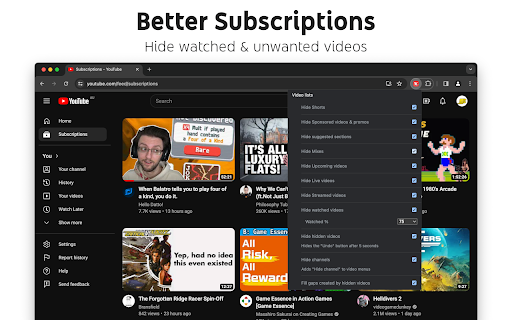
Features
Ads:
• Block ads
• Hide Sponsored videos & promos
• Hide Merch, Offers etc. (desktop version)
New video player UI:
• Disable new progress bar and controls (desktop version) - Note: this will stop working when YouTube removes the old player UI
• Hide new full screen controls
• Hide "More videos" in full screen
• Always use compact Play button (desktop version)
• Remove background from controls (desktop version)
• Restore Miniplayer button (desktop version)
• Restore corner click to toggle full screen (desktop version)
• Hide full screen title (desktop version)
• Hide full screen like/dislike buttons (desktop version)
Annoyances:
• Hide AI summaries
• Remove pink gradient from progress bars
• Hide information panels
• Hide Premium upsells
• Disable themed hover effects (desktop version)
• Restore small thumbnails in Related (desktop version)
• Automatically pause channel trailers (desktop version)
• Allow background playback (mobile version)
• Hide Open App links (mobile version)
Video lists:
• Hide suggested sections
• Hide Live videos
• Hide Streamed videos
• Hide Mixes
• Hide Playlists
• Hide Movies and TV
• Hide Upcoming videos
• Hide Members only videos
• Hide Auto-dubbed videos in Related
• Hide watched videos
• Hide hidden videos - Hides the "Undo" button after 5 seconds
• Hide channels - Adds "Hide channel" to video menus
• Disable Home feed
• Search thumbnail size (desktop version)
• Minimum grid items per row (desktop version)
• Hide Collaborations in Subscriptions (desktop version)
• Hide Posts in Home (mobile version)
Video pages:
• Disable Autoplay
• Disable Ambient mode
• Hide Related videos
• Hide the Next button
• Hide channel watermark
• Hide Share/Thanks/Clip etc.
• Hide video metadata
• Hide Comments
• Always use theater mode (desktop version)
• Full size theater mode (desktop version)
• Disable enlarged UI in theater mode (desktop version)
• Always use original audio (desktop version)
• Hide video end cards (desktop version)
• Hide video endscreen content (desktop version)
• Hide Chat (desktop version)
• Add Take snapshot to video menu (JPEG / PNG) (desktop version)
• Make Transcript downloadable (desktop version)
• Hide Posts in Home (mobile version)
Shorts:
• Hide Shorts
• Redirect Shorts to the normal player
• Hide suggested actions
• Hide link to related Short by the same channel
• Always show progress bar
• Stop Shorts looping
• Hide Remix button (desktop version)
• Hide Shorts metadata until hover (desktop version)
• Minimum Shorts per row (desktop version)
UI tweaks:
• Show full video titles
• Use square corners for thumbnails and videos
• Hide categories in Home
• Hide channel banner images
• Hide Search with your voice
• Link YouTube logo to Subscriptions (desktop version)
• Tidy Guide sidebar (desktop version)
• Hide "Latest" bar in Subscriptions (desktop version)
• Use grid view for Subscriptions & Search (portrait only) (mobile version)
• Hide Explore button in Home (mobile version)
• Hide channel list in Subscriptions (mobile version)
Embedded videos:
• Hide Share button
• Hide pause overlay
Latest reviews
- PL
- Been using this app for almost a year now and it's good overall, but I've noticed that the "Hide Members only videos" function has stopped working as of a few days ago.
- Katie Willems
- Would love if there was an option to remove the big pause/play circle that pops up over the centre of the video when you hit K or spacebar to pause/play the video. That's the one UI thing that's really bothering me atm and I can't find a setting for it on this extension.
- Jay
- Not all heroes wear capes. Thank You.
- J k
- Videos still autoplay. The rest of the stuff is good.
- Adam Confer
- Makes Youtube usable again.
- John Petras
- Best YouTube UI ever
- Maksym “Max” Yenin
- After years of the YouTube team steadily degrading the user experience, this extension is the first thing that actually lets me take control back. The removal of the subscription list view was the final push that forced me to look for workarounds, and Control Panel for YouTube does exactly what the platform no longer allows. It’s still bizarre that using YouTube comfortably now requires stacking multiple extensions - Restore Dislike Button, Unhook, and this one - just to approximate what used to be standard functionality. The only real issue I’ve run into is that Control Panel doesn't hide new “Most Relevant” section on Subscription page. Aside from that, it does what YouTube no longer seems interested in doing: giving the user control.
- Jeff K.
- I love the features to block ads and restore functionality that YouTube keeps removing. What is keeping me from giving it five stars is the fact that they have not yet worked on a feature to restore the ability to sort by Upload Date.
- Janne Vuori
- If i have this enabled then a playlist and the recommended videos goes over the video player. This have happened on 2 different days. Gets back to normal on its own after a while.
- Aleksi
- A HERO THE WORLD NEEDED! 10/10 EXTENSION! A HUGE THANK YOU from the bottom of my heart for giving me an option to properly hide AI slop, shorts, live, premieres, featured, and members-only videos. I visit YouTube only for scientific and important content, and this extension allowed me to properly remove all the garbage from my feed. F Google for ruining what is essentially a public library. We should not have to go through all these loops to remove all this junk nobody asked for from our lives!
- N.J
- This extention is fantastic! I've been having issues with shorts in particular. I have been getting so distracted to the point where it has affected my productivity and my mental health. I had shorts and recommendations rope me into YouTube so much, it has been effecting my sleep and possibly my attention span. This Extention elminates it out right. It looks like YouTube during 2016 - 2018. It's perfect! The only thing you need to do after installing this extention is find an extention for the Dislike Button Ratio, and it's perfect. From what I can tell, they disclosed they do not collect data through this extention. It's strictly for the love of YouTube before short form content and Streaming Movie slop. It warms my heart that there are programers that love YouTube and want to see it returned to what it was suppose to be. My only nitpick is they don't have this extention for the YouTube App. If they can figure out how to do it for the Andorid App, then I would I feel it would be worth more than it's weight in Gold. 5/5 Easily the best extention I have ever used
- Bob Bob
- Did SFA for several of its claimed features - especially the disable audio/video on mouse hover. App called Unhook does everything this one does - but better - clean and simple to use.
- Paul Parkes
- Love this!! I've been using this for ages, it's SO useful! I have found recently though that when viewing a video, the list of recommended videos on the right hand side of the screen has shifted left and now overlays the main video.
- faselblaDer3te
- Since YouTube keeps clattering the subscriptions page with annoying and useless feeds like "most relevant" and Shorts, instead of keeping a clean chronological list of videos, and thus making the latest uploads from the channels I subscribed to less accessible, I love an add-on like this that fixes thiese problems.
- Jaero Sales (JABS)
- THANK YOU SO MUCHH!!!!
- evilution
- Youtube slowly change everything and make it worse. Goodbye subscription button, hello shorts and "most relevant". It was the most relevant that pushed me over the edge.
- Simple Guy
- Thanks a lot for this extension. The subscriptions page in particular has been reduced to pretty much unusable in the last couple months. Glad to know there are still people out there who care about the UX, because youtube themselves obviously don't.
- Frank
- Hello, and thank you; I really appreciate your work and effort. I am having a small issue regarding YouTube links that include timestamps. When I click a link, the page loads, but the video starts from the beginning instead of the specific timestamp. I have been reviewing the plugin settings to see if I missed something; I am not completely sure the issue stems from the YouTube Control Panel, but it is my primary suspect right now.
- Александр Никитин (TwoTocix)
- Installed this useless piece of code only for stop autoplay in playlists and it cant do it even with "disable autoplay" function in "video pages" section. Useless. Redo it.
- Atreyeau Boyce
- One of the added features is to hide the "experiencing interruptions?" thing, and it worked wonders for a few days, but now it shows up again and it's a real problem for an autist like me
- T _
- A lot of handy features to push against Youtube´s Enshitification!
- deltastar
- This is a really convenient list of toggles to customize YouTube and it replaced all of the UBO filters I was using to remove things like shorts seamlessly. If it's changing things you don't want it to, I recommend disabling everything and trying all the options one by one. I didn't think I needed it but now I'm glad I gave it a chance.
- dokoham1
- BRING BACK THE SORT BY UPLOAD DATE FEATURE PLEASE
- C T
- Joining other unhappy reviewers, suddenly enabling every option by default for existing users was a really dumb move. The only reason I have this in addition to Unhook is the option to hide AI summaries, but I think I will look for something else now because hiding random buttons that I use all the time, like "share", really pissed me off.
- Blue Ant
- Great extension, made my YouTube videos load way faster since I could disable three other extension that allowed to have more than 3 huge videos thumbnails per row on the homepage and disable auto translation and auto dubs by using Control Panel for YouTube. I have no idea why YouTube is making the UI worse with each new update. Would be awesome to have an option to display the dislikes on Desktop below the normal video view (not full screen) again. There is currently another working extension that does this (I know that the numbers may not be accurate but usually gives a good impression if a video is worth watching or not) but that has become somewhat sketchy recently by opening new tabs with ads.
- Disent Design
- Update BROKE this, as every one mentioned below PLUS Now playlists wont load with the extension, it doesn't matter if I tick or untick "hide playlist" option. Some options still work but overall it makes you tube worse, not better.
- Rissa Weirich
- This extension was great until the most recent update which has now caused end screen content to not show up when signed in youtube even if the option to remove the content isn't enabled. I've had to disable this entire extension just to see the end screen content which is sad because I really loved this extension.
- Robbie Woods
- Genuinely dont understand why you would implement by default changes to users like the logo going to subscriptions instead of home? This is not the only youtube related addon I have, how on earth am I meant to know what is causing the behaviour when it starts occuring for seemingly no reason and the setting is near the bottom with no indication its new? Just give any indication that you made the change or that the setting is new. Adding/removing features with no indication at all while being buggy as hell is starting to make me question why I have this addon instead of just using filters.
- Shayna Trisker
- YouTube is continually making the interface more and more unfriendly and intrusive, this extension has been genuinely so great to be able to customize exactly what I want and don't want to see to keep it closer to the way it used to be.
- Stanislav Demchenko
- Used this app to fix 5 videos per row. Until recent (today) update everything was fine. Now it somehow changes my feed + added new weird issues (like opening subs instead of landing page). Hope this update worth it, dear devs. Have no idea why you intentionally break things that work.
- Brazen NL
- Excellent extension. Thanks for bringing back list view for subs!
- Hayes
- Extension was fine for months and suddenly now is forcing popups without user consent. The browser wasn't even on screen and it's forcing popups, minimizing other applications.
- hzhnr iar
- BRING BACK THE SORT BY UPLOAD DATE FEATURE
- Maik Husein
- Just Installed it because of the "Sort by upload date" Feature. They Removed it 1 Day after. No Explanation in Update Log or Support Thread.
- Anthony Mounkes
- Was great until they removed "Sort by upload date" feature, as others have pointed out.
- Prussian Mapping
- Yall should add the old search filter back. So basically bring back sort by upload date and sort by view count
- Mikael Korhonen
- It was really good but now I'm missing the 'sort by upload date' filter. Big miss because that was the reason I downloaded this...
- Gala
- where did the 'sort by upload date' filter go oh my god
- hamza ziane
- "sort by date" filter? BRING IT BACK :(
- Danny
- Unfortunately, classic Google doing stupid things made the only reason I had this extension not work anymore. I'll still give it 5 stars because it's perfect when sorting by upload date works. Hopefully the developer is aware of this and will be able to get that back.
- Vernandus
- did they force you to remove the "sort by date" filter? do they have your family?
- Santino Eli
- BRO WHERE DID RESTORE UPLOAD DATE GO!?!?😭
- Andrew Robert
- Only downloaded this to get the "sort by upload date" back and now that does not work anymore. Will be uninstalling.
- Cato Alsén
- Sort by upload date removed in last update?
- Rose huml
- I’ve been using the extension mainly to for the search filter from the newest upload date that YouTube removed. Now it’s no longer working and has disappeared from the extension menu. Please bring it backk
- Julia Michaelis
- As others said, Restore "Upload Date" search filter isn't working because Youtube removed it completely even via URL changes. It was very useful :( Your extension is such a lifesaver when Youtube screws up, I hope you will update it soon.
- J C
- gigachad
- Jerzy P
- Thank you for returning to us a sense of control and ability to list view my subscriptions after the recent REMOVAL, bruv :(
- Brennan Fensling
- fantastic - only thing we need now is the description on videos back, and it's like we've delayed youtube's enshittification
- Sonic Lakhani (Sonicfan0250)
- Restore "Upload Date" search filter is not working for me anymore!