
To-Do List Manager
Extension Actions
A simple offline to-do list manager.
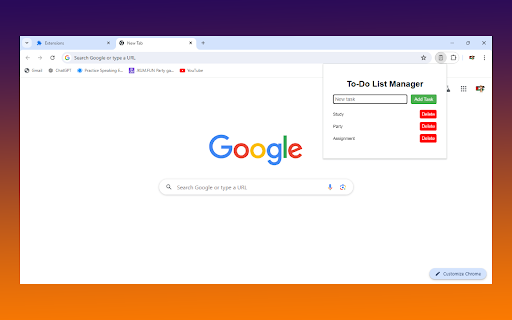
To-Do List Manager 📝
Stay organized and productive with the To-Do List Manager! ✅
Keep track of your tasks effortlessly with our simple and user-friendly Chrome extension. Perfect for daily tasks, project management, or just keeping your life in order! 🌟
Features:
Add Tasks Quickly: Type your task and hit "Add Task" to save it. 🚀
Simple Interface: Clean and intuitive design for a seamless experience. 🎨
Offline Support: Manage your tasks even when you’re offline. 🌐
Storage Sync: Your tasks are saved locally in your browser’s storage. 💾
Delete Tasks Easily: Remove completed or unwanted tasks with a single click. 🗑️
How to Use:
Install the extension and click the To-Do List Manager icon in your toolbar. 📌
Type your task in the input box and click "Add Task." 🆕
View and manage your tasks in the list. 📋
Delete tasks by clicking the "Delete" button next to each task. ❌
Take control of your day and never miss a task again with To-Do List Manager! 🌟
Get Started Now! Download the To-Do List Manager and boost your productivity today! 💪
Latest reviews
- Karen Llamas
- Simplistic. Just like a lil to do list.