
Disney Plus Ultrawide Fullscreen Support
Extension Actions
- Live on Store
Toggle Disney Plus video size to support fullscreen on ultrawide monitors, remove black bars.
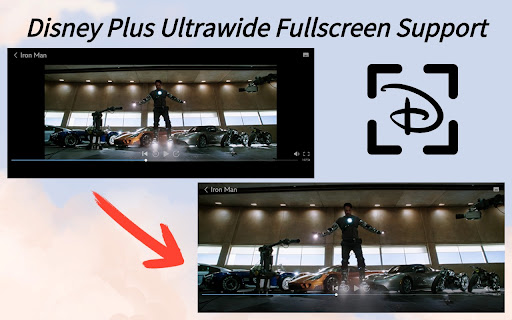
Experience Disney Plus like never before on your ultrawide monitor with our Chrome Extension – the Disney Plus Ultrawide Fullscreen Support!
Are you tired of those pesky black bars ruining your immersive Disney Plus viewing experience on your ultrawide monitor? Say goodbye to wasted screen space and hello to full-screen bliss with our simple yet powerful extension.
With just a click of a button, toggle between the default view and a custom-fit ultrawide fullscreen mode optimized specifically for your monitor. Watch your favorite Disney movies and shows in all their glory, with no more distractions from those unsightly black bars.
Features:
- One-click toggle: Easily switch between default view and custom-fit ultrawide fullscreen mode with a single click.
- Optimized for ultrawide monitors: Enjoy your Disney Plus content in its full glory on your ultrawide monitor without any black bars or wasted screen space.
Enhance your Disney Plus experience on ultrawide monitors today with the Disney Plus Ultrawide Fullscreen Chrome Extension. Install now and elevate your viewing experience to a whole new level!
🔥🔥 Check out our other GREAT EXTENSIONS:
🎯Disney Plus Dual Subtitles - Subtitle Translator
https://chromewebstore.google.com/detail/ojhgmkdbdcgmgcioandnlaabnhofbnel
💌 If you have any issues, simply contact me through email or click the support button within the extension.
Latest reviews
- Mladen Antović
- Very usable on Macbook. Thank you so much!
- Jupiter Morrow
- thank god.
- Raven
- doesn't work
- Andres Leza
- This extension used to work but now it does not. I get the error, "Disney Plus Ultrawide Fullscreen Support: Cannot read properties of undefined (reading 'style')."
- Liz Dean Kravis
- Does not do anything
- Bob Yager (NFG)
- not working
- remy p.
- Mutch better disney .. pfff why
- B Money
- works great thx
- Máté Nagy
- Does not do anything
- Dennis Tillson
- works like it's supposed to
- Alexandru “Seleniar” Iaurum
- Awesooome
- Jay Bienvenu
- Hey it works so great! But subtitles won't show:(
- Adam Tennant
- This cuts off a small part of the viewable area at the top and bottom of the screen which is not ideal.
- Asher Benter
- Frankly, I can't figure out how this works. I have it downloaded, but I don't see a 'button' as the description suggests.
- Rayaan Merali
- Works well but I feel like the quality of the show goes down when enabled?
- Mike Taylor
- I think it's awful that after years Disney still doesn't provide Ultrawide Support to paying customers. This Extension fixes the issue so I can finally enjoy full screen content as it was intended without letterboxing. The Extension stopped working a little while ago when Disney updated their DRM so I contacted the developer and the issue was fixed within days. Thanks a lot, Five Starts!
- Riley Gamson
- Only one that works, though subtitles do not work with it enabled
- Kyle W
- Tried a bunch of different extensions, this is the only one that worked. Good work. Works on Edge.
- vatsal sharma
- thanks alot
- Lucas
- Does exactly what it promises. No more black bars :D
- Sofus Bech-Jacobsen
- It works!
- Johnny Trujillo
- Works! 10 out of 10
- Michiel Steenwinkel
- This is the one we've been looking for. NOW THE FUN BEGINS.
- sas bet
- Awesome for Full screen, but the stream is still 720p is it possible to make it stream 4K?
- Eemeli Kaituri
- Just plain ol works
- Sebastian Baldini
- Works perfectly.
- Dom
- PERFECT! THANK YOU!
- Naga Karumuri
- Thank you, it works well. Wonder why disney doesnt do it by themselves.
- Demon Lord Illidan
- Great to see an updated addon that still works to make Disney+ a better experience, but... Is there or will there be easier keyboard commands added? At this time the only way to activate is to keep minimizing, activating the addon and making the video Fullscreen again. A zimple keyboard command would be nice, the other versions of full screen apps had these as well, sometimes the commands could be added as whatever key you wanted.
- Daniel Wessels
- Currently (april 2024) the absolute only Ultrawide extension for Disney Plus that actually works
- Hig Lition
- Works great!
- John Sinclair
- Only working extension I can find March 24. Thanks!