
TeX equation editor
Extension Actions
- Live on Store
You can generate an image of a mathematical formula using the TeX. Paste the TeX equation, QR Code, Barcode to Google documents.
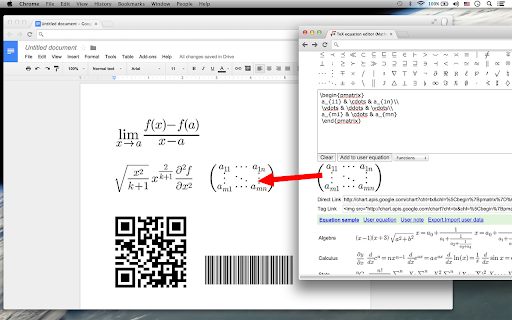
This app is an equation editor for writing math equations, expressions, mathematical characters, and operations. Supports realtime TeX code rendering.
You can also generate an image of a mathematical formula using the TeX(or LaTeX) language.
This is useful for displaying complex formulas on your web page.
Provides connect with Google Drive. Paste the TeX equation, QR Code, Barcode to Google documents.
TeX equation editor that creates graphical equations. Produces code for directly embedding equations into HTML websites, forums or blogs. Images may also be dragged into other applications like Word.
You can change the equation background color, text color, transparency, size.
Latest reviews
- colkin samuels
- VERY GOOD
- Mukesh Meena
- cant acces
- LVA Lessions
- This application has been a great help in my work... but don't know why today (28-11-2018) I found that I cannot copy the generated formulas. Therefore, I would greatly appreciate if the concerned can fix this issue, the soonest possible. I sincerely thank all who are involve in maintain such a great service.
- Ade Setiawandi
- very good
- Mathïs Fédérico
- Can't have a fully transparent background ...
- Richard Herman Alsenz
- The back button disappears and this becomes dysfunctional.
- jovy
- Good tool!
- Rafael Radkowski
- Cannot remove it since the icon is not in the extensions list
- Tomek Prussak
- It overrides docs as the default .docx editor.
- Antonio Eduardo Assis Amorim
- Nice. Give a excellent way to put equations in our documents.
- vishalakshi nt
- This is very good & useful to us
- PENTA QUARKS
- it's awesome
- CATHERINE CULLISON
- Maybe I am using it wrong, but it is not very user friendly. I wish Mathtype was available as an app. It is a much easier product to use and makes it so simple to insert equations into documents.
- Vinod Kumar C
- useful one
- Richard Sullivan
- I agree with other reviewers that the 200 character drawback is a problem. An even bigger problem for me is the lack of the \cong symbol. This is a pretty much fatal flaw for me and will prevent me from using this app (and will prevent me from recommending it to my co-workers). It's too bad since otherwise this is a great tool.
- Youyou w
- look good may i ask..how to use it ? it will be very useful,if there is a video to show .
- Chad Waddington
- I absolutely love this app. The one thing that really needs upgrading is the 200 Char. limit. Bump that up to a thousand or two to three thousand and this would be a blockbuster app.
- Dmitry Ityaksov
- Good, but I cannot type russian letters, they aren`t supported.
- Felix Angeles, Jr.
- A very good editor, especially for those using Google Drive, but I need the congruence symbol desperately since I teach geometry. Other equation editors have it, but I like the url feature of this one. It makes it simple to use, especially with web documents. For instance, Daum Equation Editor has this symbol, but forces you to save a file. Working with a url is more elegant and simple for my applications.
- Song Qian
- Very good. But it has a 200 character limit.
- hai nguyen
- works ok, but there should be a feature of auto-close brackets
- Jorge Brown
- Great app! Pro level!
- John Boccanfuso
- Good equation editor for copying equations into Word or Google Docs.
- a l
- It is useful for those who would like examples of TeX equations and for those who frequently post about mathematics on social media websites.
- Leandro
- very good