
更改谷歌日历背景
Extension Actions
自定义谷歌日历的背景。
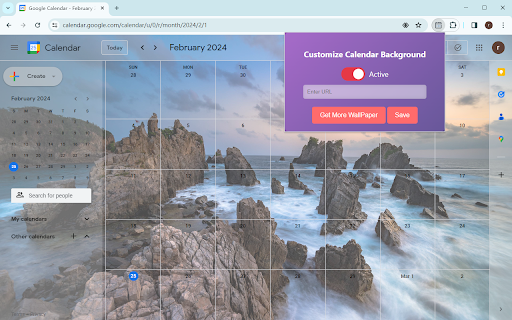
The "Change Google Calendar Background" extension is a Chrome extension that allows users to customize the background of their Google Calendar. With this extension, users can personalize the appearance of their Google Calendar by setting their preferred background image.
### Key Features:
1. **Background Image Customization**: Users can input the URL of a new background image via the extension's popup UI.
2. **Save Functionality**: After inputting the URL of the new background image, users can click the save button to apply the specified background image to their Google Calendar.
### How to Use:
1. Click on the extension icon to open the popup UI.
2. In the popup UI, input the URL of the new background image.
3. Click the save button to save user background image.
4. Click active button to apply the changes.
### Notes:
- Ensure that the URL provided for the background image is valid. Invalid URLs will not result in any changes.
By using this extension, users can personalize their Google Calendar and tailor it to their preferences with custom background images.
Latest reviews
- Poe Hall
- No success adding a URL, hence only 4/5 But adding a wallpaper from the gallery is a piece o' cake. There's 117 so I'm all good. Cheers!
- Susan Palmer
- Can not get the add on to change the google calendar image to a new url no matter what i do.
- Paul
- Well added wallpaper to Calendar and nothing appeared
- Lexie Hayes
- honestly great and easy to use, i hated the pure white background of google calendar
- Ayde
- For context I'm using this with Vivaldi. The extension does not work. Not with URL, nor with the library of options.
- Nice Lilas
- Super excellent and very simple to use !!! THANKS 👍👍