
GLaunch - Panel
Extension Actions
- Live on Store
GLaunch is a Chrome App that provides a popup panel linking to various Google services - Chrome App.
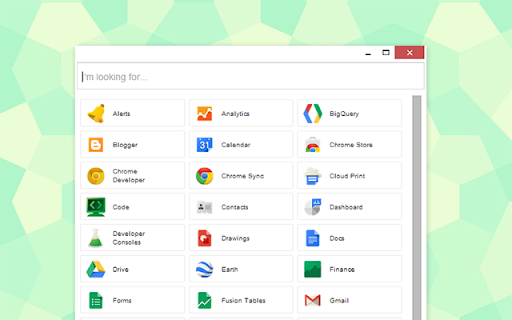
Important: Chrome Apps are depreciated, please use the extension variant which offers the panel view amongst other functionality: https://chrome.google.com/webstore/detail/glaunch/plaeoaehhcgncjfedjhnnoidagfdjamj?hl=en-GB
GLaunch is a simple extension that provide a popup link panel to numerous Google services. Services can be quickly filtered by typing the name of the desired service.
Recently Google have been performing various experiments moving menu's on the default search page, changing menus entirely, re-jigging Chrome every release and while I enjoy new things. I also enjoy some consistency hence the birth of the Google Service Launcher or GLaunch.
Features:
- Chrome App version (ChromeOS) compatible.
- Material based Design (NEW!)
- Quickly search and find Google Services.
- Filters services as you type.
- Opens outside of Chrome so you can quickly access your desired service.
- Open with Key binding (CTRL + SHIFT + Y).
- Discover Google Services you did not know existed!
Please note that the icons used to represent each service are the official icons by Google they were sourced from the service itself.
Any of the trademarks, service marks, collective marks, design rights or similar rights that are shown, mentioned or cited on the website are the property of their respective owners and not of Integrated Brands, its contributors or visitors.
The word mark, "Google" and the logo, and any service logos are copyright. The copyright is held by Google.
Latest reviews
- Aaron Salitzar
- I think this is better than Google apps, in that it has Blogger (blogspot) link inside the list (why couldn't Google do that)?!?
- Matthew Meadows
- Holy crap this is amazingly helpfull
- Gérald Rheault
- how to modify list and change order of presntation?
- Ml Hayes (HGW Associates)
- This is a lot better that hunt and peck looking for apps