
Salesforce Inspector Advanced
Extension Actions
- Extension status: Featured
- Live on Store
Productivity tools for Salesforce administrators and developers to inspect data and metadata directly from the Salesforce UI.
Salesforce Inspector Advanced - The Ultimate Developer Toolkit for Salesforce
Transform your Salesforce development workflow with this comprehensive browser extension designed for developers, admins, and architects. Salesforce Inspector Advanced provides powerful tools to inspect, analyze, and optimize your Salesforce org.
🔍 INSPECT & ANALYZE
• Object & Field Inspector: Deep dive into object metadata, field usage analysis, and relationship mapping
• Flow Analyzer: Comprehensive flow analysis detecting performance issues, security vulnerabilities, and best practice violations with actionable recommendations
• Org Analyzer: Identify unused resources, code quality issues, security vulnerabilities, and migration opportunities across your entire org
💾 DATA MANAGEMENT
• Advanced SOQL/SOSL Editor: Intelligent code editor with autocomplete, syntax highlighting, and inline suggestions for fields, objects, and relationships
• Data Export: Query and export data with advanced filtering, sorting, column management, and support for GraphQL
• Data Import: Bulk import with Bulk API support, hard delete capabilities, and smart field mapping
• Inline Editing: Edit records directly in the data export view with bulk update capabilities
⚡ APEX DEVELOPMENT
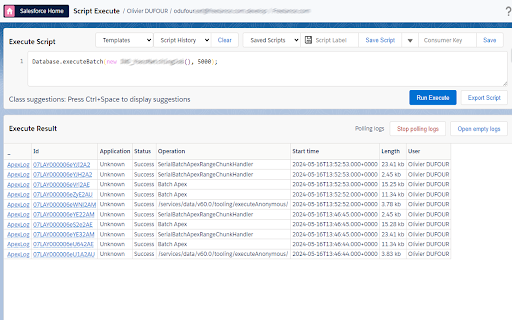
• Apex Runner: Execute anonymous Apex, batch jobs, and queueable classes with real-time log monitoring
• Log Viewer: Advanced log analysis with flame charts, profiler, resource tracking (SOQL, DML, callouts), and unit test execution with code coverage
• Code Editor: Full-featured editor with syntax highlighting, auto-indentation, and intelligent suggestions for Apex classes and methods
🔧 METADATA & DEPLOYMENT
• Metadata Browser: Explore and download metadata with automatic package.xml generation
• Metadata Import: Streamlined metadata deployment with relationship handling
🌐 API & INTEGRATION
• API Explorer: Test Salesforce APIs with templates, history, and response formatting for REST, Bulk API, Chatter, Reports, and more
• Platform Event Manager: Subscribe, monitor, and publish platform events, push topics, and change data capture events
🤖 AI-POWERED FEATURES
• AI Flow Analysis: Leverage ChatGPT, Claude, Mistral, or Agentforce to analyze flows and generate SOQL queries
• Intelligent Suggestions: Context-aware autocomplete for fields, picklist values, and relationships
🎨 USER EXPERIENCE
• Customizable Interface: Custom favicon colors, editable shortcuts, and personalized settings
• Quick Access Popup: Fast access to common tasks, user management, and org navigation
• Modern UI: Clean, responsive interface with keyboard shortcuts and intuitive navigation
🔒 SECURITY
• OAuth 2.0 with PKCE: Secure authentication with support for external connected apps
• Security Analysis: Detect SOQL injection vulnerabilities, XSS risks, and access management issues
Perfect for developers who need to:
• Analyze and optimize Salesforce Flows
• Query and manipulate data efficiently
• Debug Apex code with advanced log analysis
• Manage metadata and deployments
• Test APIs and integrations
• Identify org health issues and optimization opportunities
Whether you're building new features, debugging issues, or maintaining your org, Salesforce Inspector Advanced provides the tools you need to work faster and smarter.
https://github.com/dufoli/Salesforce-Inspector-Advanced
This extension is based on the original Salesforce inspector extension made by Søren Krabbe and Salesforce inspector reloaded by Thomas Prouvot.
Latest reviews
- Chaitanya Chigullapally
- I’m unable to see Item.ProductCode in the inspector to load the Contract Item Price. It was working fine up until the 6th
- Jeff Callahan
- Keeps getting better - love the ability to run apex scripts.
- Conrad Lagowski
- Data Exports are returning incorrect values. EXAMPLE: - The record has a date of 2025-08-01 - The export query returns a value of 2025-07-31 I'm seeing this consistently for all date values.
- Adam Mcnamee
- This was a fantastic tool. However, I've noticed that the CSV function is broken which may be a Salesforce problem and not the extension. Basically whatever settings are being used on export, doesn't allow for clean loading into anywhere because the commas aren't recognized as separators. Also, the tool won't even load for me now. If it does, I can't copy any text into the query window or it crashes. Such a shame because this was my favorite tool as an Admin.
- Rahul Dewani
- The recent update has completely disrupted the user experience. The separation between query history and saved queries was a key feature, and now they’re combined in a way that complicates everything. I’m uninstalling immediately and searching for a better alternative to this Salesforce Inspector.
- Prateek Sisodiya
- Superb extension with a lot of advanced features. Made my day to day life easy.
- Kolumam
- It would be amazing if you could add debug log support since the debug log is so huge and is very difficult to troubleshoot errors or response times for API calls.
- Yehoshua {Jeff} Krakowski
- Very helpful But i don't see how to close the window once popped out It would be helpful to for option to login as incognito (like reloaded does) and also a way to get to Flow trigger explorer from the shortcuts search The inline edit function is great, being able to bulk update would be amazing
- surya sv
- This is very useful and increase our Productivity
- Luiz Octávio Caseto Benetti
- This is the best version of Salesforce Inspector!!!
- Youngjun Kim
- Best Extension for Salesforce Dev
- Boyd Petrie
- A brilliant improvement over the original Salesforce Inspector and much better than the Salesforce Inspector Reloaded as well. In-line suggestions is the immediately noticeable change and it is so good. If you are a Salesforce admin and work with data manipulation, this is an absolute MUST HAVE extension.
- Bob Hatcher
- This is straight-up heavenly. Thank you!
- Ryan Schierholz
- This is fantastic—a great improvement from the original and must-have for any SFDC admin.
- Guillaume Dufour
- Smart tool. Thanks