
Clipchamp - Video Editor
Extension Actions
Edit & compress videos. Record your screen and webcam. Free & secure.
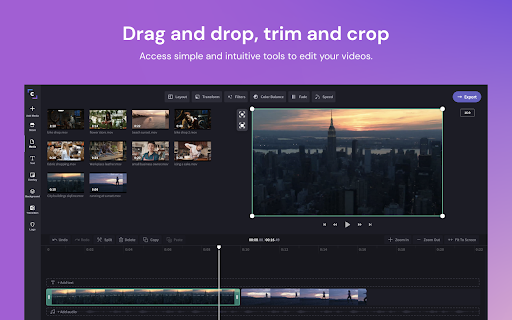
Clipchamp is the online video editor that empowers anyone to tell stories worth sharing through video. Around the world, over 14 million people use Clipchamp to easily edit videos for corporate, educational and creative projects.
Our editor gives users access to professional tools and features from simple trimming and cropping, to efficient online screen recording, to special effects like Green Screen. Users also have access to Clipchamp’s stock library filled with over 800,000 video and audio files. Better yet, it comes with direct Google Drive and Google Photos integrations. All happens in-browser — no downloads necessary.
Once the editing process is complete, Clipchamp enables users to export their videos in a range of resolutions and aspect ratios, optimized for popular sharing platforms like YouTube, Instagram, and more.
Latest reviews
- Olivia Johnson
- This is the dumbest thing a human has ever made. It won't let me export my video for NO REASON. This app actually sucks.
- Jay Protopapas
- I will be absolutely overjoyed to add that one missing star if/when the following suggestions are worked on: 1. There really ought to be an unambiguously intuitive reverse-clip capability in the free version. I was rather disappointed to discover that an (IIRC) outside instructional video seemingly furnished users with a workaround for this, only to find out that the method in question actually showed said users how to noodle around with the *order* of clips being worked with. And even if there *is* a thread of truth in the existence of such a turorial, IMO needless complication would set in. 2. Re this next particular observation: File management can be "much" more often than not rather confusing. For instance, when I delete a project on the main page, am I "yeeting" the files associated with them as well? It would seem that I'm not; but it takes me an IMO inordinate amount of time backtracking between Clipchamp and my Files' s Downloads file & trash bin to find all that out. Another problem I have is weeding out created movies that I've either saved already or the app identifies as "Untitled" because the original files have been deleted, whether accidentally or on purpose. ANd lastly, the files I save automatically go to their assigned destination folder in my Chromebook; making the app's save-to-cloud prompt IMO somewhat redundant (I don't remember of there is a "radio button"/checkbox with a "Do not ask again" in this respect.) If this critique somehow makes less sense to you than how I'm trying to convey it, it's not your fault. I'm eager to master the finer points of this app (inability to pay for the full version for those without Paypal or credit card ::raises hand:: is an unfortunate reality). I'm simpl trying my best to comprehend video editing tasks/issues within a non-iMovie framework. But I *do* hope these two overall suggestions can be addressed with subsequent version releases. Thank you.
- kjstaylit
- I used to use this app all the time and now it wont work anymore
- Exorcist twin's
- i have been using this for awhile now, and for the pass 2 weeks or if i add text to the video, it wont export, please fix this.
- Christiano Adams
- its not good for making funny moments video because when i import the assets there glitched when i put im importing the video please fix it i will give 5 if you fix it please!
- messimike
- i tried to use it now it is not responding
- 박준기
- It's very easy and convenient, but on my computer it stutters a lot and the quality is poor.
- hobo lorian
- i really liked this app, and it served me well for two years. but because my chromebook is older it is no longer getting updated, so i cant use this app anymore. anyone who wants to edit videos, please use this app, it is great, but i cant use it anymore.
- Rick McClure
- Easy to use. Free version is great for quick videos you need to do in one sitting.
- Metalherbs
- Ok, one problem is that I can't play recordings of my voice onto the editor. But still is good! 8/10
- Krishnendu Laha
- The Microsoft acquisition just made it epic
- Wisnu Ade
- Very Nice
- Bubblyx!
- ok i just used it and wow it took a while for the vid to download but it did workk
- Ricky Zheng
- I loved this Extension!!! But I do have some problems, Sometimes My files take way too long to load!!! And it sometimes wouldn't even open!!
- leo w.
- I do not recommend. The app does have nice editing and professional tools, yet it is entirely too glitchy and hard to work with. The only reason why I tried it was because I got a free trial offer, there is no way I'd pay 19 dollars for these tools. I just wanted to edit a video for a yt video on my chromebook to try it out, but I think I'll stick to using CuteCutPro on my iPad. Plus, the export process is entirely too long. Using my iPhone or iPad would have taken less than 2 minutes, and this is taking hours. If you have the patience, use this at your will. But there are definitely more convenient editing softwares out there.
- Alan Sanchez
- Wow, how is this a web app!? Solves one previous downside of being on a Chromebook. Thanks for putting this together. The only thing I've been struggling with so far is it complaining about my ad blocker when trying to import media from Google photos. I've disabled the ad blocker but it doesn't seem to solve the issue. May need to do a bit more digging. Overall great app, super easy to use.
- Connor Hall
- this is the best chrome video yet you legit deserve an award.
- That Toxicity
- works really well and simple. unblocked for me and great quality. bad export speed because my video took 2 hours to export..
- sophie flattery
- it is wonderful i love it its great i recmened it its amazing
- David Alexander
- I used the free version for a year and worked out my issues with it under those conditions. My issues were ALL "operator related." Grateful for how well it worked, I have now begun paying. Along the way, I've used other video production programs on Windows machines, and haven't liked them near as much as this one on my Chromebook. That being said, none of the things I "make" run longer than 4 minutes. Upload directly to YouTube is a great advantage.
- Sparxzツ
- Love it but I wish I could get more the 480p but it's works
- Jackys World
- I love this website/app :)
- Tracy Pan
- This app is great! Easy to use, paste, and download. The only problem is the upgrades, where you have to pay to use certain things. Make sure not to use a too long video, and be patient!
- Jakaiya McDaugale
- Not even worth a star... Videos that I added on either came up as a black screen or froze up at one still-shot after adding any effects, fades, or texts and made it impossible to see any product you make. This software crashes after one single effect added as well. If I could rate it below 0 stars I would.
- Michael Klein
- I love this for editing my YouTube vids. super easy for me to use; especially as new editor. I just save to google drive, and were off to a great vid thank you!
- katarzyna jarecka
- its is perfect for video editing
- k time
- This has to be the best free video editor website of all time supper easy to edit and aply my media defiantly a recommend!.
- paulsletsplays 77
- Great for people who are new to video editing software and are looking for a video editor that is free and easy to use
- Jay Lippman
- Let me preface this review by saying that I am a professional video editor, and as such, I'm very picky about any editing apps that I try. However, I also know how to manage expectations. This app is not Premiere Pro, Davinci Resolve, or anything close to any of the other professional level editing applications out there. HOWEVER, it has everything you need in order to create a good looking and good sounding video. It's intuitive, easy to use, and, as far a browser-based editing apps are concerned, one of the most full featured options out there. The templates are easy to use and are great for short-form video, and the blank template won't leave you feeling lost when trying to create something more long-form. All in all, I think Clipchamp is worth a try. With a little creativity, you can push it pretty far.
- mikeal “Cashout Jr.” Johnson
- Export time is slow but its aight
- dev
- horrible quality. very slow
- Adrienne Williams
- To whoever made this THANK YOU. there is no limit no watermark and it is EASY.check out clipchamp
- Terrance Snider
- Put the pay details at the start of using the app, not after hitting export. dont waste my time.
- Raphael Eade (Raph)
- I am fairly new to editing and don't really edit to heavily but it does help me to string clips together and add in music or text when i want to. Would recommend for people who are new to editing or just want a light job done.
- Double Three Gaming
- Amazing, downloads quickly, easy to edit.
- yeyeng thunder
- worst video editor ever I screen recorded a video and then it keeps saying "clipchamp only supports image, videos, pictures, and audio" bruh its a screen recorder its a literal video
- Tad Loud
- It just didnt work i never got a file uploaded wouldnt recomend
- William Kellum
- Worse editing app It will freeze and my music wont even play. Will be stuck on "loading assets"
- Natalie Mejia
- it looked amazing but when I cook to go to the app my teacher blocked it
- Theo Larson
- I only rated this four stars because I didn't really use the extension; and more used the browser version. The browser version worked amazing!!!
- sofia s
- This app is so helpful for me! I am so grateful for ClipChamp and all that it provides. Although it is a bit laggy for a Chromebook, it is absolutely what I picture for editing. Hope this helps <3
- mali mall
- Clipchamp is easy to use and very app friendly. Best feature about this app is that you can cut and edit more precisely. I also like how you can adjust screen size and change aspect ratio. Exporting is faster than most video editing apps. Great app!!! 💯💯💯
- I’m old
- Great!
- Naate Koss
- Nice for recording my videos I edit with kapwing tho!
- Victor Basilio Simon
- Great app, would 80% recommend. They still haven't added the "green screen" feature so not worth trying.
- Alt account (A_lt ac)
- the reason that i rated it 3 stars is because since SOME people dont want pay for premium or simply because there not allowed to, they get the worst video quality and i think not fare so im saying could you at least make it better
- Nya
- This was a great app i've tried countless editors like WeVideo but overall this is the best i highly recommend even though i would like to add more transitions
- Jabin Nibbelink
- I love this video editor, I use the free plan which has limited export quality, but it is worth it for not paying anything. I use this daily and this is the best. 1000% :D
- Heather Williams
- This app SHOULD be so good. It has so much potential, but it buffers and reloads and cuts out to the point I want to bang my head against a wall. I will NEVER use it again.
- Eric R o a
- OMG Goog is promoting "Clipchamp Business Platinum* free for 2 months" as a "Perk" but Chrome 88.0.4324.186 (Official Build) totally refuses to open the site linked on the chrome web store: "Your connection is not private Attackers might be trying to steal your information from clipchamp.com (for example, passwords, messages, or credit cards). ...sent back unusual and incorrect credentials. You cannot visit clipchamp.com right now because the website uses HSTS." Certificate: (Cloudflare Inc ECC CA-3) NET::ERR_CERT_AUTHORITY_INVALID