
สำรองข้อมูลแชทสำหรับ wa
Extension Actions
ส่งออกแชท WhatsApp เป็น HTML, CSV, JSON หรือ Excel บันทึกการสนทนาและสื่อได้ง่าย
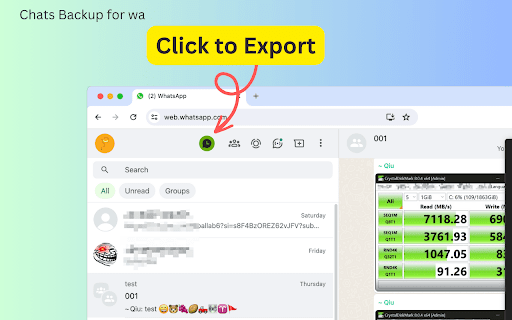
Chats Backup for wa is a powerful browser extension that allows users to export WhatsApp chat history directly from WhatsApp Web App. With this tool, you can save your conversations in various formats, including HTML, CSV, JSON, and XLSX (Excel), catering to different needs and preferences.
Detailed Features
The process of using Chats Backup for wa is straightforward, but its technologically advanced features are what make it stand out:
- It supports multiple export formats: You can choose from HTML, JSON, CSV, and Excel formats for your exports. The HTML format even allows you to preview attachments, making it easier to manage media files shared in chats.
- Time frame selection: Select the specific time you want to export. If no time is chosen, the entire chat history will be exported.
- One-click backup: A dedicated export button appears prominently, enabling quick access to the tool's features.
- Auto-generate filenames: If you don't provide a filename, “WhatsApp Chats Backup” will automatically assign one, simplifying the process.
How to Use
1. Navigate to https://web.whatsapp.com/ and open any chat you wish to export.
2. you'll find an 'Export' button in the top left corner. Click it to open the export settings interface.
3. In the pop-up window, adjust the settings for your export. Choose the desired time frame for the chats you wish to export. If you leave this blank, the extension will export the complete chat history.
4. Select your preferred export format from the options available (HTML, JSON, CSV, Excel).
5. Provide a filename for the exported data or leave it blank for an automatically generated one.
6. Click ‘Export Chats’ to initiate the fetching process.
7. Once fetching is complete, click ‘Download Items(number)’ to save the chat logs onto your computer.
Whether you're a professional needing to archive client conversations or someone looking to preserve memories, Chats Backup for wa offers you a reliable solution. Its user-friendly interface combined with powerful export capabilities makes it the perfect choice for anyone using WhatsApp. So why wait? Give it a try today and take the first step towards secure and efficient chat management!
Data Privacy
Your data stays on your device and is not stored or transmitted to our servers. We prioritize keeping your information secure and confidential.
Disclaimer
This extension is an independently developed product by ExtensionsBox and has no association with WhatsApp LLC.
Latest reviews
- Madhav Majumdar
- not working , tried many times , just same error , app is not opened ,
- Hassan Ali
- tried many apps for backup, but this one works the best honestly!
- João Leocadio
- Don't waste your time The app doesn't work, it asks you to sign up with Google, but it keeps spinning and nothing happens.
- Sahand Madadi
- GOOD
- Donya Sing
- All I will say is.... 15 out of 20 "5star" reviews are placed on the same date (18 December). The remaining 5 other reviews are literally 1 day before or after these "5 STAR" review. Lol. I will let you come up with your own conclusion whether to trust OR not to trust.
- Carlos Luis Perez
- Excellent application helps a lot to have a good management of my whatsapp backup chat.
- Jhonrey
- it is great,very helpful extension
- mohamed benfetima
- Really excellent
- Estanislao Pons Estel
- the best extension for wa chats
- Milan Pesic
- Chats Backup for WA is a game-changer! Exporting WhatsApp chats is effortless with its multiple formats like HTML, CSV, and Excel. The time-frame selection and media preview in HTML make organizing conversations a breeze. I love the secure, device-only processing—simple, efficient, and privacy-focused. It’s perfect for both work and personal use!
- Ahmed Elrays
- Chats Backup for WA is a reliable and user-friendly tool that allows you to effortlessly export WhatsApp chats in multiple formats, select specific time frames, and even preview attachments directly in HTML exports, all while ensuring complete data privacy. Truly a must-have for efficient and secure chat management!
- jamal elsardi
- I have tried a lot of Extension for similar purpose but this is by far the best. Everything is easy to use
- Reham Lela
- It is Very Good
- DEO ROCHE CABAHUG
- Great extension, easy to use
- Natnael
- WA Chats Backup is a Chrome extension that seamlessly exports WhatsApp chats from WhatsApp Web, including media, making it perfect for organizing and backing up conversations effortlessly.
- reza pahlevi
- i like the concept. i will try it and hope it works well
- BJKASS BERKANE
- Great extension, good use for a while
- Chester Lagman
- Great extension for archiving whatsapp messages
- Aswald Castillo
- Being able to backup conversations is always important and with a tool that always works it is much more reliable. It has a good functionalities and also services that can help you.
- Ken Adams
- This extension makes it easy to export WhatsApp chats in formats like HTML, CSV, JSON, or Excel. The user-friendly interface allows you to choose a time frame, preview attachments, and download chats quickly. It’s a great tool for saving important conversations or media while keeping your data private and secure.
- Susana Authement
- It's wonderful, because it doesn't let me get sidetracked from my work while I look for the flat to talk to.
- Renzo Madríz Morales
- Its a great Idea having a copy of security of all chats
- Denise
- I loved the functionality of this extension, being able to backup conversations is always important and with a tool that always works it is much more reliable.
- Kivanor
- Too intuitive
- Irailma
- best extension I've ever tested of its kind, it has very good functionality and is ideal for anyone who wants to make these backups
- Eduardo Melo
- The quality is the best and I really love its great features which I recommend to everyone.
- Muneeb Ur Rehman
- Really bad support from the team, i tried to use the free version but didn't worked then i also bought the subscription and even still not working then i requested a refund with in the first week from paddle and they updated the status to "Refunded" and they took my Subscription as well now it's been more then 10 working days yet still i haven't recieved my refund and i am not even able to use the extension as well even though i paid and the worst part is that i sent them multiple emails but they are not responding
- Chandan Singh
- Doesn't work. Doesn't do anything. Forces you to pay.