
NotebookLM Web Importer
Extension Actions
- Extension status: Featured
- Live on Store
Nhập trang web và video YouTube vào NotebookLM chỉ với một cú nhấp
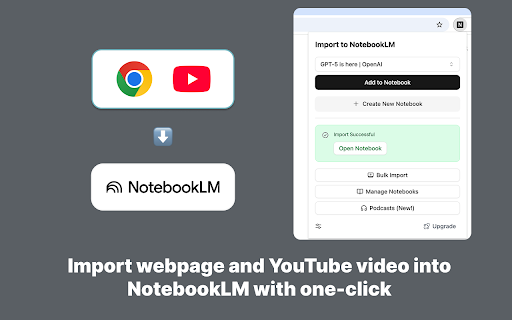
Save time and boost your productivity with the NotebookLM Web Importer.
Features:
1. Import webpage and YouTube video to NotebookLM with one-click!
2. Bulk import links to NotebookLM, from link list, browser tabs, YouTube playlist, RSS and more!
3. Manage notebooks and audio overviews in one place!
4. Sync audio overviews to Podcast feed!
How It Works:
* Install the NotebookLM Web Importer extension from the Chrome Web Store.
* Browse the web or watch YouTube videos as usual.
* Click the NotebookLM Web Importer icon to save the current page or video to your NotebookLM, full websync!
Then you can chat on NotebookLM with this webpage or video, or generate a podcast using the Audio Overview feature.
Latest reviews
- govany gamal
- fast and amazing
- Vladyslav Sikula
- The description is misleading; this tool does not allow for downloading notebooks.
- Tim Spencer
- Great for quickly adding research ideas into NotebookLM, saves all that exhausting cut&paste!
- Dave's Rani
- A very useful extension, I always enjoy using this extension
- praises Felix
- Really useful tool, especially if you’re doing heavy research. I like how everything goes straight into NotebookLM without extra steps
- Mark Tania
- Great tool for saving web pages while learning or writing reports.
- Konstantin K.
- It works!
- Nick Walther
- I absolutely **love** the NotebookLM Web Importer – it’s become a core part of my daily research and lesson-planning workflow. With one click I can send full web pages and YouTube videos straight into NotebookLM, where I can immediately start asking questions, generating summaries, and turning sources into study guides or outlines. The bulk import feature is a huge time‑saver for me, letting me grab multiple links or open tabs at once instead of copying and pasting everything manually. The extension feels lightweight and reliable, quietly sitting in the toolbar until I need it, and then just working exactly the way I expect. If you use NotebookLM regularly for research, teaching, or content creation, this importer is a must‑have that makes the whole system feel faster, smoother, and a lot more powerful.
- Veronka M
- Works good for text webpages or YouTube videos to import. But can not manage descriptions to YouTube videos. Why not to add some selector to able to view a YouTube video page as a webpage, not just as a source of the video transcription. Another problem is the extension can put empty sources to NotebookLM if there is any auth in the webpage.
- Mакс Кудряшов
- not free there is free alternative, so no reason to pay
- Xavier
- Really helpful!
- Shraga Turchinsky
- Great!Thansk!
- Maina Murage
- Fantastic. So much faster than copy pasting
- Tammy Stoner
- Easy to learn, simple to use and I haven't experienced a single crash or issue in either Brave or Vivaldi browser during the several months I've been using it. I plan to keep using it since it is the fastest way I've found to capture information and send to NotebookLM. Highly recommended!
- Jenni Duncombe
- Love it! Awesome. I'll never have to copy paste again! Lifesaver
- Ola
- Great! fast and easy to use.
- kfcman21
- Good!
- Tomi Wiredu
- Top notch, efficient app
- henry Lin
- I really wanted to like this extension, but it simply doesn't work as advertised. The main feature—importing articles—is completely broken. For many articles, the extension shows a misleading "Import Successful" message, but when you check, nothing has actually been imported. It gives you a false sense of accomplishment while failing to do its core job.
- anusha mishra
- The best app I came across. Helps me a lot in keeping tracts on my studies. Thank you so much for developing such a lifechanging hack!
- Changhua Dai
- It is very useful!!! perfect! I really like this extensions!
- George Nurijanian
- Really handy extension and I don't mind paying as it does a few small little helper functions that make life much easier with NotebookLM. Great work.
- luca
- Simple and practical
- Eric Hileman
- Doesn't work with adding files from google drive.
- Timothy Foster
- One of the best purchases I made in 2025!
- Rajat Kujur
- loving it, very useful for students .
- Mathias Jonsson
- This is a very useful extension. It simplifies my research process.
- CSÁNYI Sándor
- Something absolutely useful. Must have.
- Tawanda (Work)
- Really helping me gather my sources
- Jon Schlottig
- It's a great app. Free tier works awesome. I'm considering upgrading because it's just so helpful and a great way to build knowledge bases and more.
- Horrace Githinji
- Great especially on a Chromebook that already has the NotebookLM app installed
- Dan Parfenov
- Does not really work as advertised (at least on Vivaldi), and there are legal concerns regarding consumer and data protection rights. Though I must commend the idea behind the extension, it is far from finished, and there are some safety and legal concerns that I think need to be addressed. The good: - This extension is capable of importing web pages and YouTube videos (most of the time). - It does offer source organization/management features such as bulk deletion in your notebook (something Google should've added from the beginning). - It can bulk import links and web pages through manual entry of the links into its interface I haven't tried importing RSS feeds, as the button is not there for me on its interface, nor do I use any such feeds. The bad: - While the images on the Chrome Web Store show a pop-up window under the extension button, in reality the extension opens a side panel (on Vivaldi) that is much more basic than what the images promise. This leads me to my next point... - Features that it advertises are outright missing. There is no podcast management button. There is no RSS feed button. There is no "Links", "Browser Tabs", "Page Links", "YouTube Playlist", or "RSS Feed" option for putting in a link and parsing it. - There is no notebook management like it advertises in its documentation site, no tagging feature. - The "link selection" feature where you click on links to add them is buggy, and doesn't work outside the most basic of websites (as an example, it works about 75% the time on Wikipedia, from my experience). Legal Concerns: - The developer attempts to deny all mandatory EU consumer rights in their privacy policy and TOS by claiming to be a 'non-trader'. While it's all well and good to post that up on the store, the fact that the policy and TOS are signed '© 2025 Less But Better, LLC' makes me think it is a company attempting to skirt consumer protections. - There is a total lack of transparency with regards to its obligations under the EU's GDPR, most notably not stating the legal basis for data processing and an absence of safeguards on international data transfers. We don't even know where our data is going, or how it is processed. - There is no clear mechanism to exercise your rights as a consumer and as someone whose data is used. There's no designated contact channel, no mechanism for EU users to exercise their right to access, to correct, or to erase the data, not to mention no channel for addressing consumer disputes. This all goes on while the company/developer claims we can exercise our rights within the privacy policy. - The terms of service, from a cursory read, are unenforceable in the EU. They're very slanted in favor of the company, and I don't think they would hold up to scrutiny from any Data Protection Agencies or in EU courts. TL;DR This thing is missing the features it advertises or misrepresents the way they function, and is also legally opaque as to where your data is going and what your rights are. There is no contact info for the developer in order to report bugs, to ask for help, or to exercise your basic consumer and data protection rights. If those issues could be fixed, I think it has the potential to be the best NBLM importing extension out there.
- Collence Mathibela
- Absolute lifesaver. Makes studying so much easier and quicker. Helps with last-minute work.
- Steve R
- working great so far
- Ryan Nowak
- Very happy with this.
- Constance Reid
- Does what it says it does - too easy!
- Sorawut Lertplangsanti
- I would be nice if there is ability for auto entering pre-prompt when creating new notebook.
- louzhu gan
- hope a option to change the name of website
- Nick Evans
- Just works!
- Michel Boda
- this extension is the only one that seems to consistently work.
- Lana Delrey
- thanks a lot for making this tool.
- Russell Raath
- ⚡️It's great - does all I need it to do; looking forward to the continued and ongoing improvements and enhancements.
- Melton Thomas
- I don't know how I was able to live without this extension... oh yeah: PAINFULLY. It's a godsend for productivity.
- bulltobear (ぶるとべあ)
- much useful
- Josh Bolland
- Love this extension! It makes importing links so easy to my Notebooks and they are improving its features all the time.
- 김경민
- Very easy and convenient.
- domenico cavalli
- Mostly good, almost exactly what I want from the extension. There is still no option to save notes in Google Doc, Word, or PDF format to make using LM Notebook more efficient. You can still save, but it's a huge waste of time.
- Andi L
- Mostly good, almost exactly what I want from the extension. Constant nagging about a 5-star review forces me to give 4 stars only
- Joshua Chuang
- Perfect AI Tool
- Chin Yu-Sheng
- The NotebookLM Web Importer is an excellent tool that helps me quickly build my knowledge base in NotebookLM, saving me a lot of time.