
Easy Encrypt - 간편 텍스트 암호화
Extension Actions
AES, DES, Base64, SHA-256 등 다양한 알고리즘을 지원하는 빠르고 안전한 텍스트 암호화 도구입니다.
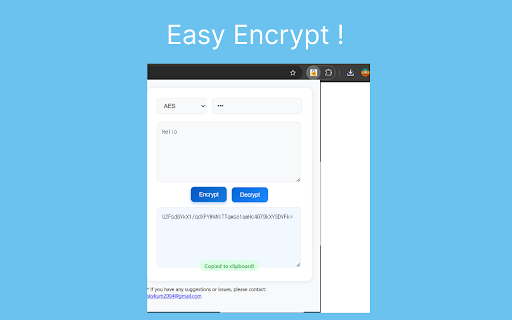
Easy Encrypt - A Simple and Efficient Text Encryption Tool for Chrome
Easy Encrypt is a Chrome extension designed for quick and secure text encryption and decryption. This tool supports a variety of encryption algorithms, allowing users to easily secure their data directly within the browser.
Main Features and Benefits
📍 Multiple Encryption Algorithms
AES, DES, Base64 encoding, and SHA-256 hashing are available to meet a range of security needs.
Simply select your desired encryption type from the dropdown menu.
📍 Easy-to-Use Interface
Simple buttons for encryption and decryption, as well as a clear output display.
A one-click copy button allows encrypted or decrypted text to be saved to the clipboard instantly.
📍 Automatic Settings Storage
Easy Encrypt remembers your last selected algorithm and secret key, allowing for quick reuse.
User settings are stored locally in Chrome for maximum convenience.
📍 Secure and Private
All encryption and decryption operations happen locally on your device, ensuring data privacy without external transmission.
No internet connection required for encryption.
Technical Features
- Uses Chrome's Storage API to securely save user preferences locally.
- ClipboardWrite permission is used to allow one-click copying of the results.
- AES, DES, Base64, and SHA-256 algorithms are implemented for reliable encryption and decryption processes.
- Secure storage of encryption settings via Chrome’s storage to ensure a seamless experience.
FAQ
Q: Can I copy encrypted results directly?
A: Yes, simply click the copy button to save your encrypted or decrypted text to the clipboard.
Q: Are my settings saved automatically?
A: Yes, the selected algorithm and secret key are saved automatically and reloaded when you open the extension again.
Q: Which encryption algorithms are supported?
A: Easy Encrypt supports AES, DES, Base64 encoding, and SHA-256 hashing.
Future Updates
- Additional encryption options
- Dark mode support
- Keyboard shortcut functionality
If you have any questions or feedback, please feel free to contact us at [email protected].
Latest reviews
- Alexander Queen
- A great little tool for text encryption. Not sure why there aren't any reviews. I work on a public PC and journal a lot, so having that extra layer of privacy in case my google account is left open is pretty good. Can wholeheartedly recommend.