
Gmail Tabs by cloudHQ
Extension Actions
Set Gmail labels or Gmail filters as tabs
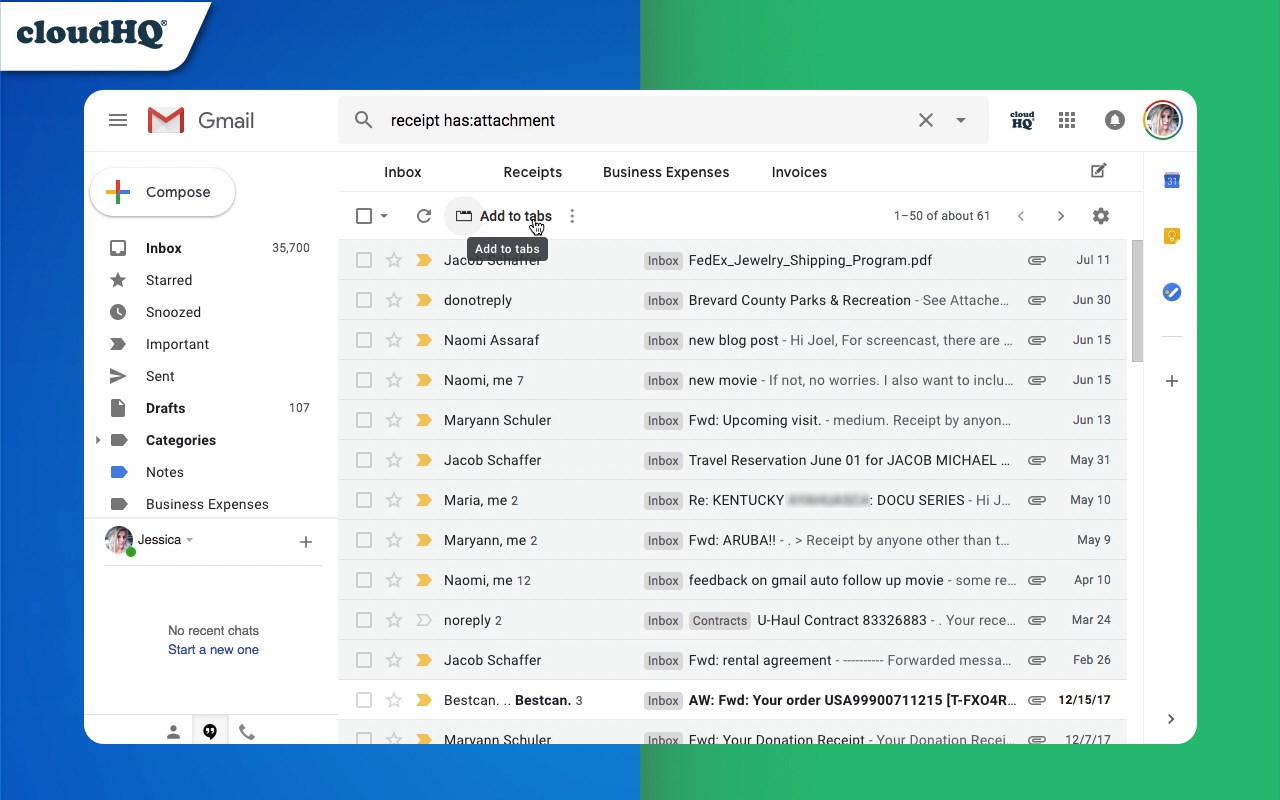
**Organize Gmail Labels and Filters with Custom Tabs**
Navigating through alphabetically arranged Gmail labels can be a hassle, especially when you're in a rush to find a specific one. Save time and streamline your email management with our latest productivity enhancer, Gmail Tabs!
With Gmail Tabs, you can personalize Gmail for better clarity and quicker access to essential items such as:
- Your most-used Gmail Labels
- Frequently used Gmail search queries (e.g., receipts with attachments, emails from key contacts like customers or your boss)
### Key Features:
- Effortlessly turn any query into a Gmail tab
- Create tabs featuring all emails under a specific label
- Include emails from both a label and its sublabels in a tab
- Customize the font color of your tabs
- Adjust the background color of your tabs
- Edit tab descriptions and queries for enhanced personalization
### Get Started Now and Boost Your Productivity:
1. **Install the Extension:** Begin by adding the Gmail Tabs extension to your browser.
2. **Choose a Label or Enter a Search Query:** Select the label you want to tab or input a search query.
3. **Add to Tabs (for Labels):** In the label menu, choose either "Add to tabs" or "Add to tabs (including sublabels)".
4. **Add to Tabs (for Queries):** If entering a query, simply hit the "Add to tabs" button.
Try Gmail Tabs today and transform how you manage your emails, making your workflow smoother and more efficient.
cloudHQ. Helping your productivity, 1 click at a time.
Website: https://www.gmailtabs.com/
Pricing: https://www.gmailtabs.com/pricing
Support page: https://support.cloudhq.net/category/browser-extensions/gmail-tabs/
Blog: https://blog.cloudhq.net
Gmail, Google Calendar, and Google Workspace are trademarks of Google LLC. Use of these trademarks is subject to Google Permissions.
cloudHQ is trademark of cloudHQ LLC. https://www.cloudhq.net/trademark
Latest reviews
- Eliza
- The sublabels feature is underrated. Have a main label called Projects with like 12 sublabels under it and one tab shows me everthing across all of them. Before this I had to click into each one individually.
- Favour
- Pretty much the first thing I install on any new work computer now. Gmail without this feels broken to me at this point lol.
- Odisi
- The color customization is nice. Color coded my tabs so client stuff is blue, internal team is green, and billing is red. Makes it really easy to visually jump to what I need.
- hart
- Love that you can turn any search query into a tab. Had a really specific filter I used constantly and now its just always there. No more retyping it or trying to remember the exact search syntax.
- Rosline
- Didn't realize how much time I was wasting clicking through labels until I set this up. Now my 4 or 5 most important labels are just sitting there as tabs at the top of Gmail. Way faster.
- femi
- Made a tab for "emails from my boss with attachments" and now I can find those in one click instead of typing out a search query every single time. Such a small thing but it adds up when you do it 5 times a day.
- Ruby
- Gmail's default label system is honestly kind of a mess if you have more than like 10 labels. This turns the ones you actually use into tabs right at the top so you're not scrolling through a giant alphabetical list every time. Huge improvement.