Youtube Loop Assistant
Extension Actions
Auto replay videos with ONE-CLICK, able to customise features such as AUTO LOOP toggle, setting loop counts and loop portion.
Have you ever wanted to watch to the same video on the YouTube™ without pressing replay button every time at the end of the video?
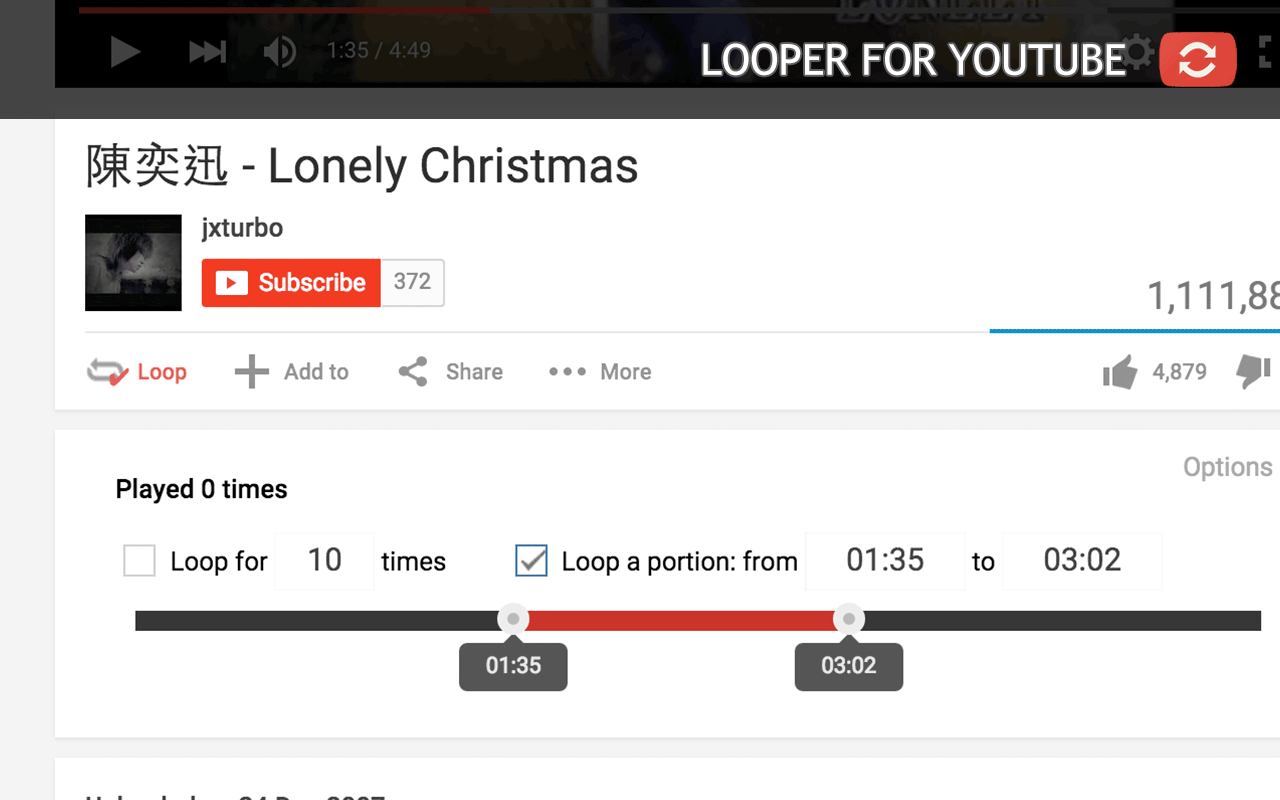
With Youtube Loop Assistant you will get a loop button under the YouTube player. After you press the button, video will repeat itself infinitely.
HIGHLIGHT FEATURES:
1. DEFAULT AUTO LOOP
> Able to set automatically loop every video.
> An indicator label will be shown to inform this setting.
2.LOOP IN A PORTION
> Select a range of time in a video to loop by either entering the exact time or dragging the timeline.
> You can type "&start=00:10&end=01:00" in url to start loop the video from 10 seconds to 1 minute automatically.Double-click input boxes can get current time.
3.LOOP NUMBER OF TIMES
> Set to loop video for number of times that you want. If you are on playlist, you are able to set continue the playlist after the limit.
> You can type "&loop=10" in url to start loop for 10 times automatically.
4.KEYBOARD SHORTCUT (P)
> Set letter 'p' as your keyboard shortcut for loop action.
> Keyboard shortcut works even in Full-screen mode, if you using HTML5 version of player.
5.AUTO HD / AUTO 4K/5K/8K
> Force the video quality in 2880p (5K), 2160p (4K), 1440p, 1080p, 720p, 480p, 360p, 240p, 144p.
> If quality selected is not available, the highest quality will be taken.