
MailKing: Email Campaigns in Gmail by cloudHQ
Extension Actions
Send text message reminders and mass emails directly from Gmail
Searching for top-tier mass email software for marketing or notifications?
MailKing sends your campaigns directly from your Gmail address, ensuring higher open rates. It operates seamlessly within Gmail for easy access whenever you need it. Campaign setup is straightforward, intuitive, and highly effective.
MailKing offers a wealth of features. Here are some key highlights:
✅ Higher open rates
✅ Send emails from your Gmail, not "[email protected]"
✅ Thousands of professionally designed email templates to choose from
✅ Intuitive drag-and-drop email design editor for custom designs
✅ HTML design editor available
✅ Import templates from Mailchimp or Hubspot
✅ Easily upload CSV files from Mailchimp, Yesware, Salesforce, Zoho, and other CRMs
✅ Mail merge capabilities with any spreadsheet
✅ Email list builder
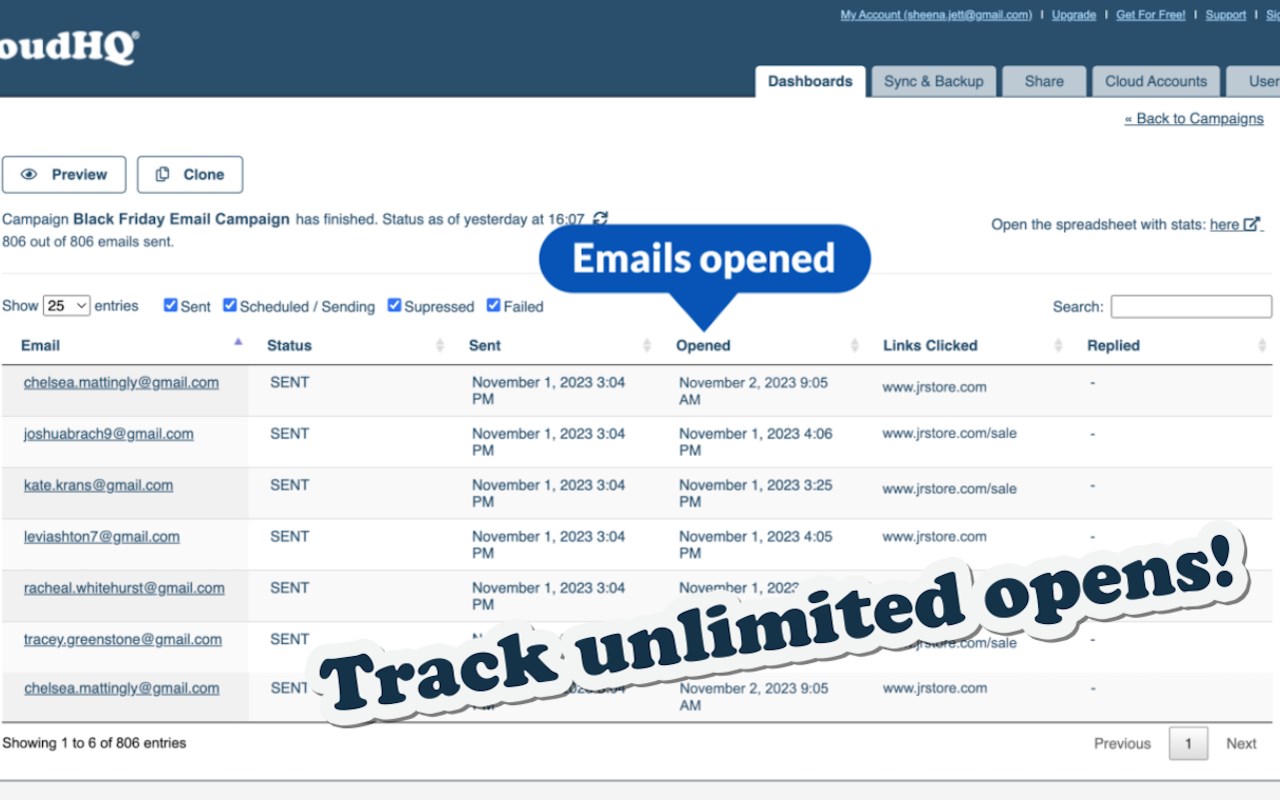
✅ Track unlimited opens and clicks in your campaigns
✅ Sequence and follow-up email campaigns
✅ Personalize names, emails, or other data
✅ Detailed email campaign analytics
✅ Text message campaigns (US & Canada only), using your phone number if desired
✅ Send up to 2000 emails/day based on Gmail's limits, upgrade to the Premium Plan to remove the logo at the bottom
In summary:
This robust email marketing software is designed to help small to medium-sized businesses stand out and get noticed. Enjoy this comprehensive app, which offers best-in-class email and text message marketing software.
Who uses MailKing?
- SMB business owners needing reliable email marketing solutions
- companies for internal emails
- Salespeople looking to close deals faster
- Marketers in small businesses or marketing contractors
- Anyone needing to convey the same message to many recipients
cloudHQ. Helping your productivity, 1 click at a time.
Website: https://www.mailking.io
Pricing: https://www.mailking.io/pricing
Support page: https://support.cloudhq.net/category/browser-extensions/gmail_campaigns/
Blog: https://blog.cloudhq.net
Latest reviews
- Eliza
- Used the mail merge to send personalized emails to about 500 contacts and every single one had their name and company filled in correctly. Looked like individual emails, not a mass blast. Got a ton of replies from people who thought I wrote to them personally.
- Favour
- Being able to import my contact list straight from Salesforce was a huge time saver. No exporting to CSV, no reformatting columns, just pulled it right in. Same with Google Sheets if thats where your list lives.
- hart
- The analytics are solid. Can see exactly who opened what, who clicked which links, and when. Helped us figure out that our audience reads emails mostly on Tuesday mornings so we shifted our send times and saw a bump in engagement.
- Rosline
- Small business owner here. Was paying $50 a month for Mailchimp and barely using half the features. This does everything I actually need for a fraction of the cost and its way less complicated to set up.
- femi
- The template library is massive. Found a professional looking template for our monthly newsletter in about 2 minutes. Drag and drop editor made it easy to swap in our logo and colors without touching any code.
- Ruby
- Switched from Mailchimp to this and my open rates went up almost immediately. Turns out people actually open emails when they come from a real Gmail address instead of some generic noreply. Makes sense in hindsight.