
Web Highlights: PDF & Web Highlighter + Notes
Extension Actions
- Extension status: Featured
Productivity Highlighter & Annotation Tool for Websites & PDFs with AI Summary - free, easy to use, no sign-up required.
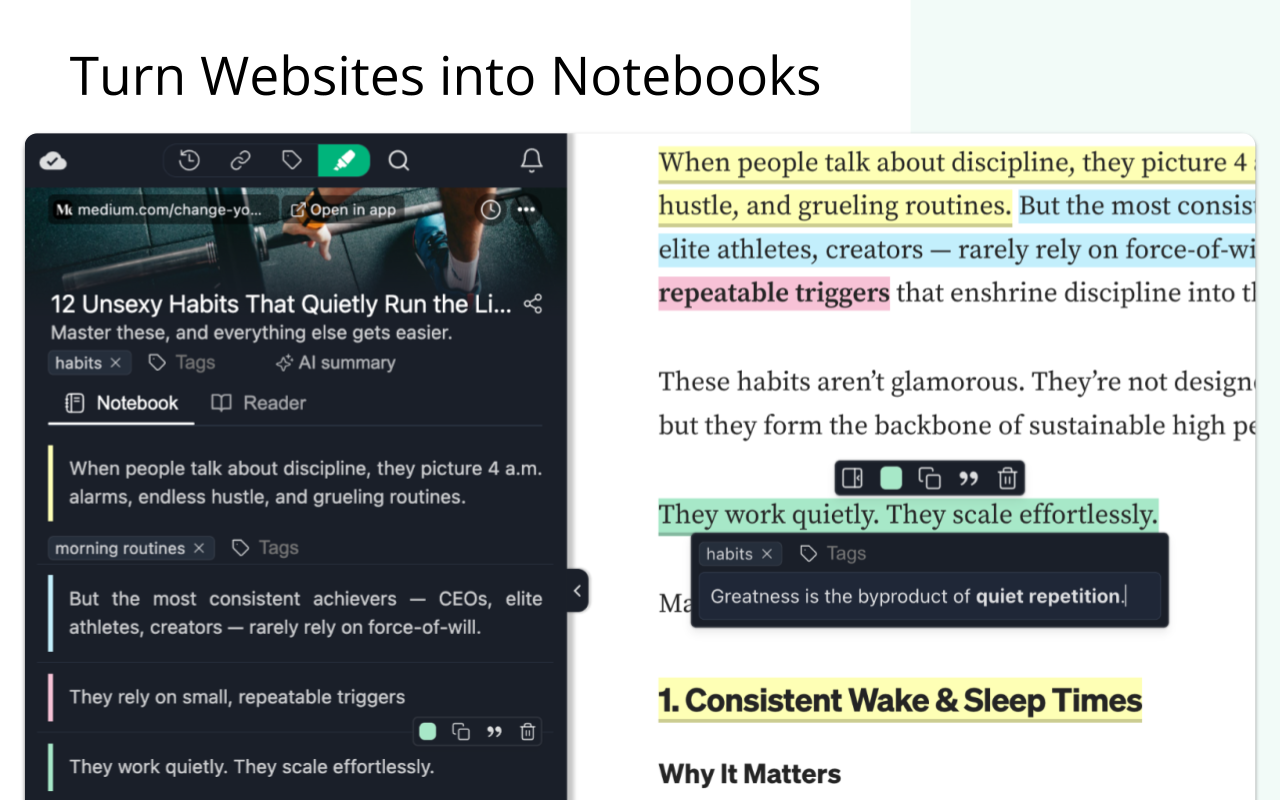
Stay organized online with Web Highlights — a powerful Edge extension to highlight text on websites, annotate PDFs, take notes, manage bookmarks, and generate AI summaries of your content. Whether you're a student, blogger, developer, researcher, or lifelong learner, Web Highlights helps you stay productive, save, organize, and revisit what matters — all in one place.
Use it as your personal text highlighter for Edge with smart note-taking, PDF annotation, tagging, full-text search, and AI-powered content summarization. Choose offline use or sync everything to the cloud via the web app.
⭐ TOP FEATURES ⭐
🟢 Highlight websites and PDFs (including local files)
🎨 Multiple highlighter colors
✍️ Take notes and connect them with your highlights
🤖 AI Summary - Generate smart summaries of your highlights and websites
🔖 Save pages as bookmarks or use as a read-it-later web clipper tool
🏷️ Tag your highlights & bookmarks for easy filtering
🎥 Youtube Highlighting - Highlight & annotate Youtube video transcripts
🔄 Sync across devices and access highlights anywhere *
💻 Web app & sidebar with an overview of all your highlights, bookmarks, and notes
🔍 Powerful full-text search to find anything instantly
📷 Highlight images and visual elements *
𝐓 Highlight in various formats (headings, paragraphs, etc.) *
🧠 Daily recap of your highlights for better retention
⚡ Use keyboard shortcuts for ultimate productivity
📄 Export to Notion, Obsidian, Capacities, and other popular note-taking tools
📑 Copy to HTML and Markdown
📁 Export to PDF and HTML files *
📱 Bookmark on mobile with our web app *
⏰ Set email reminders for specific pages *
📚 Import Kindle highlights easily
💾 Backup and download your research *
🔗 Share your highlights *
👥 Discover content from others
* Premium/Ultimate features available during a 7-day free trial: See pricing: https://web-highlights.com/pricing
💡 WHY WEB HIGHLIGHTS?
✅ It just works – Highlight text in multiple colors on any website or PDF with a simple click
✅ Persistent highlights - Your highlights stay visible even after reloading the page.
✅ Works offline – No account required for basic use
✅ Sync across devices - Create an account to access your highlights anywhere from the web app.
✅ Integrate with Notion, Capacities, Obsidian, and other note-taking tools
✅ Export your research — PDF, HTML, Markdown, or clipboard.
✅ Perfect for online deep work & and efficient research management.
✅ Help children learn - We proudly support the Save the Children charity and other great causes.
🔥 HOW IT WORKS 🔥
You can use Web Highlights completely free without an account. Highlight, bookmark, and take notes offline anytime.
Create a free account to enable cloud sync and unlock all features with a 7-day trial. Afterward, continue using the free offline version with basic features or upgrade for seamless access across all devices. Check out the current pricing here: https://web-highlights.com/pricing.
💡 PRO TIPS & GOOD TO KNOW 💡
➡️ Enable/disable the highlighter popup via the settings and highlight using keyboard shortcuts or by right-clicking text.
➡️ Customize keyboard shortcuts at edge://extensions/shortcuts
➡️ Some websites may have limited compatibility.
➡️ Local PDF support requires access to file URLs (see PDF setup guide: web-highlights.com/blog/how-to-highlight-pdfs-using-web-highlights).
➡️ Right-click images to save them to your sidebar of highlights & notes.
➡️ Use as a web clipper – Click the bookmark icon or right-click any website to save pages and add tags like "ReadingList" for easy reference later.
➡️ Disable extension on specific websites: Click the power icon in the sidebar to disable the highlighter on a site. You can also configure a blacklisted domain list with patterns in the settings under "Excluded" domains.
➡️ Sort highlights manually: Highlights should appear in the same order as on the page. If not, use the drag & drop or arrows in your annotation sidebar to rearrange them as needed.
➡️ Customizable Sidebar: Change the sidebar width by dragging its edge, and align it on the left or right side of the page for a personalized experience.
➡️ Switch to Advanced Highlighter Mode in settings to organize highlights with headings, paragraphs, and more in the sidebar.
➡️ Multiple Colors: Choose from predefined standard and pastel shades or click the plus icon to add your own custom color.
➡️ Note Taking: Use standard keyboard shortcuts like CMD + B for bold, CMD + U for underline, etc., in the note-taking editor for efficient formatting.
➡️ Focus highlights on website: Click on a highlight in the sidebar, and the page will scroll directly to the highlighted section for quick access.
➡️ Color Mode: Switch between dark and light mode by clicking the sun/moon icon in the sidebar.
➡️ Your data is always private unless you choose to share it.
➡️ You may be exposed to affiliate links on sites you visit while using this extension, and you may be encouraged to click on them, but you are never required to do so.
🔐 YOUR PRIVACY MATTERS
We believe your data belongs to you.
✔️ Your highlights, notes, and bookmarks are private by default
✔️ Nothing is ever sold or used to profile you
✔️ Secure sync and export, only accessible with your account
We never use your data for advertising, lending, or unrelated purposes.
📜 TERMS OF SERVICE 📜
By installing the extension or signing up with an account, you agree to Web Highlights Terms of Service and Privacy Policy which you can find here: https://web-highlights.com/legal/terms-of-service
-----
❤️ This is a one-person project I’m building with love and late nights. I hope you enjoy using this tool as much as I do.
Feel free to share your feedback with me:
· Email: [email protected]
· LinkedIn: linkedin.com/in/marius-bongarts-6b3638171
· Twitter/X: https://x.com/MariusBongarts
Latest reviews
- shawn
- good. does exactly what i want
- Erin
- I'm sorry more people aren't leaving reviews for this add-on. Web Highlights is an amazing tool that allows you to take notes on any web page, pdf or YouTube video. The free version is very generous with the features it offers. I have not had any technical issues with the app and have been using it, while lightly, for a couple of years. Thank you to the creator. Your hard work is much appreciated.
- Jatin
- This Extension has came to my life as a "life" saver.
- Joni
- Clean, simple and free with no strings attached
- Bright
- Fantastic extension with excellent features.
- sarly
- I love this tool, it is perfect. User friendly is key and this highlighter nails it
- Marco
- Without an account, if the extension accidentally gets corrupted and you repair it, you lose all the highlights.
- Dathan
- I've been a paid subscriber for about a year now, primarily using this highlighter for school research. I frequently highlight on various AI websites and am very satisfied with its performance. Recently, I experienced an unexpected system restart while preparing a paper, which involved highlights spread across 13 different pages. To my relief, when I restored the windows, all my highlights were preserved. I am extremely grateful not to have lost that work. I think this app does a fantastic job and works well with the major AI platforms, including ChatGPT, Gemini, Grok, Claude, Perplexity, DeepSeek, and Meta. Only partially works with M365 Copilot.
- Bo
- tried several and finally stick to this one
- Asma
- Perfect
- Pierre
- I just needed to highlight content to keep track of what I copied. This is the perfect Tool.
- Joselle
- Great for studying digitally through the phone, tablet, or laptop. issue is when downloading the highlighted file, all of it was gone. and if you ready it for printing, gone as well.
- Dipan
- Very useful
- Thyme
- 非常好用,威利古德
- Rizalito
- Very convenient choice if you want to organize your notes in the web. Great app if you want to recall everything from your studies to your personal life too. Thanks Marius!
- Yaser
- very good tool...I recommend it for all of you.. Thank you Guy ..Go on
- Phát
- Great Extension! Anyway I hope it's had no problem with privacy. Thank to the developers.
- Maria
- recien acabo de descargar...estaria bueno que haya una version en español.
- Daniel
- Less than 24 hours after I installed it, it was already spamming me asking me to get a subscription for the pro version (and there's no way to disable the annoying popups in the settings). Uninstalled immediately.
- Pranay
- works flawlessly.
- kin
- 很好用,可以本地导出导入
- JoEllen
- I chose this highlighter app because it came highly recommended. I find its ability to highlight PDF's a bonus, but the way that it stores highlights makes it a must-have app for me.
- Joël
- By far the most valuable extension I've come accross - ever. Great for learning, reviewing and memorizing learnings. A tool I was longing for all my years at university and which finally someone created. For someone who has to constantly update himself on new features, techniques, possibilities and tools, where the need to understand and work with the documentation is key, this is a rare gem. You made my digital learning and reviewing of documentation finally as efficient as any printed out document. Highest praise and many thanks!
- Dipali
- lovitt
- YOU,
- I have used this highlighter about a month, very nice
- Vicky
- I really like it, in some web pages does not work, maybe for the time of them, some of scientific journals.
- Alexandre
- Imensamente superior às alternativas. Contudo, sugiro fortemente incrementar um atalho à extensão para deletar dado highlight ao invés de ter que selecionar, esperar, selecionar a lixeira e clicar para deletar. "Immensely superior to the alternatives. However, I strongly suggest adding a shortcut to the extension to delete a given highlight, instead of having to select it, wait, select the trash icon, and click to delete."
- Alejandro
- La extension Web Highlights es sencillamente espectacular. Me ayuda a subrayar los temas más importantes del curso de Microsoft Lean.
- Sahil
- The best highlighter till 2025
- Edwin
- Cannot praise the functionality, convenience and usefulness of this extremely well-designed highlighter/annotator/bookmark add-on enough!. There is also a Web dashboard that consolidates all of your saved highlights and allows for flawless filtering and download. Give it a try!!
- Jason
- Does not work at all. I followed his instructions at the bottom of his page, and nothing happens. Nada. Zilch.
- Brian
- I don't say this lightly . . . this is hands down the best highlighting add-on for MS Edge I've ever found. Easy, intuitive, user friendly, and full of great features. It took me forever to find one that really works well. This one does!
- Christina
- I found this very useful, especially for organizing my literature review. I made great use of the different choices of color of highlighting and tagging that were available
- GUILHERME
- PERFECT
- mila
- Excelente, sirve mucho para estudiar, marcar, recordar, y más. Desearía haberla conocido antes 100/10
- 奕涵
- 好用
- Phương
- It worked better than I expected, very useful <3
- Ammar
- No doubt, one of the best extensions I have used. Wish you all the best, Ammar
- Barry
- If I could keep only one extension, this is the one I'd choose. It is very useful for academic research, consumer product research, or saving highlighted text for reference later. If you are looking for a web highlighter, I'd highly recommend you give this a try.
- ZHANG
- By far, the best highlighter extension I have found on Microsoft edge!
- Karavula,
- noice
- RUCHI
- very helpful for reader over web
- Melissa
- This the greatest highlighter app I ever used, and the fact that it is free is mind boggling!
- Dawood
- Does what it says perfectly.
- Raheem
- very good
- Denissa
- very helpful for researchers and students. thank you! :)
- Isabel
- It's great! Makes highlighting a lot easier, I no longer yearn for the printer as much now. Great tool. The only issue I've run into is how it copies the highlight over to a Google Doc, whenever the text itself is copy-pasted. It's easy to get rid of, but it would be nice if it didn't do that.
- Ali
- when i load a site that i already had markups and notes in it, for a second they show up, but then they disappear
- Aref
- This extension is fantastic, makes my web browser way more efficient.