
Chrono Download Manager
Extension Actions
- Extension status: Featured
Download Manager | Video Downloader | Bulk Image Downloader
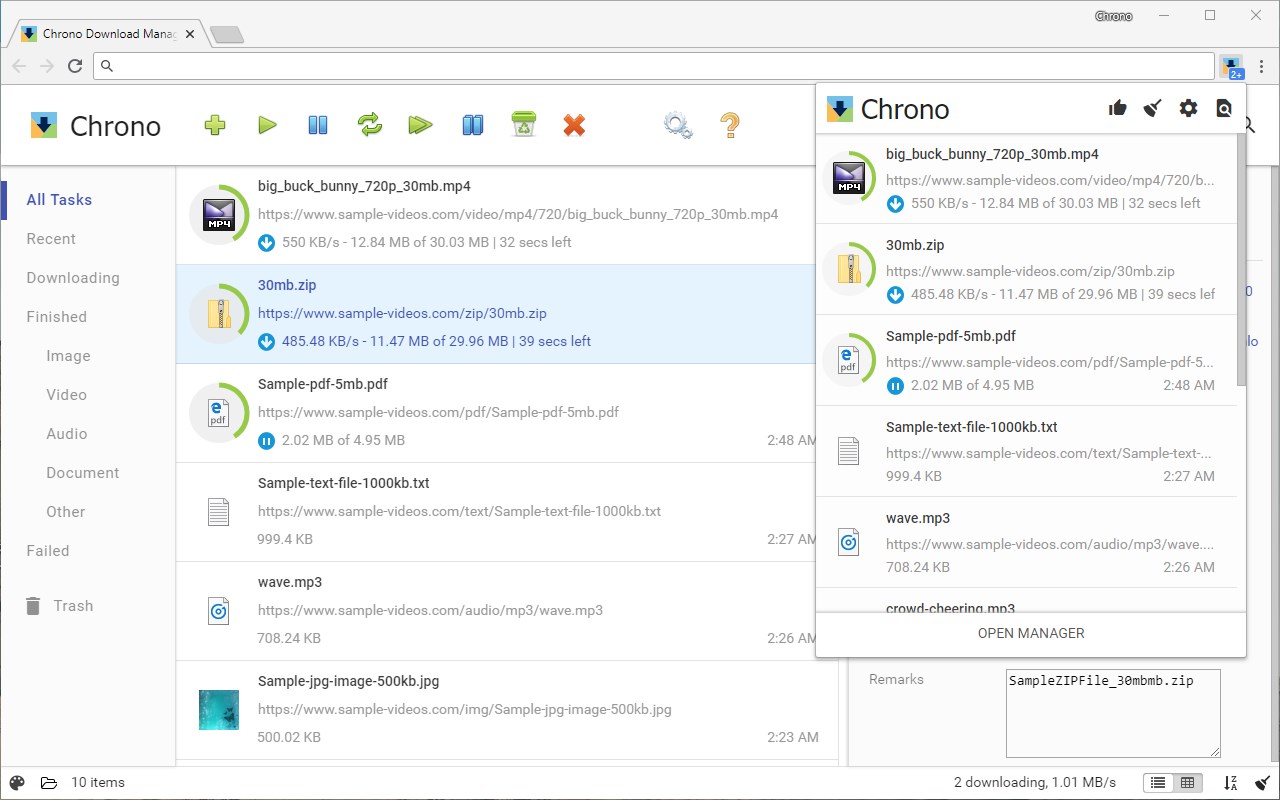
Chrono Download Manager is the first and only full-featured download manager browser extension. Manage all your downloads inside browser and there is no need to install any separate downloader application. Chrono is tightly integrated with browser by context menus, toolbar buttons and keyboard shortcuts.
Besides download management, Chrono is also your best video download helper and bulk image downloader. The Chrono Sniffer detects all links, images, audios and videos on a webpage, and you can filter URLs by their file types or by Regular Expression.
Start downloading with Chrono today! Have fun playing with it, and don't forget to share!
====================================
*** FEATURES
====================================
* Access your downloads in a popup window with a single click on the toolbar icon.
* Organize your downloads with a fresh and clean table view or list view, and apply custom filters to group your downloads into different categories.
* Notifications for downloads.
* Preview your docs, images, audios, videos and zip files right after your download completes.
* Initiate batch downloads by entering multiple URLs or URL pattern.
====================================
*** MORE ADVANCED FEATURES
====================================
* Highly customizable task filters let you group downloads by type, date, url etc.
* Batch descriptors help you download a range of URLs with pattern painlessly.
* Naming Mask allows you to name a downloaded file by link text, page title, URL components, date/time and many more.
* Rule System uses programmable rules to automatically rename your downloads, and to route your files to different folders.
====================================
*** KNOWN ISSUES
====================================
* Chrono currently uses browser's built-in Downloads API, so it does not offer multi-threaded downloading capability and has limited support for pausing and resuming a large download.
* All downloaded files can only be saved under browser's default downloads folder or any of its subdirectories.
* The extension may not work properly in incognito mode.
====================================
To file a bug or request a feature, please use http://bugs.chronodownloader.net
Latest reviews
- yang
- 很棒的下载工具,特别是动态页面
- 林子
- 如何嗅探视频音频格式多媒体的文件呢?有待添加就更完善了!望添加
- Rao
- 能否在扩展图标上增加发现视频或音频可供下载的提示,点击即可下载的功能?
- ije
- .bin后缀的配置文件无法识别,会识别下载为无法识别的格式。望修复。
- poplar
- 以前在chrome上就用这个插件,好用
- 京伟
- 很好,非常好,受够了,原来edge自带的下载了,注意后面开发一定要轻量化
- GESS
- Edge自下载总是断连,用这个完美解决😍
- 圆圆
- 好
- 祥彬
- 其他的功能还可以,就是edge浏览器无法和chrome浏览器一样,直接接管系统默认的下载。edge浏览器默认的下载还是在正常下载。希望改进下。
- 祥彬
- 其他的功能都还要,就是edge浏览器无法和chrome浏览器一样,直接接管系统默认的下载。edge浏览器默认的下载还是在正常下载。希望改进下。
- 芳向
- 还行
- Garrick
- Very easy to use.
- meng
- 规则数量有上限,30+条的时候任何修改都不会保存了,但是文档和帮助里都没有说明。
- けんじ
- 「3 の言語で使用可能」に日本語が無いが、Chromeウェブストアのと同様日本語で、容易に使えた。 設定等もきっちりやるには、わかりにくい日本語もあり、英語の方がわかりやすい人もいると思うが、ブラウザの言語設定を採用する仕様なので、これだけを英語にはできない。
- yz
- 非常棒,帮我整理下载项
- 斥染
- 下载方面有一个问题,我也不知道是edge的限制还是什么:当我用浏览器下载一些文件时,速度偶尔会变得很慢,只有几K/s,不管是这个插件还是原生下载.但当我复制链接使用外部下载器(比如比特彗星)时下载速度则能达到链接允许的上限,这是对我而言影响很大的问题,毕竟我尝试使用这个插件就是为了避免下载速度缓慢
- Block
- 可以URL拉取丢给下载器!
- WM
- 重传功能还挺有效的。
- Flynn
- It's a nice little interface with some additional functionality not included by Edges standard downloader. the only drawback is that you still have to click over to Edge's downloads and click whether or not to keep or delete a pending download, albeit Chronos will show it already downloading, but if you don't click over and click keep it won't officially save until you do
- 小T想睡觉
- 从 Chrome 过来的,这个扩展在 Chrome 上用得很舒服。 但是因为 Edge 高度定制过的缘故,因此替换下载界面是无效的,而且打开文件还需要二次确认。 不过这个下载 Toast 通知算是弥补了 Edge 原生下载的缺陷了。 要是能解决一下打开文件确认的问题,就已经很不错了。 至于替换下载页面,不适配也无伤大雅了。 Coming from Chrome, this extension is comfortable to use on Chrome. However, because Edge is highly customized, the ability to replace the download screen is ineffective, and opening the file requires a second confirmation. However, this toast notification when downloading a file makes up for the shortcomings of Edge's native download. It would be nice if we could solve the problem of opening the file to confirm. As for replacing the download page, it doesn't hurt to be unsuitable.
- Иван
- Шикарный менеджер загрузок, лично я использую его в Edge, но, хотелось бы чтобы он полностью заменял собой стандартный загрузчик Microsoft Edge.
- KEMAL
- seri ve atak sadece işini yapan bir uygulama.. free downloand benzeri bir yazılım.. emeğinize sağlık
- AN
- 并不能像chrome浏览器那样完全接管浏览器下载.原始下载任务依然会显示,这就没必要再安装了