
Snooze Email by cloudHQ
Extension Actions
Snooze of an email will temporarily remove them from your inbox - it will come back to the top of your inbox at the time you set it.
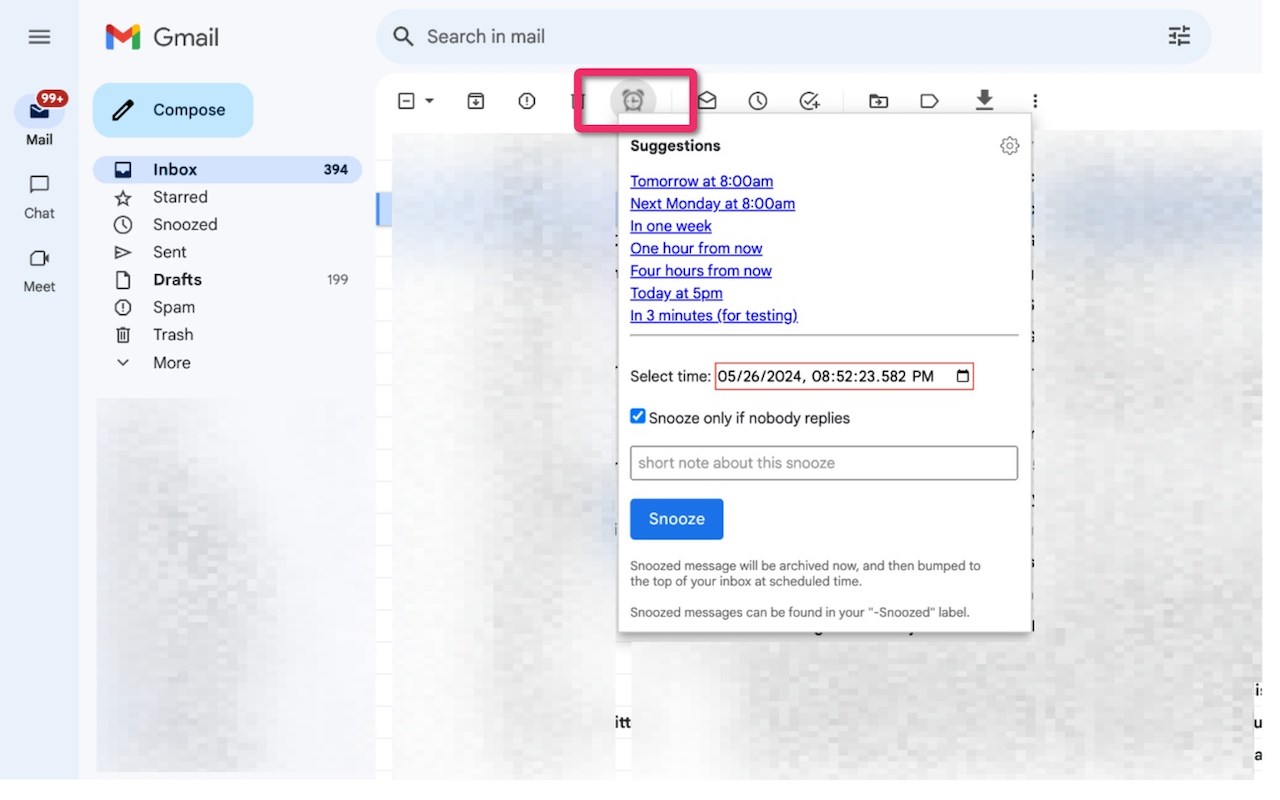
There are times when you might not be prepared to open and address an email. Using this snooze email extension, you can specify when you'd like the email to return to the top of your inbox.
Main features include:
- Add personal notes to your snoozed emails
- Only snooze emails if there are no replies
- Receive mobile text reminders (available with paid plans)
- Automatically snooze emails upon sending (available with paid plans)
cloudHQ. Helping your productivity, 1 click at a time.
Website: https://www.snooze-email.com/
cloudHQ website: https://www.cloudhq.net
Pricing: https://www.snooze-email.com/pricing
Support page: https://support.cloudhq.net/category/browser-extensions/gmail_snooze_email
Blog: https://blog.cloudhq.net
Gmail, Google Calendar, and Google Workspace are trademarks of Google LLC. Use of these trademarks is subject to Google Permissions.
cloudHQ is trademark of cloudHQ LLC. https://www.cloudhq.net/trademark
Latest reviews
- Eliza
- Great for managing different time zones. Get emails from overseas clients at 2am and I snooze them to the start of my workday so I can respond with a clear head instead of half asleep.
- Favour
- Used to just star emails I wanted to come back to later and then completely forget about them. This actually brings them back to the top of my inbox at the right time so nothing slips through the cracks anymore.
- hart
- Dead simple. Open the email, pick when you want it back, done. No learning curve whatsoever. My whole team is using it now.
- Rosline
- Love the "only snooze if no replies" option. Snoozed a few emails waiting for someone to respond and once they did the snooze cancelled itself. Smart feature that I havent seen in other extensions.
- femi
- The personal notes feature is what makes this better than other snooze tools. When the email comes back I can see exactly what I wrote to myself about why I snoozed it. Otherwise I'd just be staring at it like "why did I push this off?"
- Ruby
- This is how I keep my inbox from turning into a to do list. If something comes in that I cant deal with right now I snooze it to Monday morning and it pops right back up when I'm ready. Out of sight, out of mind until then.