
Web Swiss Knife
Extension Actions
A versatile toolkit for web browsing
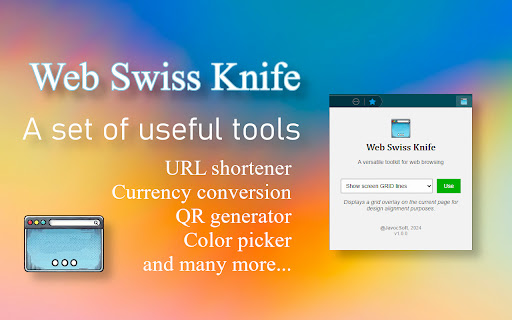
The "Web Swiss Knife" extension is a versatile browser tool that offers different functionalities that can be useful while browsing or working with the web.
It currently includes twenty-three features:
FEATURES
• 🔗 Open Links in New Tab
This function makes all links on a page (that don't already have a specific behavior defined) automatically open in a new tab when you click on them. This is especially useful, for example, when browsing search results on Google or Bing, as it allows you to keep the results page open while exploring the links.
• 📐 Show Screen Grid
This function overlays a soft and discreet grid on the current webpage. The grid is designed to help designers and developers verify the alignment and layout of elements on a webpage, without interfering with normal navigation.
• 🎨 Color Picker
This function allows you to select a color from the current page by moving the mouse over the color you are interested in on the page. The color will be displayed along with its hexadecimal code.
• ✂️ URL Shortener
This function allows you to obtain a shortened URL for free from the website you are on, using the free service of L4Y.es.
• 🔇 Mute Tabs with Audio
This function allows you to mute all tabs, except the current tab, that are playing audio.
• 📝 Generate Lorem Ipsum Text
This function allows to generate random Lorem Ipsum text content. The length of the text depends on how many words you need.
• 💱 Currency Converter
This function allows to convert between different currencies.
• 🔐 Secure Password Generator
This function allows to generate secure safe passwords. You can set the length of it.
• 💾 Save/Restore Session
This function allows to save and restore browser windows and tabs.
• 🌐 User-Agent Switcher
This function allows to change the browser's User-Agent. The user-agent is the information that is sent to the web server to indicate which browser it is.
• 📋 Quick Notes
This function provides a simple notepad to jot down quick notes while browsing. Notes are automatically saved and persist across sessions.
• 📏 Page Ruler
This function allows you to measure elements and distances on any webpage. Simply drag to create measurement areas and see width, height, and position coordinates.
• 🔄 Base64 Encoder/Decoder
This function allows you to encode and decode text to/from Base64 format. Useful for developers and anyone working with encoded data.
• 🔍 Duplicate Tab Finder
This function helps you find and manage duplicate tabs in your browser. It identifies tabs with the same URL and allows you to close duplicates with one click, helping you keep your browser organized.
• ⏱️ Pomodoro Timer
A productivity timer based on the Pomodoro Technique. Includes three modes: Work session (25 min), Short break (5 min), and Long break (15 min). The timer continues running even when the popup is closed and sends desktop notifications when complete.
• #️⃣ Hash Generator
This function generates cryptographic hashes from any text. Supports multiple algorithms: MD5, SHA-1, SHA-256, SHA-384, and SHA-512. Useful for developers, security professionals, and anyone needing to verify data integrity.
• 🔤 Font Inspector
This function allows you to inspect font properties of any element on a webpage. Click any element to see its font family, size, weight, style, color, and line height. Perfect for designers and developers.
• 🖼️ Image Compressor
This function allows you to compress images to reduce file size. Control quality, resize dimensions, and convert between formats (PNG/JPEG/WebP). Perfect for optimizing images before uploading them to websites or sharing online.
• 🔎 Regex Tester
This function provides a real-time regular expression tester. Test regex patterns with live matching, support for flags (global, case-insensitive, multiline), and detailed match information. Essential tool for developers working with text patterns.
• 📊 Text Diff Checker
This function compares two texts and highlights the differences between them. Uses an advanced algorithm to accurately detect additions, deletions, and modifications. Perfect for code review, content comparison, and tracking changes.
• 🕐 Unix Timestamp Converter
This function converts between Unix timestamps and human-readable dates. Supports both seconds and milliseconds, bidirectional conversion, and displays results in multiple formats (Local Time, UTC, ISO 8601). Essential for developers working with timestamps.
• ⏰ Crontab Generator
This function generates and tests cron expressions for task scheduling. Visual editor with human-readable descriptions, shows the next 5 execution times, and allows you to copy the expression with one click. Perfect for system administrators and developers working with scheduled tasks.
EASY TO USE
The extension is easy to use:
• You can enable or disable each function independently
• A green counter on the extension icon shows you how many functions are active
• Functions are automatically disabled when you switch tabs
• It doesn't work on special browser pages for security reasons
The extension is designed to be simple and non-intrusive, allowing you to enhance your browsing experience without complications.