
Language Learning with Spotify™
Extension Actions
- Live on Store
Learn languages with music on Spotify
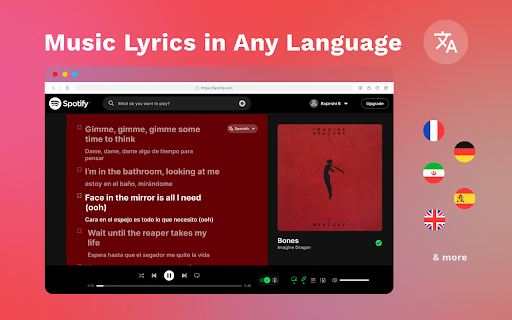
Learn Languages with Spotify – Dual Captions & Smart Dictionary
🚀 Turn Your Music into a Language Learning Tool! 🚀
Want to improve your foreign language skills while listening to your favorite songs on Spotify? Our Chrome extension brings dual-language captions, a hover dictionary, and a lyrics-saving feature to your Spotify web player!
How It Works:
1️⃣ Install the extension from the Chrome Web Store.
2️⃣ Open Spotify in your browser and log in.
3️⃣ Refresh the page to activate dual-language captions.
4️⃣ Enjoy real-time translated lyrics while listening to music!
5️⃣ Hover over words for instant translations with the built-in dictionary.
6️⃣ Save interesting lyrics and download them to review later.
Why Use This Extension?
✔️ Learn effortlessly while listening to your favorite songs.
✔️ Enhance vocabulary with contextual translations.
✔️ Improve pronunciation by following along with native lyrics.
✔️ Boost retention by saving and reviewing lyrics anytime.
🎵 Transform your music time into a fun language-learning experience!
🔹 Supports multiple languages
🔹 Works seamlessly with Spotify Web Player
🔹 100% free to use(with optional premium features)
💡 Start learning today – install the extension and take your language skills to the next level!
Latest reviews
- Elitsa Zhekova
- Not working. It displays "Could not load the page"
- Loouli Viv
- This was exactly what i was looking for, but sadly it's not working :/