
Trupeer AI Screen Recorder & Video Editor
Extension Actions
- Live on Store
Screen record, edit, annotate, translate and create professional product videos and step by step guides in seconds
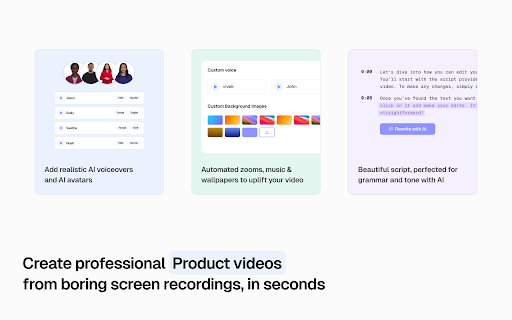
Trupeer AI transforms your screen recordings into polished videos and guides effortlessly. Utilizing advanced AI, it generates scripts, adds realistic voiceovers and avatars, and automates editing tasks. Perfect for creating engaging product demos, instructional tutorials, and comprehensive training guides in seconds.
Key Features:
Free Screen Recorder: Capture your screen seamlessly to demonstrate product features, conduct live demos, or create engaging training videos.
AI Script Generator: Automatically refines scripts by removing filler words and correcting grammar.
AI Voiceovers: Over 100+ accents and styles for lifelike narration.
AI Avatar: Integrate realistic avatars into your videos, enhancing engagement. Your words are read out by an AI avatar (no camera necessary!)
Automated Editing: Applies smooth zoom effects, intros and outros, and transitions automatically based on clicks on your screen.
Step-by-Step Guide: Transform your screen recordings into comprehensive step-by-step guides, complete with structured headings, clear descriptions, and visual screenshots for easy understanding.
Screen Capture or Screenshot Picker: Easily include or replace screenshots in your guide (training materials/ transcripts) without re-recording, saving time and enhancing efficiency.
Customizable Branding: Incorporate logos, colors, and backgrounds to align with your brand.
Multi-Language Support: Translate videos into 50+ languages with a single click.
Flexible Export Options: Download videos or step by step guide documents to share via private or public indexable links.
Easy Editor: Edit video by editing text. Easily crop or trim your video.
Blurs and Annotations: Add blurs, highlights and annotations in your video and guide.
Shareable Pages: Share generated videos and guides via shareable links with access control. Embed the videos directly in your website.
Analytics: Get advanced analytics on shared videos, such as watched video minutes, views, clicks at aggregate and user level.
Benefits of using Trupeer AI:
No Editing Skills Needed: Turn your screen recordings into polished videos without any editing experience.
Saves You Time: Automates tasks like AI avatar creation, voiceovers, and editing, so you can focus on what matters.
Cost-Effective: Eliminates the need for expensive video editors or voice actors.
User-Friendly: Designed for anyone, no tech skills required.
Professional Results: Create high-quality videos with AI-generated voiceovers and avatars.
Create More Content: Produce multiple videos quickly, keeping your audience engaged.
Customize Your Brand: Add your logo, colors, and style to make videos uniquely yours.
Reach a Wider Audience: Translate videos into over 50 languages with a single click.
Works with Your Tools: Easily integrates with your existing workflow and tools.
Use cases of Trupeer AI:
Product Marketing with AI Video Editor
Make product launch videos that stand out. Record your screen, add AI voiceovers and avatars, and edit everything in one place, no video team needed.
Employee Onboarding with Training Video Generator
Create onboarding videos fast. Just record your screen and let AI handle the voiceover and visuals. Great for remote or growing teams.
Sales Enablement with Explainer Videos
Help your sales team pitch better. Build clear, customized explainer videos using AI avatars and screen recordings that walk prospects through your product.
Customer Education with Video Tutorial Creator
Turn walkthroughs into professional video tutorials. Use the screen recorder, add step-by-step narration with AI, and publish helpful content in minutes.
Made for Chrome: Video Tutorials in Your Browser
Record, edit, and publish videos directly from your browser. This Chrome extension is built to help you create content quickly, right where you work.
How to Get Started:
1. Install & Pin
Click “Add to Chrome” and pin it to your toolbar.
2. Record your screen
Record any tab, window, or your full screen directly using this Chrome extension.
3. Create AI video and guide
To turn your recordings into AI-powered videos or guides, head to app.trupeer.ai to upload, generate and edit your AI content from rough screen recordings.
For support or feedback, please contact us at [email protected].
This screen recorder chrome extension builds on Screenity, originally created by Alyssa X and licensed under the GNU GPLv3, with enhancements developed by the Trupeer team. Source code available here: https://github.com/trupeer-ai/trupeer-chrome-capture.
For more information about how to use Trupeer.ai, please visit https://docs.trupeer.ai/.
Latest reviews
- SAHIL SEN (Leo)
- good stuff, the click highlight feature alone is worth it
- sunita
- Developer advocate here. I make tutorial videos for our API docs and the auto-generated written guide alongside the video is the underrated feature. Our docs team started asking me to record more stuff so they could pull from it.
- Dany Robert
- Run a small video studio and we use this for client progress updates. Instead of typing out project notes every week, I record a 5 minute walkthrough. Clients say they prefer it and I'm probably saving 4 hours a week on status updates alone.
- Good Giorno
- I'm a QA engineer and I use this for bug repros. Used to record long Loom clips walking through the steps. Now I record once and it gives me written repro steps alongside the video. Devs actually read them now.
- A360 Gradi
- I record product walkthroughs for investor updates and it used to take me an hour because I'd re-record every stumble. Now I talk through it once and the AI handles the rest. The avatar feature is also weirdly good, way less uncanny than what I've seen from other tools.
- Taormina Hostel
- Pretty solid overall. AI voiceover is good and the auto zoom on clicks is handy. Only gripe is sometimes it trims silent parts a little too aggressively and the pacing ends up feeling clipped. Small thing. Still using it daily.
- lihas nes
- I do customer onboarding at a fintech and we used to run 20-min Zoom calls for every new signup. Now I record it once, let Trupeer clean it up, send that link. Cut onboarding calls in half and nobody has complained yet.
- Sahil Sen
- Swapped Loom for this for engineering walkthroughs. The AI editing handles my ums and stumbles so I stopped re-recording every time I tripped on a word. Docs it generates are surprisingly usable too, not a dead transcript.
- Arpit Bajpai
- This tool is amazing and solves one of the most unique problem. Their AI is summarizes the raw recording very smoothly and on top it, the video editing tools they provide completes the entire process quickly. Strongly recommend to all businesses.
- muskan pal
- This is a great tool that should be in every content creator’s stack for software and product workflow content.
- Sanika Kadu
- been using it for documentation - so far so good.
- Farhan Saifee
- The Tool deserves a 5 star. Honestly, I've made videos to communicate concepts and share it across to clients. Everyone seems to love it. Trupeer is fast and reliable. Kudos to the team
- Nidhin M
- don't usually post reviews, but the tool is very very very useful for generating documentation. started using it for documentiting web development, and so far these documentas are a lot more useful to share with other people than a loom recording. it gets things that even i miss to explain sometimes. all in all pretty great.
- ayush lakhotia
- Amazing tool should be used by all the content creators when it comes to software or product-related workflows.
- Deepanshu Diwakar
- I use Trupeer to show the features I build, and it’s been pretty smooth so far. Recording is simple, and the AI editing saves me a lot of time. The videos come out clean without much effort. Feels better than Loom.
- TARUN BO
- The translation feature on Trupeer is just wow, one click and my video was ready in a different language with perfect sync. Saves so much time. Highly recommend!
- Mahipal Saini
- Tried recently to create a demo video. Great product, seamless experience, much better than Synthesia and Supademo that I have been using.
- Alex Goodridge
- The extension works seamlessly. Allows me to highlight my clicks as well. Making it easier to create guides. I am a PM and haven't spent more than 10 minutes on internal demos post release ever since i started using this.
- Pavan A M
- I recently tried Trupeer AI and found it to be a very helpful tool for creating product demos and tutorials. The screen recording is smooth and the AI can quickly turn recordings into professional videos and step-by-step guides. The AI voiceovers and automated editing save a lot of time. Overall, it’s a great tool for quickly creating training or product videos.
- Tania Agarwal
- Was using loom earlier for this, but this provides so much more functionality to actually share professional videos with my prospects
- Olivia Goodridge
- Saved me a lot of time, easy to install and create professional videos
- bhagwat Shukla
- Product is really good and its really handy for making training and product videos and the best feature that I personally like is the conversion of documents from video and the zoom feature is really amazing and have reduced my 10 hours of weekly work to less than 20 minutes now..
- EG
- Paid Pro Plan but No Credits, Billing Issues, and Unstable Product I purchased the Pro subscription for Trupeer.ai on December 28, 2025 (USD 49), but my experience has been extremely disappointing and raises serious concerns about the product’s reliability. Here are the main issues: Pro credits were never properly granted After payment, my account still shows free-plan limits (around 45 seconds) instead of the advertised 20 AI video minutes. I have not created a single AI video, only a few guides. Even assuming some AI usage for voiceover or translation, it is technically impossible to exhaust 20 minutes under this usage. This indicates a billing or credit allocation error. No transparency in AI minutes usage There is no clear breakdown or log explaining how AI minutes are consumed. Users are left guessing what actions deduct credits, which is unacceptable for a paid AI service. Unstable platform and login issues At times, I was unable to log into my account at all and had to access the service via another account. This points to serious authentication or session management problems. Poor PDF export quality PDF exports are generated as a single continuous page without proper pagination, making them unsuitable for professional or print use. I had to manually export via Word or Markdown as a workaround. Due to repeated technical issues and unresolved billing problems, I no longer trust this service and have removed my payment method to prevent further charges. The idea behind Trupeer.ai is promising, but the current implementation feels unfinished and unreliable for paid users. I would strongly advise potential customers to proceed with caution until these fundamental issues are resolved.
- Kshitij Arora
- Awesome tool! Makes generating context videos so easy
- Nikunj Mohota
- Easy to use. Was able to create an amazing video with almost no effort!
- Parvin Eyvazov
- why cant I start the video without mic? doesn't make sense
- Hema Landa
- The voice over and the video editing are crazyy, really helpful to create tutorials and product demos. Wish they extend the use case to pick photos and videos from gallery and make good insta reel haha
- Tushar Saxena
- A remarkable tool for building professional snippets and training guides. The ease of use and AI capabilities are much better than any alternative. Amazing and powerful extension for day-to-day use.
- Shrenik Jain
- Crazy, I can create a profession studio level demo video in minutes.
- Aarya Sawant
- Amazing concept and a very helpful tool for all video making and editing needs of everyone. Highly commendable in its execution. The user interface is clean and intuitive to use, and overall this is a very well rounded tool. Look forward to using it for my future projects.
- Arnav Aggarwal
- Very robust in video guide creation and documentation of products. Loved it.
- Hardik Madan
- Pretty good tool and honestly a game changer for user manual and video guide creation. Must try for your product documentation
- Pritish Gupta
- the AI doc quality is nice
- Prerak Sharma
- Created a video for my product.. looks good