
Hide Tab Info
Extension Actions
- Live on Store
Hides favicons and tab titles
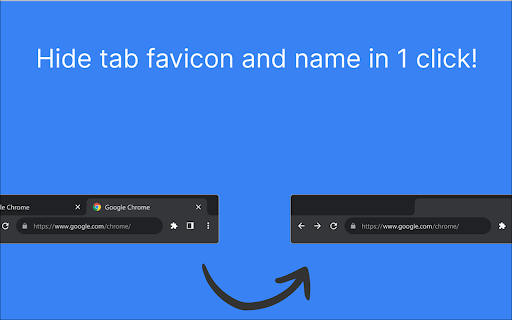
🚀 Hide Tab Info – A Cleaner, More Private Browsing Experience.
Hide Tab Info protects your privacy by hiding tab names and favicons, ensuring no one can peek at your browsing activity. Whether you're working in a shared space, presenting your screen, or simply want a cleaner look, this extension has you covered.
🎯 Who is Hide Tab Info for?
This extension is perfect for:
✅ Privacy-conscious users – Keep your browsing activity hidden from people around you.
✅ Minimalists – Remove visual noise and keep your browser sleek and clean.
✅ Remote workers & professionals – Maintain a polished, professional browser during screen sharing.
✅ Students & researchers – Organize multiple tabs without overwhelming text.
✅ Streamers & presenters – Prevent viewers from seeing sensitive or personal tab titles.
✨ Key Features
🔹 Hide Tab Names – Remove tab titles while keeping them fully functional.
🔹 Hide Favicons – Get rid of distracting tab icons for a cleaner look.
🔹 Quick Toggle – Enable or disable settings in one click.
🔹 Lightweight & Fast – No impact on browser performance.
🔒 Your Privacy Matters
Hide Tab Info does not collect, store, or share any data. Everything happens locally, ensuring your browsing habits remain completely private.
🎨 Minimal & Modern Design
Designed with simplicity in mind, Hide Tab Info integrates smoothly into your workflow with an intuitive interface and a distraction-free experience.
🚀 Download Hide Tab Info today and take control of your tabs!
Latest reviews
- Elli (Elle)
- Works well. But when I remove the name, It become a hyphen. Not sure why. Overall, great extension. Works as promised.
- Swastik Pradhan
- Great little tool! Thanks for creating this, dev.
- Екатерина Карпенко
- ok